
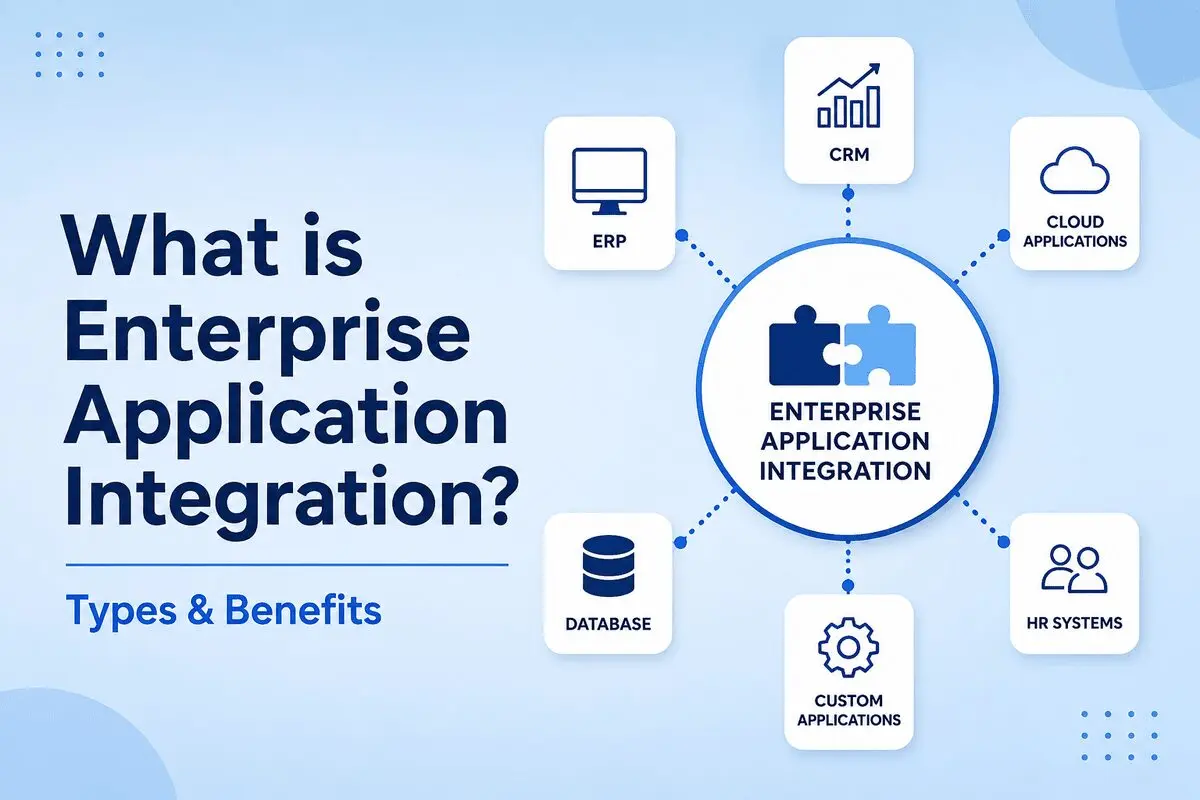
Many applications are used by organizations to run their businesses. Customer data may be stored in a CRM application, financial data in an ERP system, and employee data in an HR system. In case these applications don’t communicate with each other, the data becomes disorganized. This makes things move slowly. The teams have to spend a lot of time moving data between applications. This is what happens when these systems work in silos.
Enterprise Application Integration solves this problem by connecting business applications and facilitating communication between them. Businesses will not need separate systems that are not linked to each other. Instead, they can use a system that is integrated with all other systems and allows data to flow between apps.
At present, enterprises usually adopt cloud services, mobile applications, and dedicated software. Enterprise application integration is important for IT plans these days. It helps us understand our data, do less work by hand, and communicate more effectively across teams.
What Is Enterprise Application Integration (EAI)?
A company can integrate all its systems through enterprise application integration. It can connect systems such as sales and finance to share data.
If a company does not have this connection between systems, it can cause many problems. For example, it can be hard to get the information you need because it is locked in a single system. This is called a data silo. There is also the issue of process, such as when something takes more time than it needs to. Enterprise Application Integration ensures there will be no such issues.
How Enterprise Application Integration Works
Enterprise application integration connects business applications so they can exchange data automatically. While the process may vary, most integrations follow the same basic steps.
- An application creates or updates data.
- The integration layer receives the information.
- The data is transformed into a format that other systems can understand.
- The information is routed to the correct application.
- The receiving system processes the data and updates its records.
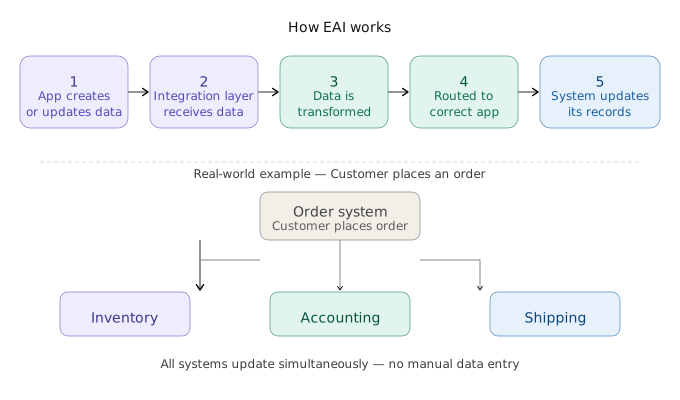
For example, when a customer places an order, the order system can simultaneously send information to the inventory, accounting, and shipping applications. This allows each system to stay up to date without manual data entry.
Why Enterprise Application Integration Matters
Modern business operations depend on data velocity and accuracy. Relying on manual updates or brittle, custom-coded connections creates immediate operational vulnerabilities. EAI technologies provide three distinct advantages
Data Synchronization
The same customer data often exists in several systems. A modification in one application might not reflect in the other application. As a result, it can create confusion when using outdated information. EAI ensures that the data remains synchronized throughout the connected applications. For instance, any update to customers’ addresses is reflected everywhere else.
Process Automation
Many business tasks involve more than one application. Without integration, employees may have to enter the same information many times. EAI technologies automate these steps. A new order can update inventory, create an invoice, and notify the fulfillment team without manual input.
Unified Reporting
Business data is normally scattered between various systems. This will make reporting even harder. In EAI, the data is centralized, allowing the team to gain a better view of its operations. Reports can be more precise without having to get data from various sources.
Common Types of Enterprise Application Integration
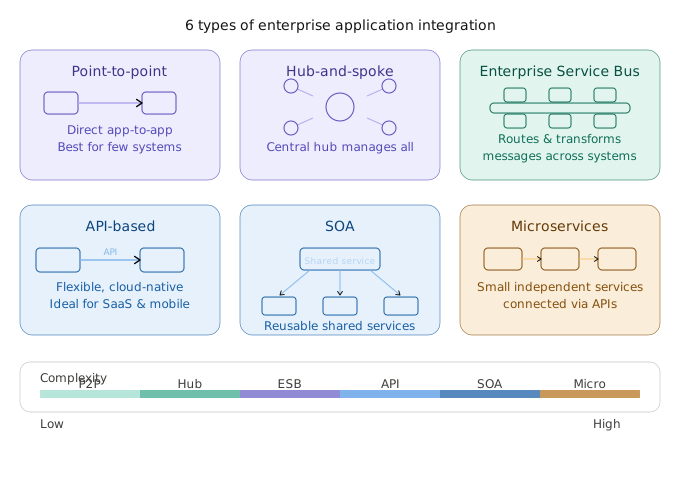
Businesses use different ways to connect their applications. Some companies only need to connect a few systems. Others may have dozens or even hundreds of applications that need to share data. The right integration method depends on the size of the business and its technical requirements.
Several integration models are used today. Each one connects applications differently.
Point-to-Point Integration
The point-to-point integration process is considered the most basic. In such an integration type, communication occurs between two applications, and information flows between them without a centralized intermediary. For instance, once the sales transaction occurs, all customer information from the customer relationship management application can be transferred directly to the accounting application. In the same way, finance teams can connect business debt management software with accounting platforms to keep debt balances, payment schedules, and reporting data more consistent.
This type of integration is ideal where there are a few applications involved and require data exchange among them. In this case, it is quite easy and cheap to implement. However, where many applications are involved, the connections become numerous.
Hub-and-Spoke Integration
The hub-and-spoke model introduces a central hub that manages communication between applications. Instead of creating direct connections between every system, applications connect to the hub. The hub receives data, processes it, and sends it to the appropriate destination.
This structure reduces the number of individual connections organizations must maintain. It also provides greater visibility into how information moves across the enterprise.
Enterprise Service Bus (ESB)
An Enterprise Service Bus (ESB) is software that helps different applications work together. It routes messages, converts data into the correct format, and enables systems to share information even when they use different technologies.
An ESB is useful for large businesses with many applications. Each system connects to the ESB rather than to every other application. This makes integration easier to manage and simplifies future updates.
API-Based Integration
Many modern businesses use APIs to connect applications. An API allows one application to send or receive information from another application. For example, an e-commerce platform can use an API to share order details with a payment system or inventory application.
API-based integration works well with cloud software, mobile apps, and SaaS platforms. It is flexible, scalable, and widely used in modern enterprise environments.
Service-Oriented Architecture (SOA)
Service-Oriented Architecture (SOA) connects applications through shared services. Each service handles a specific task and can be used by different systems. This makes it easier to reuse functions and reduce duplicate work.
Microservices Integration
Microservice Integration involves connecting small microservices that interact to form a single application. Each microservice has its own task to perform and can interact via either an API or a messaging system.
Popular Enterprise Application Integration Tools
| Tool | Primary Use |
| MuleSoft | API and application integration |
| Boomi | Cloud-based integration platform |
| IBM App Connect | Enterprise application integration |
| TIBCO BusinessWorks | Data and application integration |
| Apache Camel | Open-source integration framework |
| Microsoft Azure Logic Apps | Cloud workflow automation |
| Informatica Intelligent Cloud Services | Data and application integration |
Key Benefits of Enterprise Application Integration
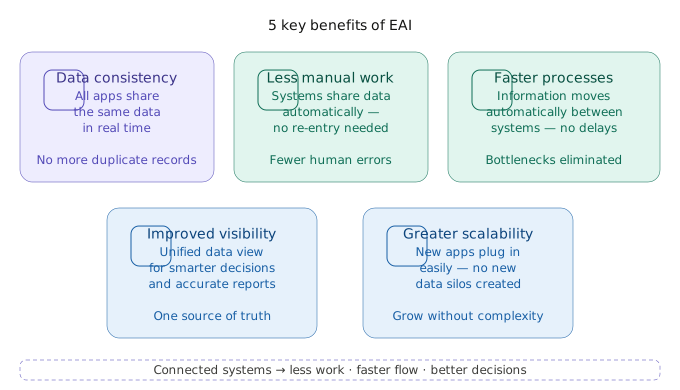
The main benefit of enterprise application integration is simple. Connected systems can share data on their own. Employees do not have to move information from one system to another or enter the same data again and again.
This saves time and reduces mistakes. It also helps teams work with the same data and get work done faster.
Better Data Consistency
Customer data rarely lives in one place. A company may store customer information in a CRM, billing platform, support system, and marketing application at the same time. When these systems are disconnected, records often fall out of sync.
Enterprise application integration helps keep information consistent across applications. Updates made in one system can be reflected in others, reducing duplicate records and improving data accuracy.
Less Manual Work
Many employees spend time moving data from one system to another. They may copy data, update records, or enter the same information more than once. This takes time and can lead to mistakes.
Integration helps systems share data on their own. Employees spend less time on these tasks and more time on their daily work.
Faster Business Processes
Every disconnected application adds friction to a workflow. A sales order may need approval from multiple departments before it reaches fulfillment. If information must be transferred manually at each stage, delays become unavoidable.
Integrated applications allow information to move automatically between systems. This reduces bottlenecks and helps business processes move forward more efficiently.
Improved Visibility
Business decisions depend on access to accurate information. When data is scattered across multiple applications, creating a complete view of operations becomes difficult. Teams may generate reports from different systems and reach different conclusions.
An enterprise integration system makes data easier to access and analyze. Decision-makers can gain a broader view of business performance without piecing together information from disconnected sources.
Greater Scalability
An organization that begins with a limited number of applications will soon find itself handling many more applications. If proper planning is not done from the beginning, each added application increases the complexity.
Enterprise application software integration sets the stage for future growth. Any new applications can be easily integrated, enabling businesses to expand their technology portfolio without creating additional data silos.
Common Challenges of Enterprise Application Integration
Enterprise application integration appears to be straightforward in theory. Connect applications, transfer information, and automate processes. However, the reality is usually more complicated. Most companies find that integration has very little to do with connections and everything to do with the complexity inherent in their applications all along.
Legacy Systems
Older systems are still common in many enterprises. These applications were often built before APIs were standard. Some were designed for internal use only, without any expectation that they would need to communicate with modern cloud platforms. Connecting these systems to newer applications usually requires custom development, middleware, or workarounds that increase maintenance effort. In Java EE environments, some of these legacy clients still connect through an application client container.
Data Format Differences
Not all applications would have to use the same language. While one application stored information about an object in table structures with distinct attributes, the other application stored information about an entity in formats such as JSON or XML, although they shared some similar characteristics. The process of integration requires translation between these different formats.
Security and Access Control
When multiple applications start sharing data, security becomes more difficult to manage. Each link represents an additional entry point that needs to be regulated. It is imperative for organizations to ensure that information is accessible only to authorized systems. It often involves tight security measures such as authentication and encryption.
Scalability Issues
An approach may be viable for a handful of applications, but it could break down as the system gets bigger. With each additional application, there will be many more connections. If the integration layer is poorly designed, it will be complex and costly to handle.
Ongoing Maintenance
Integration does not happen once and for all. APIs are upgraded, systems are swapped out, and business needs shift. These factors can impact the existing integrations, necessitating further changes. Maintenance must be ongoing to ensure the system stays up to date and effective.
Enterprise Application Integration Best Practices
Most integration problems don’t come from tools. They come from design choices made too early or too quickly. A system that looks fine with five applications can start breaking down when it grows to fifteen or fifty. That’s why planning matters as much as implementation.
Start with Clear Data Flow
Before connecting anything, it helps to map how data should move across the business. Which system owns customer data? Where should updates originate? Which applications only consume information? These questions reduce confusion later when integrations start scaling.
Without this clarity, systems often end up exchanging data in conflicting ways.
Avoid Tight Coupling
Direct connections between systems may seem like a good idea at first. The problem starts when a system changes. Other connected systems may also need changes. This can create extra work and make updates harder over time. Using APIs or a central integration tool can help. It makes systems easier to connect and easier to update when changes are needed.
Standardize Data Formats Early
Different applications often represent the same data in different ways. Names, dates, identifiers, and currencies may not follow a consistent format across systems. Small differences like these create larger problems during integration. Defining common data standards early reduces transformation complexity later.
Monitor Integrations Continuously
Integration is an ongoing process and cannot just be configured and left alone. Changes will occur within the system, the API will develop, and the business rules may become outdated. Problems will arise without proper monitoring. It will be extremely helpful for a team to examine the data flow between systems.
Plan for Growth
Integration decisions should account for future expansion. New applications will be added. Old ones will be replaced. Data volume will increase. If the architecture cannot handle change, it becomes a bottleneck instead of a support system. A flexible integration design reduces rework when the business evolves.
Conclusion
Many companies use a lot of software tools. These software tools are supposed to help people at work do their jobs. In some cases, they do not collaborate effectively. If these systems fail to communicate and exchange information, employees have to spend a lot of time copying data and fixing errors.
Enterprise application integration is the solution to the problem. This approach enables these systems to exchange data. Thus, there is no need for additional actions by employees; they save time, and all employees can use the same information.
When companies acquire software applications, it is crucial for these systems to remain interconnected. A good integration setup makes sure the data gets to where it needs to go. This makes it easier for everyone to do their work with the software tools and the company’s systems.
FAQs
What is enterprise application integration?
Enterprise application integration is the process of combining business applications. Through the integration, these applications exchange information without duplicating efforts. Employees do not have to enter the same data repeatedly across multiple applications.
What are examples of enterprise application integration?
A business may connect its CRM to its accounting software. An online store may connect to an inventory system. HR software can also connect to a payroll system. These connections help keep data up to date.
What are the main types of enterprise application integration?
The most common types of enterprise application integration include point-to-point, hub-and-spoke, Enterprise Service Bus, and API-based.
Why is enterprise application integration important?
Companies rely on different applications to run their operations. If these applications cannot communicate, employees may need to manually transfer data between them.
What is the difference between EAI and API integration?
API integration connects individual applications through APIs. EAI is a broader approach that combines multiple integration methods to connect systems across the enterprise.
What is the difference between EAI and iPaaS?
EAI traditionally focuses on integrating enterprise systems. iPaaS provides cloud-based tools that simplify integration between cloud and on-premises applications.

Comments are closed