

What is Feature Sliced Design? It is a way to structure frontend applications that gives you clear rules for how to split code into layers, business domains, and technical parts so the structure stays clear as the app grows. It gives you rules for how to split your code into layers, business domains, and technical parts so the structure stays clear as the app grows.
Instead of only using folders like “components”, “hooks”, and “utils”, you use a feature-oriented frontend structure. You organize code into pages, features, entities, and shared parts, and each of these has a fixed place in the project tree. When you open the project, you see business concepts first and the technical details after that.
You can use the Feature Sliced Design approach with React, Next.js, TypeScript, or other stacks. As a feature sliced design frontend architecture, it works well for modular and layered projects and is specifically designed for modern component-based UIs and large-scale frontend applications.
Why Feature Sliced Design Was Created
Feature Sliced Design has real, active adoption behind it, not just theory. The official FSD documentation repository on GitHub has passed 2,300 stars and 200+ forks, with regular releases and an actively maintained changelog. Companies across banking, fintech, e-commerce, and B2B SaaS have publicly shared that they use FSD in production, many of them listed in a community thread on the project’s GitHub. The methodology has also grown its own tooling ecosystem over time, including Steiger, an official architectural linter that automatically checks a codebase against FSD’s layer and import rules. That kind of tooling investment is usually a sign a methodology has moved past being a nice idea and into something teams actually rely on day to day.
React is still one of the most widely used web frameworks. The 2024 Stack Overflow Developer Survey says about 41.6% of professional developers use React in their daily work. So many teams are looking for frontend architecture best practices that fit well with React and similar tools. For mobile apps, teams often apply the same ideas with cross-platform mobile frameworks such as React Native and Flutter.
Classic folder-by-type structures do not scale well. A huge “components” folder with hundreds of files turns into a monolithic frontend, with many hidden connections between parts of the code. Even a simple folder-by-feature layout can become messy if there are no clear rules about what should go where.
Feature Sliced Design architecture builds on the folder-by-feature idea and adds clear layers, domain boundaries, and strict rules for separating business logic giving teams a practical system that scales as the app and team grow. It takes ideas from Domain Driven Design (DDD) and Clean Architecture and applies them to frontend code structure, so that business concepts shape how the project is organized.
Core Concepts: Layers, Slices, Segments
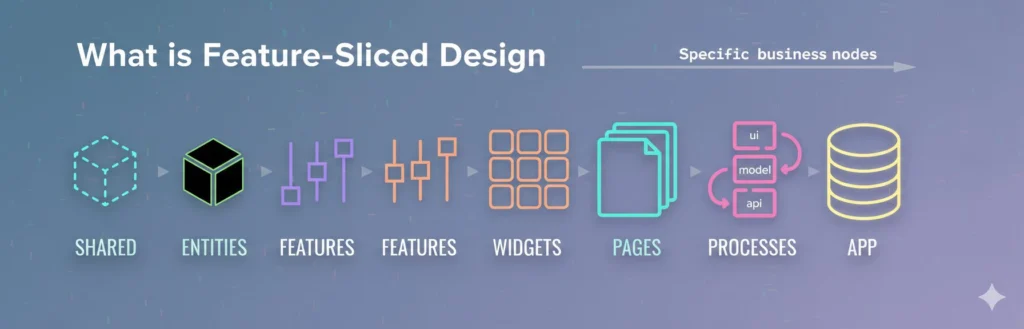
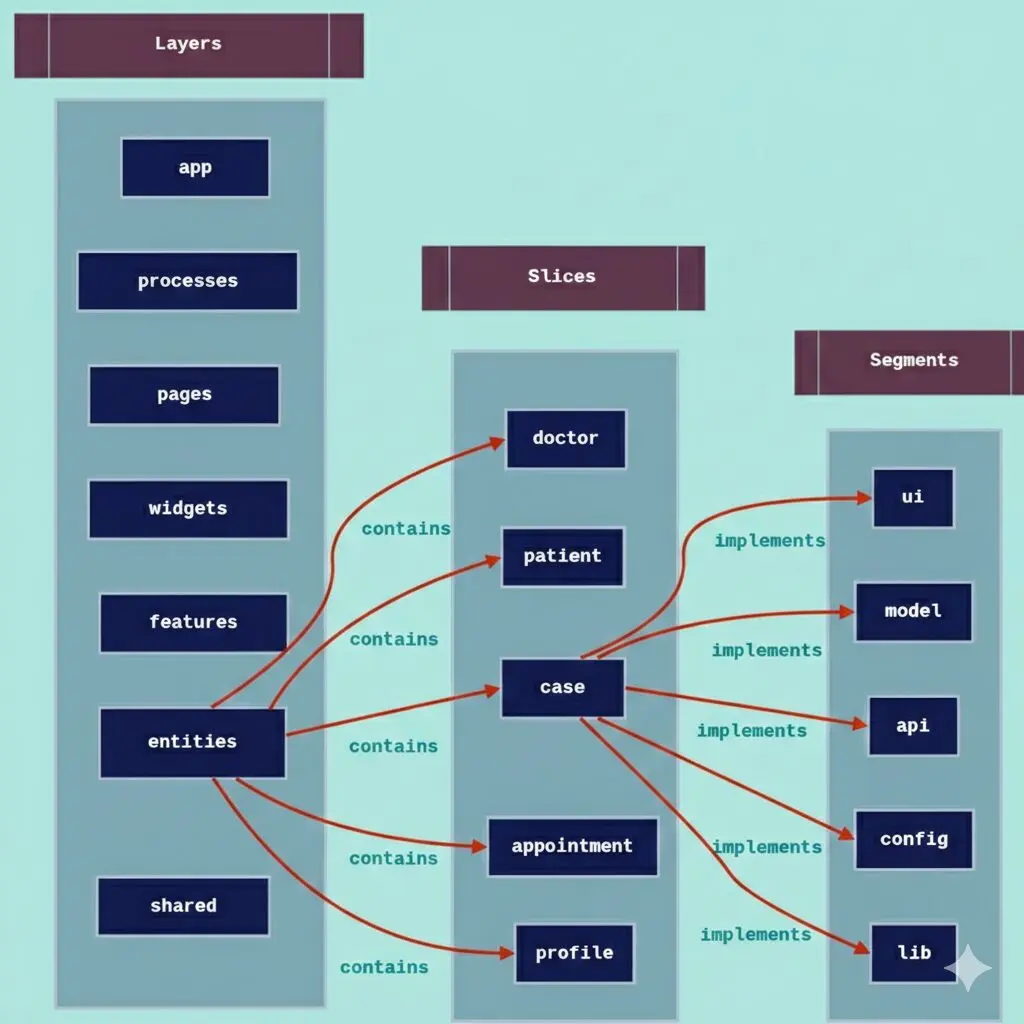
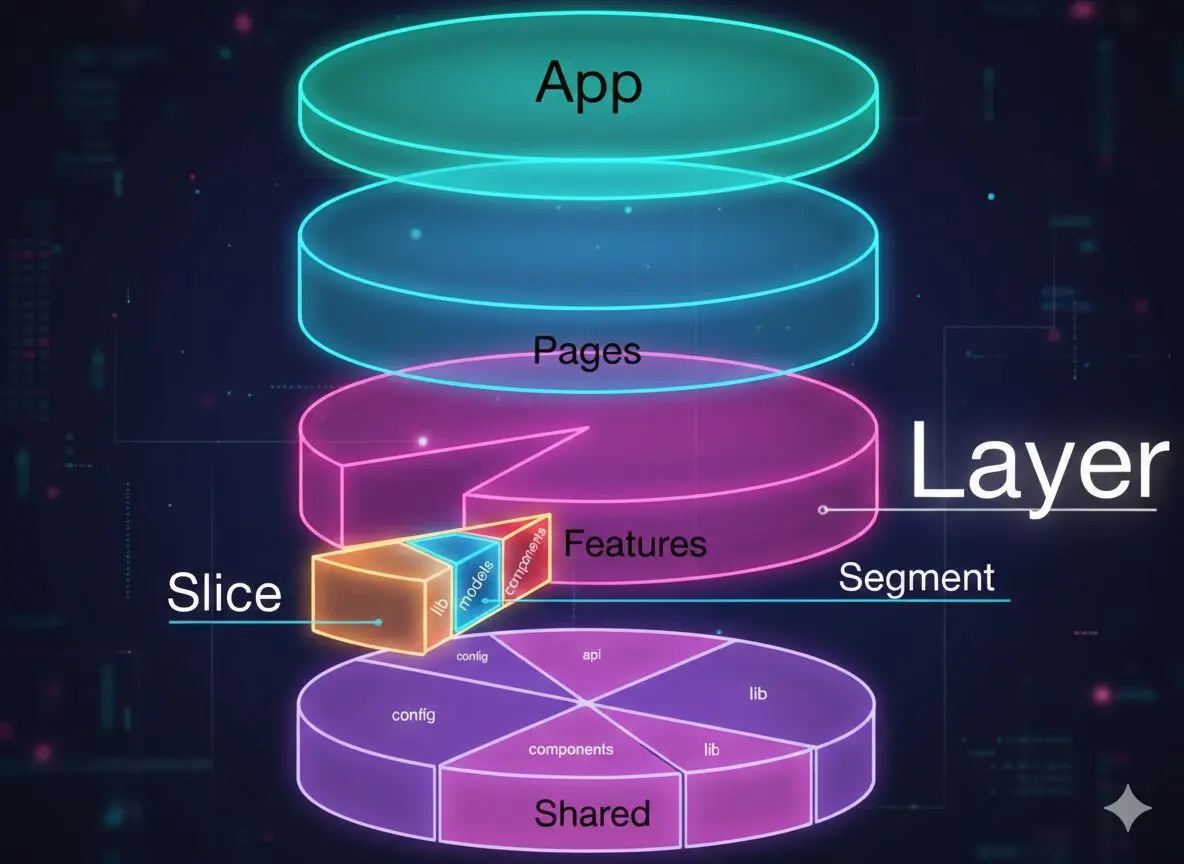
Feature Sliced Design explained starts with three core ideas: layers, slices, and segments. Together, these three concepts give your project a clear and consistent structure that scales without becoming a mess.
Layers In Feature Sliced Design
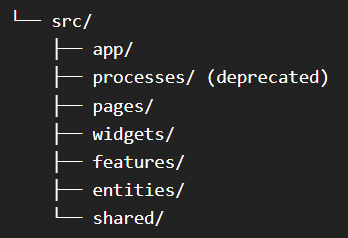
Layers in Feature Sliced Design are the highest level of the project structure they define what kind of code lives where, and each layer has one fixed job that cannot overlap with another. Each layer has a clear job and a fixed place. From top to bottom, the usual layers are:
- App layer (FSD): entry points, routing, global styles, and root providers. This is everything the app needs to start.
- Processes layer FSD: flows that go across several pages, such as multi-step onboarding or checkout wizards. This layer is mostly outdated in FSD v2, but you may still see it in older codebases.
- Pages layer (FSD): page modules, each linked to a route or a large part of a route.
- Widgets layer (FSD): self-contained UI blocks that combine features and entities, for example a dashboard panel.
- Features layer (FSD): user actions that create business value, such as “add to cart”, “reset password”, or “rate product”.
- Entities layer (FSD): core business objects, such as user, product, order, or invoice.
- Shared layer (FSD): reusable parts that are not tied to a single business domain, like design system components, common utilities, and API client wrappers.
This layered structure helps keep a large frontend project clear, and it works well with React and common JavaScript patterns.
Slices And Vertical Domains
Slices in Feature Sliced Design are the next level down from layers. Inside most layers, a slice represents one business area such as user, product, cart, or article and everything in that layer belonging to that area is grouped inside its slice. A slice is a business area such as user, product, cart, or article. Everything in that layer that belongs to that area is grouped inside its slice.
A slice is basically a small domain. You can think of it as vertical slicing of the frontend. Instead of grouping code by UI type, you group it by business meaning. This creates natural bounded contexts in the frontend and clear feature borders.
For example, in the entities layer, you might have slices like “user”, “product”, and “comment”. In the features layer, you might have slices like auth/login, “cart/add-item”, and “profile/edit”. This structure gives you a simple and practical way to break a large frontend into modules.
Segments Inside A Slice
Segments in Feature Sliced Design are the smallest unit of the structure. Inside each slice, code is split into segments grouped by what it does keeping UI, state, network calls, and helpers clearly separated from each other. Segments are grouped by what the code does. The common segment names are “ui”, “model”, “api”, “lib”, and “config” or “consts”.
The “ui” segment holds React components and simple helpers for layout and display. The “model” segment holds state, business logic, and the rules that connect the UI to data sources. The “api” segment contains network calls and functions that prepare data from the backend. The “lib” segment keeps helper functions that are used only inside that slice. The “config” or “consts” segment stores configuration values and constants.
This structure keeps responsibilities separate. UI code does not need to know all the details inside the model, and the model can change without breaking everything that uses it. It also makes it easier to build reusable modules inside each domain.
Architecture Layers Explained In Practice
Dependency Rules Between Layers
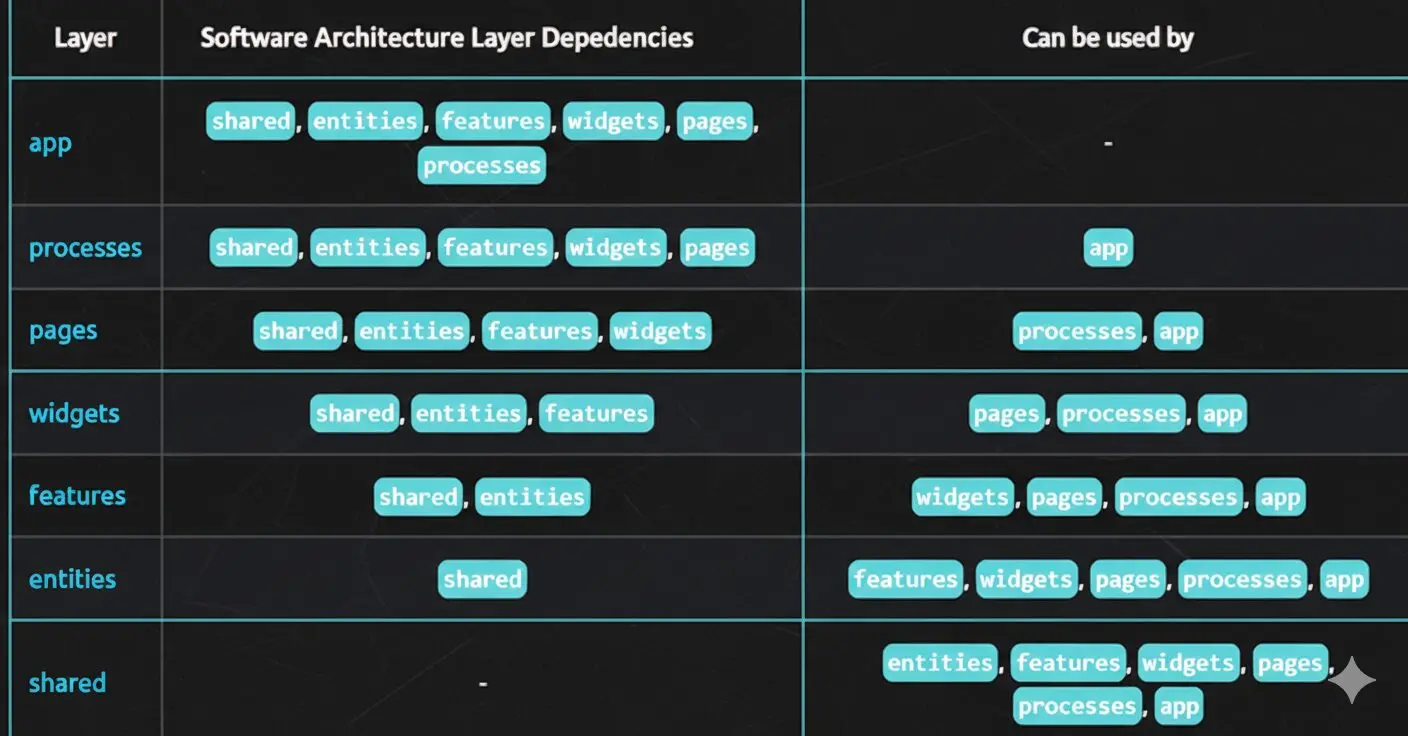
In FSD architecture frontend, an important rule is how layers are allowed to talk to each other. The dependency rules FSD are simple: a layer can only import code from layers below it, not from its own layer and not from any layer above it.
How Layers Import Each Other in Practice
In everyday use, this rule works like this:
- A “pages” module can import “widgets”, “features”, “entities, and “shared”.
- A “features” module can import “entities” and “shared”, but not other features.
- An “entities” module can import only from “shared”.
- The “shared” layer is at the bottom and does not import anything from the layers above it.
Why These Import Rules Help
These import rules are one of the core Feature Sliced Design principles they keep code easier to work with by preventing circular dependencies and tight coupling between unrelated parts of the app. They prevent circular dependencies, where files import each other in a loop, and tight coupling, where parts of the app are stuck too closely together.
They also follow the dependency inversion principle in the frontend, so high level parts of the app depend on small, stable modules, not the other way around. Principles like this come up often in system design rounds, and many of the best coding interview books cover them.
Code Ownership Across Layers and Slices
With these rules, layers and slices make code ownership frontend clear. If a team is responsible for a domain like “billing” or “catalog”, they can go straight to the slices for that domain in each layer instead of guessing where the logic is.
Public API Pattern And Dependency Rules
Each slice normally has one main entry file, usually called “index.ts”. This file defines the public API pattern frontend for that slice. Other parts of the app should only import from “index.ts”. Helper code stays inside model, api, or lib and should not be imported from other slices.
This setup helps in three ways:
- It keeps features separate, because the rest of the app uses only the public API, not the internal details.
- It also makes changes safer, because you mostly update code inside the slice and its “index.ts”.
- It also supports business logic separation frontend, because the link between the UI and the domain logic is small and clear.
Together with the layer rules, this public API style gives you a clean feature sliced design pattern. Code goes from top to bottom through a few well known entry files, which helps the team grow and maintain the project.
Benefits Of Feature Sliced Design For Scalable Frontends
Teams use scalable frontend architecture Feature Sliced Design because it fixes real problems in daily work, especially when the app and the team grow.
The main benefits are:
- It makes the frontend code easier to maintain. The folder structure follows business terms, so developers can find code faster and new team members understand the project more quickly.
- It gives a clear way to split the app into slices. Each slice is a small domain with its own UI, model, and API, so related code lives in one place instead of being spread across many folders.
- It keeps features separate by using strict layers and public APIs. This reduces hidden connections and makes refactoring safer, because changes are mostly inside one slice.
- It helps team productivity in frontend architecture. Different teams can work on different slices at the same time, with fewer merge conflicts and less time spent coordinating changes.
- It fits especially well as a Feature Sliced Design React architecture and as an enterprise frontend architecture precisely because FSD is about structure and dependency rules, not tied to any one framework or library.
Feature Sliced Design Compared To Other Frontend Architectures
Most teams already use some kind of frontend architecture pattern. Comparing Feature Sliced Design (FSD) with these patterns makes it easier to see when FSD might be a better choice.
| Approach | Organizes code by | Main strength | Main limitation |
| Feature-Sliced Design | Layers, business domains, and technical purpose | Clear boundaries and dependency rules | Requires learning FSD conventions |
| Folder-by-type | File type such as components, hooks, utils | Simple to start | Related business logic can become scattered |
| Atomic Design | UI component hierarchy | Strong UI reuse | Doesn’t define the whole application architecture |
| Clean Architecture | Dependency direction and business boundaries | Strong separation of concerns | Can feel heavy for smaller frontend apps |
| Micro Frontends | Independently deployable frontend applications | Team and deployment independence | Adds operational and architectural complexity |
Feature Sliced Design vs Folder Structures By Type Or Feature
In a folder-by-type structure, you put files together by what they are: one folder for “components”, one for “hooks”, one for “services”, one for “utils”, and so on. This feels easy at the start, but as the app grows, code from many different business areas gets mixed in the same places.
The whole project starts to feel like one big block, and it becomes hard to see which files belong to which feature or business area. A folder-by-feature structure is already better, because the UI, hooks, and API for one feature live in the same folder. But even then, you often still have no clear layers, no obvious place for shared entities, and no strict rules for how parts depend on each other.
Feature Sliced Design is domain-first and adds those missing rules. It still groups code by feature, but it also adds layers (app, pages, widgets, features, entities, shared), segments inside each slice (“ui”, “model”, “api”, and so on), and strict import rules. Because of this, features are not only grouped, they are also clearly separated, shared code has a well-defined place, and the way parts of the app depend on each other stays controlled and predictable.
This is exactly what the feature sliced design pattern provides not just grouping by feature, but a complete layered system with strict import rules and a defined place for every type of code.
Feature Sliced Design vs MVC And Clean Architecture
In MVC, you split code into three parts: Model, View, and Controller. This works well on the backend. But in a React app, if you follow MVC directly, some components start doing everything at once: routing, state, side effects, and rendering. They become big and hard to understand. Clean Architecture adds more layers and tries to keep business rules separate from technical details. The idea is good, but it is quite abstract. It does not clearly tell you how to arrange folders and files in a real React or TypeScript project.
Feature Sliced Design keeps the same goal but makes it practical for the frontend. It groups code by pages and business areas (domains). Inside each slice, the model part holds state and business logic, and the “ui” part shows the interface. Features and entities act like the application and domain layers, while shared and app are closer to infrastructure and presentation. So you get the benefits of Clean Architecture, but with a clear folder structure and import rules that are easier to use in real projects.
Feature Sliced Design vs Atomic Design
Atomic Design is about how you build and combine UI components. It groups them into atoms, molecules, organisms, templates, and pages. Its main goal is to keep the design consistent and give the interface a clear visual structure. It does not deal with business domains or where to put business logic in the codebase.
Feature Sliced Design focuses on the domain and the overall architecture, not on visual levels of the UI. It cares about where business logic lives, how features are split by domain, and how dependencies move between layers. You can use both together: Atomic Design can organize components inside “shared/ui”, while Feature Sliced Design decides how those UI parts are used across pages, widgets, features, and entities. In this way, the design system and the domain architecture work together.
In this combined approach, the shared layer Feature Sliced Design houses the Atomic Design system components while FSD layers above it handle where and how those components are used in real business contexts.
Feature Sliced Design With Micro Frontends
Micro frontends break a large product into several smaller frontend apps. Each small app can be built and deployed on its own. This helps when different teams own different parts of the product or need their own release schedules. But it also adds extra complexity and is not always a good choice for small or simple products.
Feature Sliced Design does not decide how many apps you have. It defines how code is organized inside each app. You can have one app or many micro frontends, and still use FSD with layers, slices, and segments inside each one. In practice, teams often use micro frontends to split the product into separate apps, and then use FSD inside each micro app as the feature based structure. This keeps every micro frontend clean, modular, and easier to maintain as it grows.
Case Study: Migrating an E-Commerce Frontend to Feature-Sliced Design (FSD)
The Starting Problem
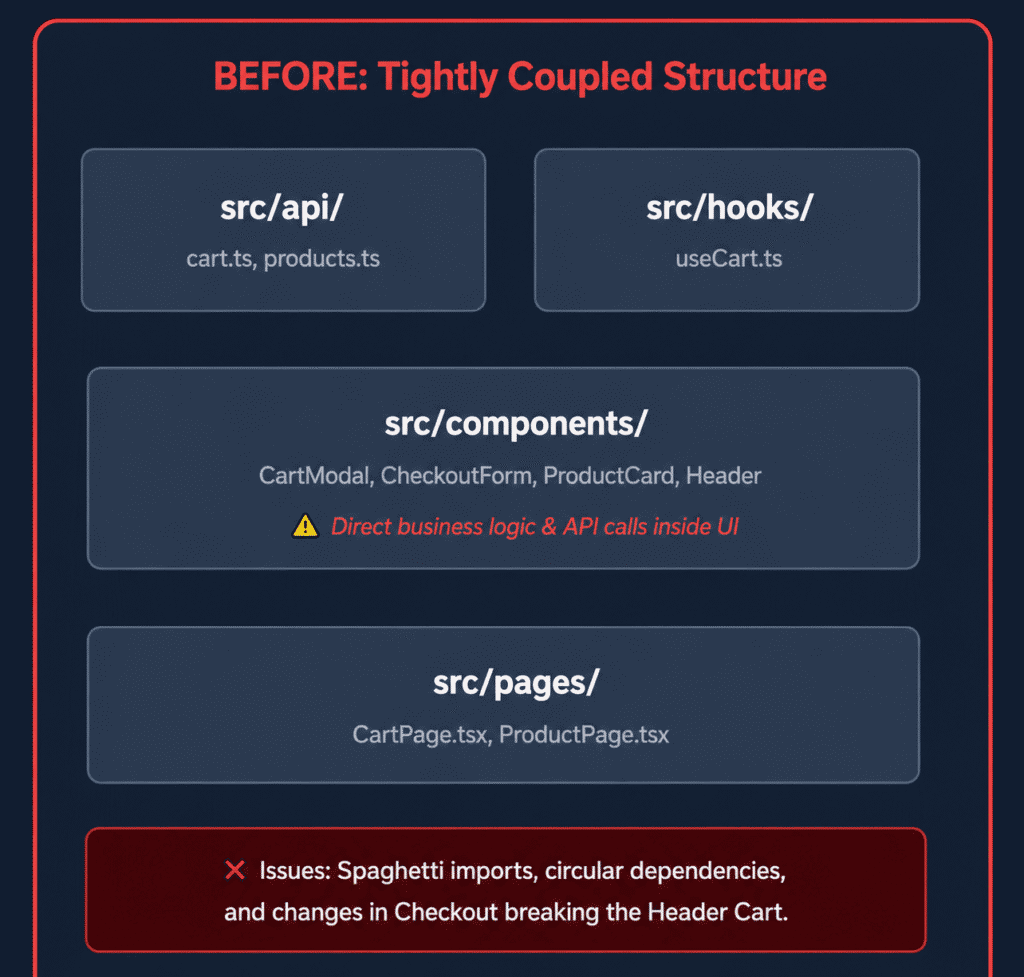
Our legacy React e-commerce app suffered from tight coupling. Components in src/components imported directly from deep global hooks, cart mutations were tied to product presentation cards, and shared utility files contained conflicting domain logic. A change to the checkout flow frequently broke the mini-cart in the navbar because business rules were scattered everywhere.
Before Structure
Migration Approach
We broke down the monolithic codebase by splitting code into standardized FSD layers:
- shared: UI primitives (buttons, inputs), API clients, and formatting helpers.
- entities: Business models with no UI actions (e.g., product, cart, user schemas and display cards).
- features: Specific user interactions (e.g., add-to-cart, apply-coupon, checkout-by-card).
- widgets: Compositional blocks combining entities and features (e.g., header, cart-drawer).
- pages: Route components stitching widgets together.
After Structure

The Migration Flow: Product → Add to Cart → Cart → Checkout
- Product Display: entities/product exports ProductCard (just data and styling, with no cart logic).
- Add to Cart Action: features/add-to-cart exports an AddToCartButton containing the mutation logic.
- Cart Widget: widgets/cart-drawer renders the entities/cart item list alongside the features/apply-coupon block.
- Checkout: pages/checkout combines widgets/cart-drawer summary with features/checkout-by-card.
The Result
- Predictable File Navigation: Developers know immediately where code lives based on whether it is pure data (entities), a user action (features), or a layout section (widgets).
- Strict Unidirectional Dependencies: Lower layers cannot import from upper layers, preventing circular dependencies.
- Isolated Refactoring: Modifying the checkout-by-card logic has zero impact on the entities/product display, eliminating regression bugs across unrelated views.
Tools & Ecosystem
Switching your codebase over to Feature-Sliced Design gets a whole lot easier when you use the tools built for it. The FSD community has put together linters, generators, and example projects so your team doesn’t have to figure everything out from scratch.
Steiger (Architecture Linter)
It is really easy to make a mistake and import a file from the wrong layer without noticing. Steiger is a code linter made specifically for FSD projects. It scans your project folders and immediately flags an error if a lower layer tries to grab code from an upper layer. This stops bad imports right away before sloppy code gets pushed to production.
CLI and Folder Generators
Setting up folders by hand every single time you build a feature gets boring fast. You have to manually create the exact same ui, model, api, and index files over and over. CLI generators let you run a quick command in your terminal to build the entire folder setup with all the starter files in a couple of seconds.
FSD Examples Repository
Reading rules is fine, but seeing real code in action is usually ten times more helpful. The official FSD Examples Repository has working demo apps built with React, Vue, Next.js, and Vite. You can browse through real files to see exactly how other developers wire up their slices, widgets, and pages.
GitHub Ecosystem
The main home for the whole project is the Feature-Sliced Design GitHub Organization. That is where you can check the latest documentation, keep up with updates, report bugs, and join community discussions.
How To Implement Feature Sliced Design Step By Step
Step 1. Stabilize App and Shared Layers
Create an ‘app’ folder for the app layer FSD this is where entry points, routing configuration, global providers, and root-level styles live. Everything the application needs to boot up belongs here and nowhere else. Create a “shared” folder for your UI kit, API client, and common helper functions. This alone already makes your frontend structure clearer and easier to work with.
Step 2. Start Slicing Pages and Widgets
Move existing screens into the pages layer FSD. Each page module maps to one route or a major section of a route, and its job is to assemble widgets and features not to contain business logic itself. Take large repeated blocks like dashboards, sidebars, or toolbars and move them into the widgets layer FSD.
These blocks combine features and entities into complete, self-contained UI sections that pages can use directly. At this stage, you are shaping the Feature Sliced Design structure without changing much of the business logic.
At this stage, you are building the core Feature Sliced Design structure the foundation that all future slices and segments will follow.
Step 3. Extract Entities and Features
Find repeated domain objects such as user, product, case, or invoice and move their logic into the entities layer FSD. This layer holds only the core business object definitions, not the actions users perform on them.
Then find repeated user actions like ‘add to cart’, ‘reset password’, or ‘submit review’ and move them into the features layer FSD. Each action that creates direct business value belongs here, not in entities or widgets. Here, Feature Sliced Design naming conventions are important: use clear domain names, not generic or vague names.
Step 4. Add Segments As You Go
Inside each slice, divide files into “ui”, “model”, “api”, and maybe “lib”. Do not create all segments from the start. Begin with “ui” and “model”, and move network calls into “api” when it makes sense. Over time, this creates a Feature Sliced Design folder structure in React that matches how data and behavior actually flow.
Step 5. Enforce Dependency and Public API Rules
Create “index.ts” files as entry points for each slice and update imports to go through these files. Make sure imports always go from higher layers to lower layers. This applies the Feature Sliced Design import rules and makes your frontend easier to maintain.
Step 6. Migrate Legacy Modules Slowly
Migrate to Feature Sliced Design one feature at a time. Keep old code in a “legacy” folder while new or refactored parts follow FSD rules. Over time, more of the app moves into the new, cleaner structure.
Common Mistakes, Limitations, And When Not To Use It
Feature Sliced Design is useful, but it is not always the best choice.
One problem is using full FSD in very small apps. If you add all the layers, slices, and segments to a tiny project, you create a lot of extra folders and files without getting much benefit.
Another problem is splitting things too much. If every slice has many folders but only a few files, the project becomes harder to read and harder to move around in. It is better to start with a simple structure and add more folders only when you really need them.
FSD also takes time to learn. Developers who are used to simple flat folders may feel confused at first. A short document in the project and a quick walkthrough for the team can help a lot.
It is also important to know when you do not need FSD. For a simple landing page, a one-off internal tool, or an app with almost no shared logic, normal basic JavaScript structure is enough. Feature Sliced Design works best for big, long-running projects that will grow over time.
Best Practices And Team Workflow Tips
To get the most from the Feature Sliced Design methodology, treat FSD as a shared team rule, not just a folder layout. The methodology only works well when the whole team understands and consistently follows the layer, slice, and import rules.
Keep layer and slice names consistent and clear. Use the same words that product and domain experts use, so the code matches the real business domains (domain segmentation), not personal developer labels.
Keep each slice’s public API small. Export only what other slices really need. This improves encapsulation (hiding internal details) and makes future code changes safer.
Try to match the structure with code ownership, so each team owns certain slices across the layers and is responsible for changing them. Architecture reviews should focus on architectural decision frontend topics, such as new layers, shared services, or shared libraries.
Remember that FSD is only one frontend architecture pattern. It can work together with Clean Architecture, Atomic Design, Domain-Driven Design, and micro-frontends, as long as you use each idea at the right level in your system.
Final Thoughts
Feature Sliced Design architecture is not a magic fix. You still need good engineering and discipline. What it gives you is a tested way to organize your frontend so the code is easier to maintain in modern React and Next.js projects. If you use layers, slices, and segments carefully, they give you a clear picture of how your frontend is structured.
FAQs
Is Feature-Sliced Design only for React?
No. It started in the React world, but it is not limited to React. You can use the same ideas (layers, slices, segments, import rules, public APIs) in Vue, Svelte, or other frontend stacks, as long as you follow the same structure and dependency rules.
How is Feature-Sliced Design different from just using modules?
Simple modules help, but they do not tell you where things should live or how they should depend on each other. Feature-Sliced Design adds rules: which layer a module belongs to, which layers it can import from, and what is exposed as a public API. This makes it easier to grow from a few modules to many business domains without the project turning into a mess.
Can I use Feature-Sliced Design with Next.js routing?
Yes. A common pattern is to keep routing in the Next.js “app” or “pages” folder and point those routes to FSD pages and widgets inside “src”. Some teams export pages from FSD folders and then import them into the Next.js route files. Both ways are fine, as long as you still follow the FSD layering and import rules.
Does Feature-Sliced Design replace micro frontends?
No. Micro frontends are about splitting one big product into several separate frontend apps that can be deployed on their own. Feature-Sliced Design is about how you organize code inside each app. You can use micro frontends for deployment boundaries and use FSD inside each micro frontend to keep its internal code clean and structured.
What kind of projects benefit most from FSD?
Feature-Sliced Design helps most on long-lived, growing products with many features and teams, for example SaaS dashboards, e-commerce sites, complex B2B tools, or large internal enterprise systems. These apps change often and easily collect technical debt, so a clear structure pays off. For very small or short-lived apps, full FSD can be more structure than you really need.
What is FSD programming?
Feature Sliced Design is a method for organizing frontend code based on business value rather than technical file types. Instead of dumping files into giant components or hooks folders, it splits an application into structured layers like shared utilities, data models, user features, and full pages. This setup makes large codebases predictable to navigate and prevents messy cross dependencies.
What is a slice in code?
A slice is a self-contained folder dedicated to one specific task or feature, such as a shopping cart or user profile. It bundles the UI elements, state management, and API calls for that feature into one place so developers can make changes without breaking unrelated parts of the app.

Comments are closed