

Finding specific information on Google is incredibly slow when standard keyword searches pull up thousands of broad, generic pages. Manually sorting through those results to catch an accidentally indexed staging site, check for unencrypted pages, or track down competitor mentions takes way too much time. It even starts with a basic choice: whether to search Google or type a URL into the address bar.
Google search operators let you skip that manual scrolling. With a few symbols and text commands, you can narrow your search results without leaving the search bar. For example, rather than relying on a forum’s weak native search, you can combine the site: command with an intitle: filter to pinpoint exact threads inside a specific subreddit.
What Are Google Search Operators?
To provide a clear search operator definition: a search operator is a specialized character, symbol, or word added to a query to narrow down results. If you want to define search operators simply, they are commands that instruct search engines to bypass broad, generic listings.
For anyone asking what is search operators and how they function in everyday browsing, practical examples of search operators include locking searches to a specific domain (site:), matching exact phrases (“”), or filtering by file types (filetype:). The same way a knowledge base helps internal teams retrieve information faster .
List of Google Search Operators
Working Google Search Operators
These are the operators that still work and deliver accurate, repeatable results.
| Search operator | What it does | Example |
| ” “ | Forces exact-match searches. | “technical SEO checklist” |
| OR | Finds results that match either X or Y. | SEO OR PPC |
| | | Functions identically to “OR.” | SEO | content marketing |
| AND | Searches for results that mention both X and Y. | marketing AND SEO |
| related: | Find websites related to a specified domain. It is useful for surfacing competitors. | related:ahrefs.com |
| () | Group operators to control the order of execution. | (SEO OR PPC) audit guide |
| – | Excludes terms from search results. | SEO –YouTube |
| * | Represents any word or phrase in a search. | “best * tools for SEO” |
| $ | Searches for specific prices. | SEO course $99 |
| € | Searches for prices in euros. | SEO ebook €20 |
| in | Converts units. | 50 GB in MB |
| define: | Finds the definition of a word or phrase. | define:crawler |
| filetype: | Searches for specific types of files. | “SEO checklist” filetype:pdf |
| ext: | Same as filetype, searching for specific file extensions. | content strategy ext:pptx |
| site: | Searches within a specific website. | site:developers.google.com search console |
| intitle: | Searches only within page titles. | intitle:”keyword research” |
| allintitle: | looks for every term following “allintitle” within page titles. | allintitle: technical seo checklist |
| inurl: | Looks for words or phrases within a URL. | inurl:blog keyword research |
| allinurl: | Searches the URL for every term following “allinurl.” | allinurl: blog technical seo |
| intext: | Searches for words or phrases that appear in the main content of a page. | intext:”Google Search Console” |
| allintext: | Returns pages where every term after allintext: appears in the body text. | allintext: technical seo audit checklist |
| weather: | Searches for the weather in a specified location. | weather:London |
| stocks: | Searches for stock information using a ticker symbol. | stocks:MSFT |
| map: | Shows Google Maps results for a specific location. | map:Times Square |
| movie: | Searches for information about a specific movie. | movie:Dune Part Two |
| source: | Searches for news from a specific source. | AI source:Reuters |
| before: | Searches for results before a specific date. | SEO before:2023-01-01 |
| after: | Searches for results after a specific date. | SEO after:2025-01-01 |
| @ | Searches for results associated with a specific social media platform or username. | @twittercristianoronaldo |
| imagesize: | Finds images with a specific width and height in Google Images. | imagesize:1200×800 website design |
| src: | Finds pages that reference a specific image URL. Mainly used in Google Images. | src:example.com/image.jpg |
| .. | Searches for numbers within a specified range. | laptop $500..$1000 |
Unreliable Google Search Operators
These operators may still work, but the results aren’t always consistent.
| Search operator | What it does | Example |
| #..# | Searches within a range of numbers. | wireless mouse $20..$40 |
| inanchor: | Finds pages linked with the specified anchor text. | inanchor:”technical SEO” |
| allinanchor: | Finds pages linked with all the specified words in the anchor text. | allinanchor: technical seo guide |
| daterange: | Searches for results from a specific date range. It can be inconsistent and requires Julian dates. | google updates daterange:2459900-2460000 |
| loc: | Finds results from a specified area. | loc:”New York” coffee shops |
| location: | Finds news from a specific location. | location:”San Francisco” AI |
| AROUND(X) | Finds terms that are close to each other. | technical AROUND(3) seo |
Deprecated Google Search Operators
Not every Google search operator is still supported. Deprecated operators no longer work as they once did
| Search operator | What it does | Example |
| ~ | Include synonyms. No longer reliable because Google includes synonyms by default. Deprecated in 2013 | ~marketing |
| “+” | Force an exact match on a single phrase. Deprecated with the launch of Google+. Dropped in 2011 | +seo |
| inpostauthor: | Searches for posts by a specific author. Deprecated in 2013 | inpostauthor: “Rand Fishkin |
| allinpostauthor: | Searches for all specified author names. | allinpostauthor: Rand Fishkin |
| inposttitle: | Finds posts with the specified words in the title | inposttitle: technical seo |
| link: | Finds pages that link to a specific URL or domain. | link:ahrefs.com |
| info: | Searches for information about a specific page or website. Deprecated in 2017 | info:developers.google.com |
| id: | Looks up details about a specific page or website. | id:moz.com |
| phonebook: | Searches for someone’s phone number. Deprecated in 2010 | phonebook: Sundar Pichai |
| # | Searches for hashtags on the discontinued Google+. Deprecated with the sunsetting of Google+ | #SEO |
| cache: | Find the most recent cache of a webpage. Discontinued in 2024 | cache:developers.google.com |
Practical Ways to Use Google Search Operators for SEO Audits and Research
While standard keywords retrieve surface-level pages, understanding an advanced search operator definition enables you to combine multi-layered commands for technical analysis, link audits, and competitive research.
The search queries below help with some of the most common SEO tasks. These examples examples of search operators are flexible, so adjust the terms and combine different rules to match your own research goals. To check visibility beyond classic results, a GEO audit shows whether your pages also appear in AI-generated answers.
Find Non-HTTPS Pages for Technical SEO Audits
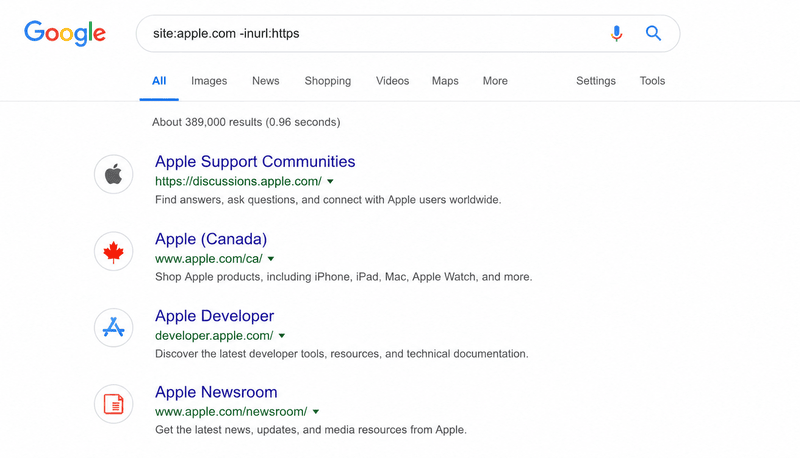
HTTP pages can create SEO and security issues. To identify unsecured URLs, run this query against your own domain while explicitly excluding secure links:
`site:example.com -inurl:https`
Find Guest Post Opportunities for Link Building
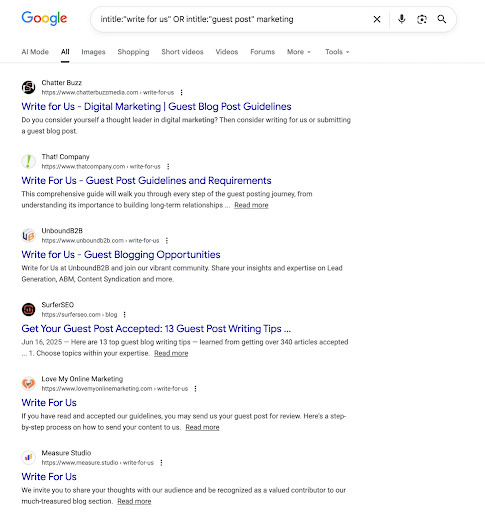
Searching for blogs takes too long if you only look for basic industry terms. Target the structural footprints left by submission pages:
intitle:”write for us” OR intitle:”guest post” marketing
Find Internal Linking Opportunities for New Content
site:yourdomain.com “target keyword” -inurl:target-page
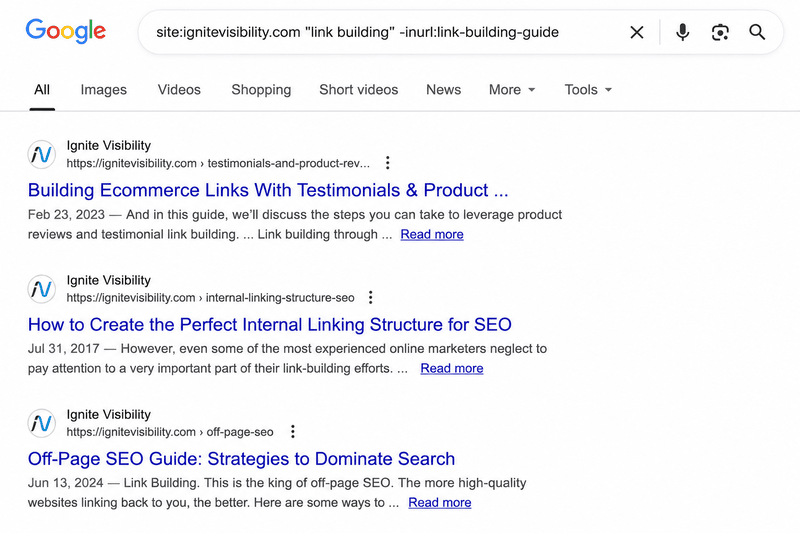
Use this query when publishing a new article. If your new piece is about link building, excluding the new URL helps surface older pages where you have already used that keyword. Review those pages to identify relevant places where the new article fits naturally.
Find Websites That Mention Your Competitors
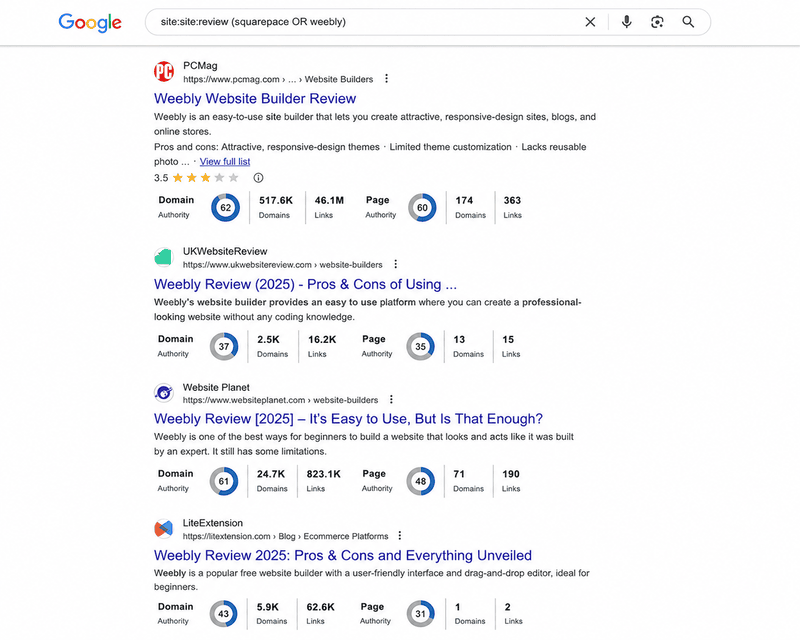
allintitle:review ([competitor 1] OR [competitor 2]).
If a website posts a review of a competitor, it may also be willing to review you. This is an easy way to find websites that already publish product or service reviews in your industry.
Find Competitor Content for Topic Research
Search a competitor’s blog titles to identify the topics and guide formats they prioritize.
site:competitor.com intext:”keyword topic”
The results highlight the long-form guides and educational content they publish around major topics.
Find Indexed PDFs and Other Documents
Internal sheets, PDFs, and staging assets are accidentally crawled all the time. To run a file extension audit on your domain, specify the asset type directly:
`site:w3.org filetype: pdf`
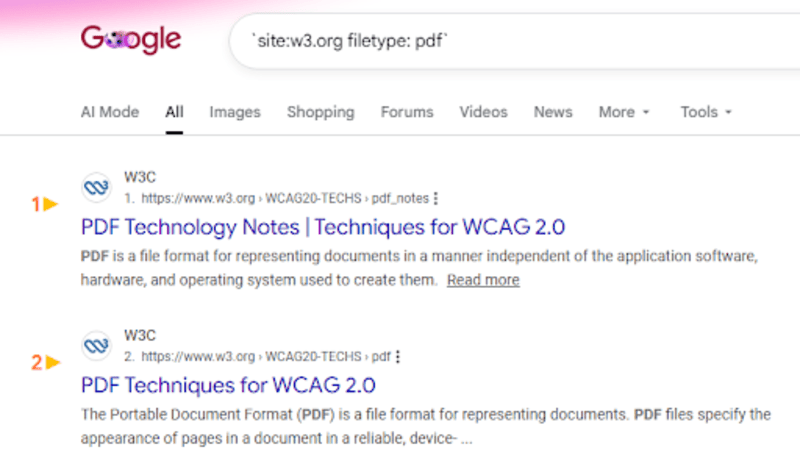
Google lists every indexed PDF on the domain.
Find Older Pages That May Need Content Updates
Older content often loses rankings over time. To narrow down historical material that needs a refresh, filter your domain index by a specific timeframe:
site:domain.com intitle:2020 OR intitle:2021

The results narrow the list to content from that timeframe, making it easier to identify pages worth reviewing.
Combine Search Operators for Advanced SEO Research
Combining search operators turns a search engine into a surgical research tool. By stacking commands, you filter out noise, pinpoint exact matches, and restrict queries to specific platforms, sites, or date ranges
site:reuters.com intitle:”artificial intelligence”

Google Advanced Search Operators Techniques
Mastering the Site Search Operator
The google search site operator (site:) restricts queries exclusively to a designated domain or subfolder. Running a google advanced site search allows webmasters to audit indexation depth and isolate unencrypted directories quickly.
- site:example.com
- Restricts results exclusively to that domain
- site:://example.com
- Restricts results to a specific subfolder or path
Targeted Filtering with Google Search AND/OR Operators
Using google search and or operators (AND, OR, |) gives you programmatic control over query parameters, letting you evaluate multiple conditions or compare distinct keyword groupings simultaneously.
- Use OR to search for either keyword: pizza OR burger
- Use AND to search for both keywords together: marketing AND SEO
- Combine AND and OR to fine-tune your search: (PlayStation OR Xbox) AND games
Search Within Specific URLs and Titles
The inurl: operator restricts results to pages with the keyword in the URL. The intitle: operator checks only the SEO title tag.
intitle: “case study” “machine learning”
Narrow Down Results With Multiple Operators
Combine multiple operators to narrow large result sets. Layer exclusions, file types, and search strings within a single query to separate outdated assets or thin content.
site:example.com filetype: pdf -inurl: archive
Search Operator Support Across Search Engines
While Google offers the widest variety of commands, international engines also maintain their own syntax; for instance, core yandex search operators mirror Google’s parameters for domain isolation, exact matches, and boolean queries.
| Operator | Bing | DuckDuckGo | Yandex | |
| site: | ✓ | ✓ | ✓ | ✓ |
| intitle: | ✓ | ✓ | ✗ | ✓ |
| inurl: | ✓ | ✓ | ✗ | ✓ |
| filetype: | ✓ | ✓ | ✗ | ✓ |
| Exact phrase (“”) | ✓ | ✓ | ✓ | ✓ |
| Exclude (-) | ✓ | ✓ | ✓ | ✓ |
| OR | ✓ | ✓ | ✓ | ✓ |
| before: / after: | ✓ | Limited | ✗ | ✗ |
| AROUND(X) | ✓ | ✗ | ✗ | ✗ |
Note: Search operator support changes over time, and some operators may behave differently across search engines. If a query doesn’t return the expected results, check the latest documentation for the search engine you’re using.
Common Mistakes When Using Search Operators
Using Outdated Operators
Google occasionally retires search operators. Legacy operators like link: and info: no longer work. Check Google’s documentation before building a workflow around an operator.
Getting the Syntax Wrong
A single spacing error changes how a query runs. Adding a space after the colon causes Google to treat the operator as plain text.
- site:example.com (Valid)
- site: example.com (Invalid)
Overloading a Single Search
Too many operators make a query overly restrictive. If a search returns zero results, remove one condition at a time until pages appear.
Expecting Perfectly Exact Results
Search operators reflect Google’s index, not a complete record of every indexed page. Estimated page counts fluctuate, and different data centers can return slightly different results for the same query. Use the data to track trends, not exact measurements.
Conclusion
You do not need to memorize the entire list of Google search operators because site:, intitle:, and inurl: cover most standard SEO tasks. The other commands are useful to know, but you will generally save them for specific cases.
These shortcuts work best when you pair them up. A single operator often introduces too much noise in the results, but combining a site: search with an inurl: directory and a minus sign to filter out unwanted pages helps isolate specific indexing issues. Mixing these commands simply lets you check for potential technical errors directly from the search bar. If you edit queries often, keyboard commands help too; our redo shortcut key guide covers Windows, Mac, Linux and Chromebook.
Frequently Asked Questions
What is a Search Operator?
A search operator is a special word or symbol you add to a search query to narrow the results. They tell the search engine to search within a specific website, look for an exact phrase, find certain file types, or apply other filters that a regular search cannot.
How Do Google Search Operators Help SEO?
Google Search operators make it easier to investigate indexing, review website structure, find duplicate content, and analyze competitor pages. They also help with technical SEO tasks, such as checking whether specific pages are indexed or locating PDFs, staging URLs, and other files.
What Are Some Examples of Google Search Operators?
Google Search Operators that are frequently used include site:, intitle:, inurl:, filetype:, quotation marks (” “) for an exact match, the minus (-) sign to exclude certain terms, and OR.
How Does the Google Search Site Operator Work?
This is a Google advanced search operator that lets you limit your results to a specific website or domain. For instance, performing a site:example.com SEO search gives you results that are found on the example.com site relating to SEO.
Do Google Search Operators Work in Other Search Engines Like Yandex?
Yes, but support depends on the search engine used. Some search engines, such as Yandex, Bing, and similar services, understand operators like ‘site:’ and quotation marks. However, many of the Google-specific operators are not supported by other search engines.
Is OR a search operator?
Yes. It tells Google to find pages containing either word or both. You have to type it in capital letters (OR) so Google treats it as a command rather than a normal word.
What are all the basic Google Search operators?
The basic operators are quotes “” for exact phrases, the minus sign – to leave out words, OR for alternative terms, AND to include multiple words, parentheses () for grouping, and the asterisk * to act as a wildcard for missing words.
What are some advanced Google Search operators?
Common advanced operators are site: to search within a single website, filetype: to locate PDFs and documents, intitle: to find words inside page titles, and inurl: to search for keywords inside web addresses.

Comments are closed