
Web scraping is the automated process of extracting publicly available data from websites using software, scripts, or bots. Businesses use web scraping for price monitoring, market research, lead generation, AI training datasets, and competitor analysis.
Simple tools work well for websites, but many modern websites use special code to load information. That is where tools like Selenium are helpful. Selenium is different from other tools because it uses a real browser to visit websites just like you would. It can click buttons, fill out forms, and get information that other tools cannot.
In this guide, you will learn about web scrapers. How they work. You will also learn how to choose the right tool for your project and the basic rules for collecting information from the internet in an easy and legal way. You will learn about competitor prices. How to track them without using spreadsheets.
1. What Is Web Scraping?
Web scraping is the process of automatically collecting data from websites. Usually, we have to do things manually because most sites don’t offer an easy download link or a direct data feed. A script handles this by opening the site’s raw HTML code, ignoring the visual design entirely, and copying the specific data points you choose. It then exports everything into a standard CSV sheet or a local database.
The process is split into two steps. First, you have a crawler that handles page discovery by automatically tracking links across a website. Next, the scraper takes over to read those pages and pull the exact text or numbers you need. Also, converts raw web layout into a structured format within seconds.
How Do Web Scrapers Work?
Most people think web scrapers are complex AI bots, but they are actually straightforward automation scripts. They simply replace the manual, exhausting task of highlighting text, copying it, and pasting it into a document.
However, running a scraper blindly across an entire website is a massive mistake. If you download every single word and image on a page, your script will slow to a crawl, and you will spend days cleaning up useless text.
The technique is targeting the exact elements you need. For example, if you are scraping car listings, you probably only care about the price and the mileage. You don’t need the seller’s bio, the dealership’s address, or the terms of service. By telling your scraper to isolate just those two specific fields, you keep your script incredibly fast and your final dataset clean.
The Step-by-Step Data Flow
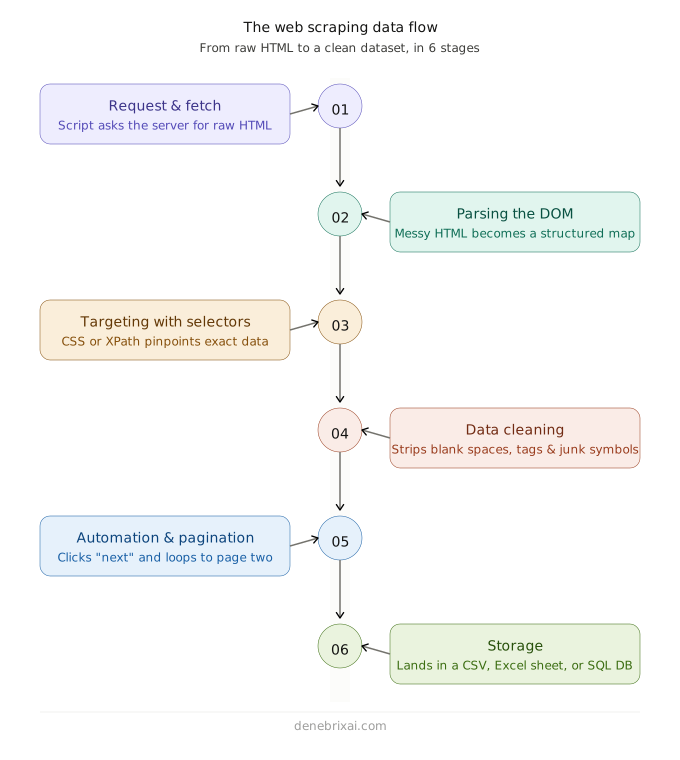
To build an efficient scraper, you need to understand how data actually moves from a live server into your local file. It is a precise pipeline that loops until the job is done.
1. The Request & Fetch (Getting the Code)
The process starts when you feed your script a URL. The scraper sends an HTTP request to the target website’s server, asking for access. The server returns the raw HTML file for the page. If the site is simple, this takes milliseconds. If the site uses heavy JavaScript to load data dynamically, you have to deploy a browser automation tool like Selenium to open a real browser window.
2. Parsing the Visual Structure (Locating the Data)
Raw HTML looks like a giant wall of messy, unreadable text to the human eye. The scraper parses the code, turning it into a structured map called the Document Object Model (DOM). It creates a clear hierarchy of elements, allowing your script to navigate through containers, headers, and paragraphs.
3. Targeting with Selectors (The Extraction)
Once the code map is ready, your script uses specific markers. Usually, CSS Selectors or XPath expressions, to pinpoint the exact data you want. You are essentially telling the script: “Find the specific table cell labeled ‘Price’ and grab the text inside it.” The scraper bypasses everything else and pulls just those values.
4. Data Cleaning (Polishing the Output)
Raw scraped data is mostly messy. It often comes with random blank spaces, hidden HTML tags, or weird currency symbols (like mixing up “$” and “USD”). Before saving anything, your script runs a quick cleanup function to strip out the junk and format the data properly.
5. Automation & Pagination (The Loop)
A scraper is only useful if it can handle thousands of pages. Once the script finishes extracting data from the first page, it looks for the code marker of the “Next” button, simulates a click, and restarts the entire fetching and parsing process on page two.
6. Storage
Once the loop finishes, the cleaned data is piped into its final home. Depending on the size of your project, this could be a simple CSV file, an Excel spreadsheet, or a live SQL database.
What Are The Different Types Of Web Scrapers?
You do not want to set up a data pipeline for a large company if you only need to retrieve a few prices from a single store’s website. The choice depends entirely on your coding skills, budget, and project scale. Picking the wrong setup can cause the target site to flag your activity and block your connection.
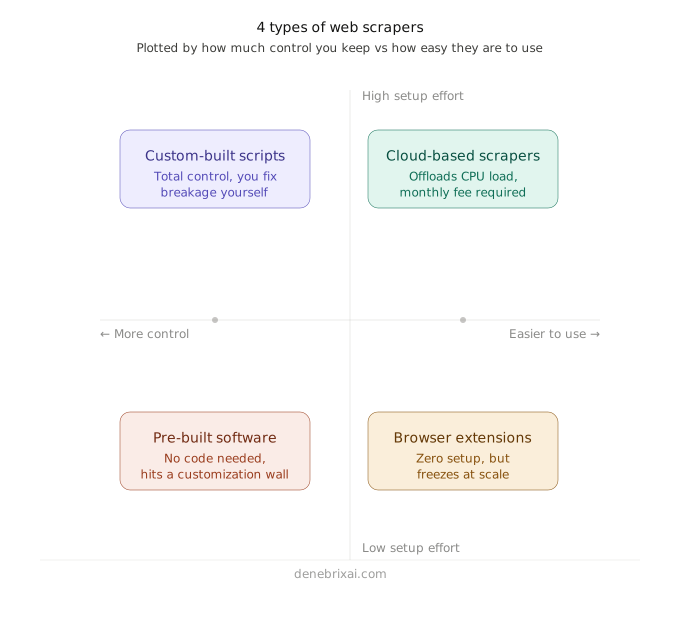
Custom-Built Scripts
If you know a little Python or JavaScript, you can write your own script. It gives you total control over the setup. You can write custom rules to extract data from complicated website layouts and send that data straight to your database. You are not limited by whatever features a third-party platform decides to give you.
But you have to fix the code yourself every time a website changes. Web designs and code updates happen constantly. When a site changes a class name or moves its data around, your script stops working. The data pipeline breaks completely and stays down until you manually review the new site code and rewrite your script.
Pre-Built Software
If you do not want to touch a line of code, you can download ready-made desktop applications or web platforms instead.
The zero-code setup is the main draw. You simply paste your target URL into a visual interface, and the software handles the background parsing automatically. Most pre-built tools also include native integrations to clean the data and push it directly into a clean CSV file or Google Sheet.
However, you will hit a customization wall very quickly. You are entirely limited by whatever features and site templates the platform vendor decides to support. If a site uses a non-standard layout, the software often fails.
Browser Extensions
Some scrapers install directly inside your browser as a simple add-on for Chrome or Firefox. These lightweight tools are perfect for small, quick jobs because they leverage your actual browser engine to load pages. This makes it incredibly easy to grab dynamic text or product listings that require human-like scrolling to appear on screen.
However, extensions struggle heavily with scale. Trying to run an add-on across tens of thousands of product pages will likely freeze your browser tab. They also lack the system access required to handle automated IP rotation or background scheduling.
Cloud-Based Scrapers
Running heavy scraping scripts locally is a pain; it hogs your CPU, drains your RAM, and completely slows your computer down. Cloud tools solve this by offloading processing to remote servers. You just set up the job, run it, and let their network do the work in the background while you use your computer for other things. You do have to pay a monthly fee, but it saves you the massive headache of managing your own server setup.
Essential Web Scraping Tools
When you want to pick a tool, you should right-click your target website. Look at the page source. If the information you need is already there in that block of text, you can use a simple script. If the page code looks empty because it uses JavaScript to add more content as you scroll down, then you have to use a tool that can control a live browser like a real person would. This is because the target website needs a tool that can load content as a browser would. You need an automation tool that can control a live browser to render the content properly.
| Tool Name | When to use it | How it actually works |
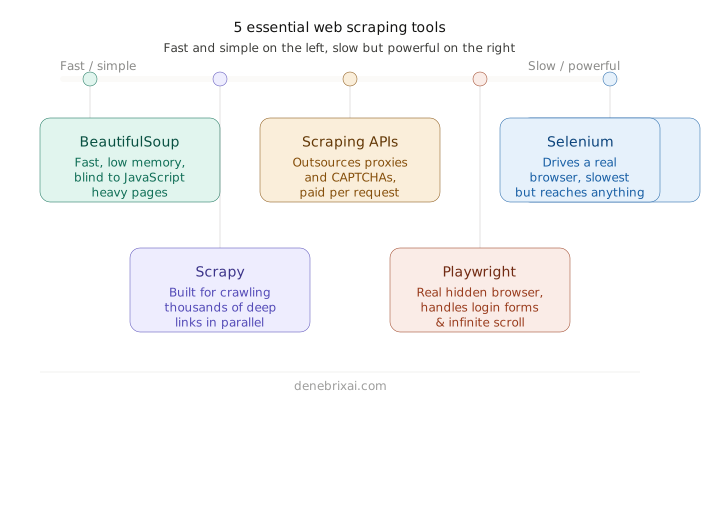
| BeautifulSoup + Requests | For basic pages, blogs, and static text layouts. | It is incredibly fast and uses almost no memory. The downside is that it is totally blind to JavaScript. If a site uses React or hides data behind button clicks, this setup hands you an empty file. |
| Playwright | For dynamic web apps, infinite scrolling, and login forms. | It spins up real, hidden Chrome instances in the background to click and scroll like a human. It works on almost anything, but it will absolutely hog your local CPU if you run too many pages at once. |
| Scrapy | For crawling giant sites with thousands of deep links. | It is a massive engine that natively supports parallel connections, so you don’t have to build your own crawling loops. It is total overkill for simple tasks and takes a long time to learn. |
| Scraping APIs (Firecrawl / ScraperAPI) | For targeting major stores or sites protected by Cloudflare. | You outsource the infrastructure. You pass them a URL, and their servers rotate proxies and solve CAPTCHA automatically so your home IP doesn’t get banned. It cuts out the maintenance work, but you have to pay per request. |
| Selenium | For JavaScript-heavy websites, interactive pages, and content that loads after user actions. | It drives a real browser to load pages and interact with them just like a human. The drawback is that it is much slower and uses far more memory, but it can scrape dynamic content that static tools cannot access. |
Why Is Python a Popular Programming Language for Web Scraping?
Python has become an important programming language for areas such as web scraping, data analysis, automation, and artificial intelligence. Beginners who want to build a foundation in programming can start with a free python course to learn core Python concepts and develop practical coding skills that can be applied to real-world technology projects.
Most developers choose Python for scraping because live web data is highly unpredictable. When you run Python scraping, you constantly encounter broken tags, sudden server errors, and messy string formats. Python is the preferred language for data extraction, where you can write quick rules to clean up that data on the fly and save it before other languages even finish compiling.
The biggest benefit is that you never have to write networking code from scratch. For simple sites, you combine requests with BeautifulSoup to map a page in just two lines of code. If you need to scale up, you use Scrapy to manage parallel connections natively. Because these tools plug straight into data science libraries like Pandas, you can handle everything from the initial web request to a clean data pipeline inside a single file.
What Can Web Scrapers Be Used For?
When an API isn’t available or sits behind a steep paywall, you write code to grab public data directly. Scraping lets you extract raw web details instantly and turn messy text into structured database entries. The real challenge is rarely the initial download; it is writing code that can survive sudden layout updates, proxy blocks, and weird string formats without crashing.
This is how development teams deploy website scraping across different fields:
1. Training AI models
Large Language Models depend entirely on the quality of their training data. If you are training a model to fix broken software code, you can’t just rely on textbook examples. Your collection script has to crawl millions of raw, messy QA threads from sites like Stack Overflow and Reddit. The technical challenge here is filtering out the noise; you have to write strict validation rules to strip out unformatted syntax and endless comment trees so your final machine learning dataset is completely clean.
2. Lead generation
Businesses use scraping to skip manual prospecting entirely. A script can scan public directories to extract company names, public corporate email addresses, and telephone numbers directly into a CSV file. This fills out automated outreach campaigns in ten minutes, completing work that would take a human researcher weeks to compile manually.
3. Sentiment analysis
Companies use scraping to monitor public perception across forums and social platforms. An insurance firm, for example, can track public posts and discussions mentioning specific keywords within a targeted location. Visualizing this data helps them track sudden shifts in public opinion. If a policy change causes a spike in negative comments, the scraper flags the issue before it damages customer renewal rates.
4. Market research and competitor analysis
Scraping replaces assumptions with actual market data. By automatically pulling reviews, product availability, and shifting prices directly from competitor sites, business leaders can instantly spot product gaps and see exactly why customers prefer a rival brand.
5. Financial price monitoring
Standard HTTP requests fail on live crypto and stock charts because modern trading platforms stream continuous price data using WebSockets rather than reloading pages. To hunt for price arbitrage across global exchanges, developers connect background scripts directly to these raw WebSocket streams or private backend API endpoints. The script isolates live bid-ask quotes, filters out network lag, and feeds the numbers directly into an execution script to capture trades before institutional algorithms close the gap.
Is Web Scraping Legal?
Scraping publicly available data is entirely legal. If anyone can view the data on the open web without an account, you are generally in the clear. A major example of this was the Meta vs. BrightData lawsuit, in which the court explicitly dismissed Meta’s complaints because the data was publicly available.
But you will cross legal lines fast if you do two things: scrape copyrighted content or steal personal data. Privacy laws like the GDPR protect user profiles, so scraping private accounts behind a login screen is a massive violation. In short, check the site’s robots.txt file, don’t crash their servers with too many requests, and leave private info alone.
Conclusion
You don’t need a complex setup to get started. If your goal is to learn how to scrape any website, just look at how your target site loads its data, grab a tool that matches, and start pulling. Write a quick script, test it out on three or four pages, and just patch the code when it breaks.
The most important rule is to scrape ethically. Set up basic rate limits so your bots don’t hammer their servers, and avoid handling private user data. Do that, and your code can handle all the boring, mind-numbing data collection while you focus on actual analysis, lead gen, or AI training.
Frequently Asked Questions
What is web scraping?
Web scraping is the process of using a script to automatically extract information from websites. Instead of wasting your time copying and pasting text into a spreadsheet, you write a bit of code that opens the page, isolates the text or numbers you want, and saves them for you.
What is data scraping vs website scraping?
Website scraping is strictly about extracting content from public web pages. It is a much broader term that means extracting information from any digital file, whether that is a web page, a messy PDF, or an old local database.
How do you scrape data from a website?
It comes down to a quick loop. You give your script a URL to look at. The script pings the site’s server, downloads the page’s background code, and searches the file for the exact text or prices you targeted. Then it extracts those details and dumps them into a clean CSV file.
Can you scrape any website?
Technically, you can scrape any website if a regular browser can load the page, because a script can read it. But that doesn’t mean you should blindly target anything. Plenty of sites use high-security walls and CAPTCHA to block automated traffic. Plus, you have to follow the law. Grabbing public product prices is fine; trying to bypass logins for private user data will cause major issues.
What is web scraping software?
It is just whatever tool you use to automate the collection process. For developers, this means code libraries like BeautifulSoup or Playwright, where you build custom scripts. For non-tech folks, it refers to simple browser extensions or desktop apps that let you click on the screen to select the data you want to save, without touching code.

Comments are closed