

Software testing basics are the foundation of building reliable software. Each software application should go through an evaluation process prior to deployment to ensure proper functionality, identify defects, and avoid introducing new issues by way of updating. Testing can be performed either manually or automated with the aim of providing reliable software products.
One error in the code can lead to failure in logging in, issues with payments, or the crashing of an application. These kinds of issues are much easier and less costly to fix while developing the product as opposed to having to address them after a release. This is the reason why testing has become a standard practice within software development and not something done as a last resort in projects.
This software testing guide is meant to teach the software testing basics that every developer and tester needs to know about.
What Is Software Testing?
Software testing is the process of checking software for bugs, errors, and other issues before it is released. The goal is to make sure everything works properly and users have a smooth experience.
QA engineers handle this day-to-day work. Their job goes far beyond clicking buttons to see what breaks. Rather than guessing, they use systematic software testing in software engineering routines to check the product, focusing heavily on verification and validation. Teams usually document these requirements before testing begins, making technical documentation a critical part of the QA process.
Verification checks if the code matches the initial technical design. Validation ensures the feature actually makes sense to a real user. Balancing both practices keeps your application stable. It means fewer broken features, fewer emergency patches, and fewer complaints hitting your customer support team.
How Software Testing Has Evolved
Quality assurance used to happen at the very end of the cycle. Testers sat at desks, followed spreadsheets, and clicked through screens by hand. This worked fine when updates rolled out twice a year. But when release cycles shrank, manual checks stalled deployment.
| Era | How Software Testing Changed |
| 1950s–1960s | Testing mainly focused on finding programming errors after code was written. Developers often debugged software manually. |
| 1970s–1980s | Structured testing became part of software engineering, with a greater focus on verification, validation, and QA. |
| 1990s–2000s | Automation tools like Selenium made repetitive testing much faster and more reliable. |
| Today | Modern teams mix automated software testing, CI/CD pipelines, cloud setups, and AI-powered tools to catch issues early and release code confidently. |
To move faster, teams dropped automated scripts right into their CI/CD pipelines. This shift built software testing basics into the daily routine. Tests ran every time an engineer saved code, stopping bugs early.
Traditional automation is powerful, but minor layout changes still break scripts. Platforms like Momentic fix this by adding agentic AI to the loop. These tools look at the interface like a human would, navigating pages and fixing their own code when layouts shift.
Why Software Testing Matters
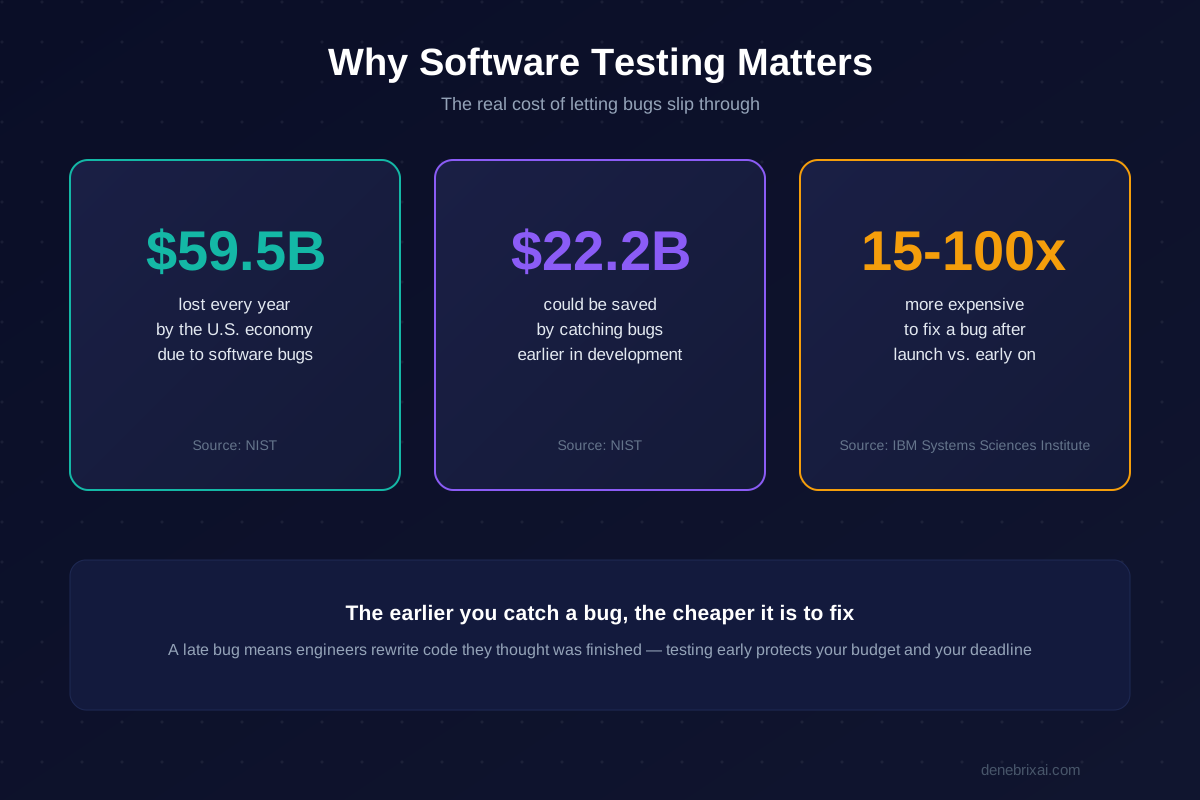
Software testing keeps companies from losing major revenue. A classic NIST study showed that software bugs cost the U.S. economy 59.5 billion dollars every year. The report found that catching these errors earlier could prevent $22.2 billion in those losses.
The financial impact increases the longer a bug hides. Research from the IBM Systems Sciences Institute analyzed the numbers and found that fixing a glitch after launch costs 15 to 100 times more than catching it early in development. A late bug means engineers waste days rewriting code they thought was finished.
To avoid those costs, teams plug automated software testing into their CI/CD pipelines. This setup catches breaking changes the minute code gets saved, keeping bugs out of production.
Learning software testing basics is just about protecting that development time. Getting these testing fundamentals down cuts down on emergency patches so teams can focus on shipping new features.
7 Principles of Software Testing
Software testing is way more than randomly clicking around a screen to see what crashes. Over decades of building apps, engineers realized that software bugs follow clear patterns.
These seven baseline rules give QA teams a realistic way to plan their work, spend their hours wisely, and catch critical problems before users ever see them.
1. Testing Shows the Presence of Defects
Running tests proves that bugs are there, but no test run can ever prove an app is 100% bug-free. You can execute fifty test cases on a user profile form and watch every single one pass. That only tells you those specific fifty checks worked.
It never guarantees a user won’t enter an unusual character or paste an oversized image tomorrow that takes down the backend. Your real goal as a tester is simple. Push the risk of defects down as far as you can, rather than promising management that the software is completely flawless.
2. Exhaustive Testing Is Impossible
Have you ever tried calculating every single thing a person could type into a basic eight-character password box? Between letters, numbers, spaces, and symbols, the math blows up into trillions of variations.
If a team tried to test every browser version, screen size, and data combination, a simple project would take decades to ship.
This is why QA relies on risk-based testing. Instead of checking everything under the sun, you sit down and figure out which features would cause the biggest mess if they broke. Areas like payments, login screens, or order processing get the majority of your attention.
3. Early Testing Saves Time and Money
Finding a broken database setup two days before a major release is a complete nightmare. Developers end up pulling all-nighters, launch dates get delayed, and fixing one piece usually breaks three other features.
Now contrast that with finding the exact same flaw during the very first week while reading the project plan. Fixing it back then took five minutes and a quick edit in a document. In the software development life cycle (SDLC), getting QA involved right at the start is called “shift-left” testing. It stops tiny design mistakes from snowballing into expensive rebuilds later.
4. Defects Cluster Together
Ask anyone who has worked in QA for a few months and they will tell you something obvious: bugs do not spread out evenly. They tend to bunch up in the same few corners of the code.
This matches the Pareto principle (the 80/20 rule). Roughly 80% of all software bugs come from about 20% of your features.
These trouble zones are usually the parts with messy business logic, old legacy code nobody wants to touch, or modules where multiple developers worked at the same time. Once you know where these clusters live, you can direct your heaviest testing straight at them and stop wasting time rechecking stable pages.
5. Repeating the Same Tests Has Limits
If your team runs the exact same 40 regression tests before every single release, those checks will eventually stop finding anything new.
Just like bugs in a garden build up resistance to the same spray over time (a concept known in QA as the “pesticide paradox”), software builds become immune to repetitive checks. Those existing tests still help confirm that old bugs haven’t returned, but they won’t catch brand new defects.
To keep defect detection sharp, teams have to regularly review their test suites, write fresh scenarios, and retire checks that no longer pull their weight.
6. Testing Depends on the Software
Testing an arcade mobile game is completely different from testing software that runs a hospital monitor or a bank’s transfer system. Every piece of software carries different risks, user types, and legal rules.
A mobile game needs you to check things like frame rates, touch responsiveness, and audio sync. A banking portal needs you to focus almost entirely on bulletproof security, audit logs, and accurate math down to the cent. Your testing approach always has to adapt to what the app actually does in the real world.
| Application | Testing Priorities | Key Focus Areas |
| Banking Software | Security, accuracy, reliability | Data encryption, transaction logs, account balances |
| Healthcare Software | Safety, privacy, compliance | Patient data privacy, system uptime, medical records |
| E-commerce Platform | Checkout speed, payments, load handling | Cart updates, payment gateways, heavy visitor traffic |
7. Finding No Bugs Does Not Mean the Product Is Good
You can build an app that runs without a single crash, loads instantly, passes every single QA script, and still watch it fail miserably once real people get their hands on it.
If an online checkout takes eight confusing steps just to buy a pair of shoes, shoppers will give up and go elsewhere. A system that works technically is useless if it doesn’t do what the user actually needed in the first place.
This is why user acceptance testing (UAT) is so critical. It checks whether the software actually solves a real problem for the person using it, not just whether it checked off technical specifications.
Black-Box, White-Box & Gray-Box Testing
The divide between these three boils down to one practical detail: how much visibility you get into the internal codebase while running your checks.
Black-Box Testing: Testing From the User’s Perspective
Black-box testing treats the system as a closed unit. You don’t look at backend logic, database tables, or server architecture. You simply open the product and interact with it like an everyday user.
If you submit a signup form and hit an unexpected 500 error instead of a dashboard redirect, you don’t dig into the repository to find the line that threw the exception. You log the reproduction steps, note the browser environment, and pass the ticket to the engineering team.
This approach focuses squarely on the end-user journey:
- Catching broken submission forms and dead links
- Identifying confusing or broken navigation paths
- Flagging missing validation messages and UI misalignments
White-Box Testing: Testing the Code Behind the Software
White-box testing removes the cover entirely, giving you direct access to the source code, repository branches, and data structures. Developers and QA engineers use this vantage point to trace logic paths, analyze control flows, and run automated unit suites.
Instead of testing inputs purely through the interface, you examine the actual statements. For instance, you can evaluate nested if/else conditions or edge-case loops to verify that every logical branch executes as designed.
Because you work directly within the codebase, white-box checks catch issues that regular UI testing rarely surfaces:
- Unreachable or dead code paths
- Unhandled exception blocks
- Memory leaks and improper resource management
- Hardcoded security vulnerabilities and raw input handling flaws
Gray-Box Testing: A Mix of Both Approaches
Gray-box testing lands right in the middle. You interact with the product from the outside, but you have targeted visibility into supporting backend components like API schemas, database clients, or server logs.
A typical workflow might look like this: you submit an order through the checkout UI like a regular shopper, then switch over to your database client to verify that the transaction row updated with the right user_id, currency tag, and payment status.
By combining front-end interactions with architectural visibility, gray-box testing bridges the gap between surface behavior and backend data integrity. You aren’t just confirming that an action looked successful on screen; you’re verifying that the server processed the data correctly underneath.
Common Types of Software Testing
You can’t test a whole app with just one tool. Finding a typo in a math formula takes a completely different approach than figuring out why a server crashed. Because of that, tech teams break testing down into a few basic categories.
Functional vs. Non-Functional
This is just checking what the app does versus how it handles real strain.
Functional testing checks if a feature works. When a user clicks “Pay Now,” the payment needs to go through.
Non-functional testing is about speed, security, and stability. The payment button might work perfectly for one person, but the real question is whether the app crashes when ten thousand people all click it at the exact same time. It also checks whether user data is secure from hackers and whether the pages load fast enough. For security in particular, many teams bring in dedicated penetration testing services to probe the app the way a real attacker would.
Breaking Down the Layers
You can look at functional testing by how much code you touch at one time.

- Unit Testing: Developers write these quick checks directly on their laptops while writing code. A unit test separates a single calculation. If an engineer makes a typo in a pricing loop, this check flags it before that file ever gets saved to the main project.
- Integration Testing: Different programs within your app have to talk to each other. This phase looks at the handshakes between your APIs, background databases, and internal servers. It stops errors where information gets dropped when moving between separate systems.
- System Testing: At this stage, QA testers take the fully completed application and run through real workflows. They pull up the actual UI to ensure the frontend screens match what the backend database is actually doing.
- Acceptance Testing: This is just the final check right before launch. It answers one core question: Did the team actually build what the client paid for?
Manual vs. Automated Software Testing
You can run all these checks by hand, or let scripts handle them. Most teams combine both methods.
Manual testing requires a person to click around the application to spot broken layouts, visual flaws, and confusing menus that a computer program would ignore.
Automated software testing relies on code to check code. Engineers write quick scripts to handle repetitive tasks. These run every time someone uploads new code, instantly flagging broken tools. That saves time so people can focus on the weird, unpredictable bugs.
Test Case Design Techniques
If you tried to test every single button click, typo, and data mix on a website, you’d never finish. A simple text box can take billions of string inputs. We use test design techniques so we don’t have to guess or waste time running pointless checks. They help us pinpoint the few inputs most likely to break the build.
1. Boundary Value Analysis (BVA)
Programmers usually make mistakes at the edges. When writing code, it’s easy to accidentally type > rather than >= or mess up an array index by one. That is why bugs bunch up around min and max limits.
With BVA, you don’t pick random numbers in the middle. You test the exact edges, plus one step below and one step above.
- Example: Say an item quantity field accepts 1 to 50 items:
0: Just below min (Should fail)
1: Minimum limit (Should pass)
50: Maximum limit (Should pass)
51: Just above max (Should fail)
- When to use it: Any time an input has clear upper/lower bounds like age limits, cart quantities, password character counters, or date pickers.
2. Equivalence Partitioning
Equivalence Partitioning cuts down your workload by grouping inputs. The core assumption: if the code works (or breaks) for one number in a group, it’ll behave the exact same way for all the others. You only need to test one representative sample per bucket.
- Valid vs. Invalid Groups: You split inputs into what the system should accept (valid) and what it should reject with an error (invalid).
- Example: An account registration asks for user age between 18 and 65:
Too young (Invalid): Check 14 (Triggers age warning)
Allowed range (Valid): Check 28 (Passes through)
Too old (Invalid): Check 72 (Triggers limit warning)
- When to use it: Form validation, numeric ranges, text fields with length limits, or file-size upload caps.
3. Decision Table Testing
Some outcomes rely on a mix of different rules happening at the same time. When you have multiple if/else conditions running together, it’s easy for developers to forget one branch. A decision table lists every condition and its outcome in a clear matrix.
- Example: Checking if a customer gets free shipping and discounts during checkout:
Condition 1: Are they a Prime member?
Condition 2: Is their cart total over $50?
Condition 3: Did they enter a valid promo code?
- Why it helps: It prevents missed scenarios like what happens when a non-member enters a valid coupon on an order under $50.
- When to use it: Checkout rules, discount engines, loan approvals, and access permission setups.
4. State Transition Testing
Applications don’t just take data; they move through different stages. State transition testing checks whether the system moves correctly from one status to another, and makes sure it rejects illegal jumps.
- State: The current condition of an object (e.g., Cart Open, Payment Received).
- Transition: The jump from one state to the next caused by an action.
- Example (Food delivery tracker):
- Valid flow: Placed → Kitchen Preparing → Out for Delivery → Delivered.
- Invalid jump: The app skipping directly from Placed to Delivered, or trying to cancel an order after it is already Delivered.
- When to use it: Shopping carts, banking transactions, user login states (Logged Out → Locked → Active), and shipment tracking.
5. Error Guessing
Error guessing relies entirely on a tester’s past experience and gut instinct. It isn’t a replacement for structured methods like BVA or EP; it’s an extra layer to catch the weird stuff users actually do in the wild.
Common things testers try during error guessing:
- Leaving mandatory fields blank or typing only spaces
- Pasting crazy strings or emojis into name fields (John 🚀 Doe)
- Spam-clicking “Pay Now” five times in two seconds
- Typing February 30 into a date box
- Uploading an .exe renamed to .png
6. Exploratory Testing
Unlike scripted testing where you step through a checklist, exploratory testing is completely unscripted. You learn how the system works, design your test ideas, and execute them all at the exact same moment.
- How it works: You pick an area of the app, say, the checkout funnel, and poke around naturally. If you notice the page flickers when changing quantities with a coupon applied, you immediately stop and dig into that specific behavior.
- When to use it: Early feature drops, fast Agile sprints where full documentation isn’t ready yet, or right before a release to catch unexpected UI and logic flaws.
7. Pairwise Testing
Testing every single software and hardware mix creates a combinatorial explosion. If you have 4 browsers, 3 operating systems, and 4 payment gateways, running all configurations means 4 ✕ 3 ✕ 4 = 48 full test cycles.
Pairwise testing cuts this down drastically. Research shows most bugs are caused by the interaction of just two parameters. By using a pairwise grid, you only test pairs of variables together (e.g., Safari + macOS, Chrome + PayPal) rather than every full combination, cutting total test runs down by over 60% without losing serious test coverage.
Popular Software Testing Tools
| Tool | Best For |
| Selenium | Web automation and browser testing |
| JUnit | Unit testing for Java applications |
| TestNG | Java testing framework with advanced test management features |
| Cypress | Frontend and end-to-end web application testing |
| Playwright | Cross-browser testing across Chromium, Firefox, and WebKit |
| Momentic | AI-powered UI testing with self-healing automation |
How Do You Test Software? Step-by-Step
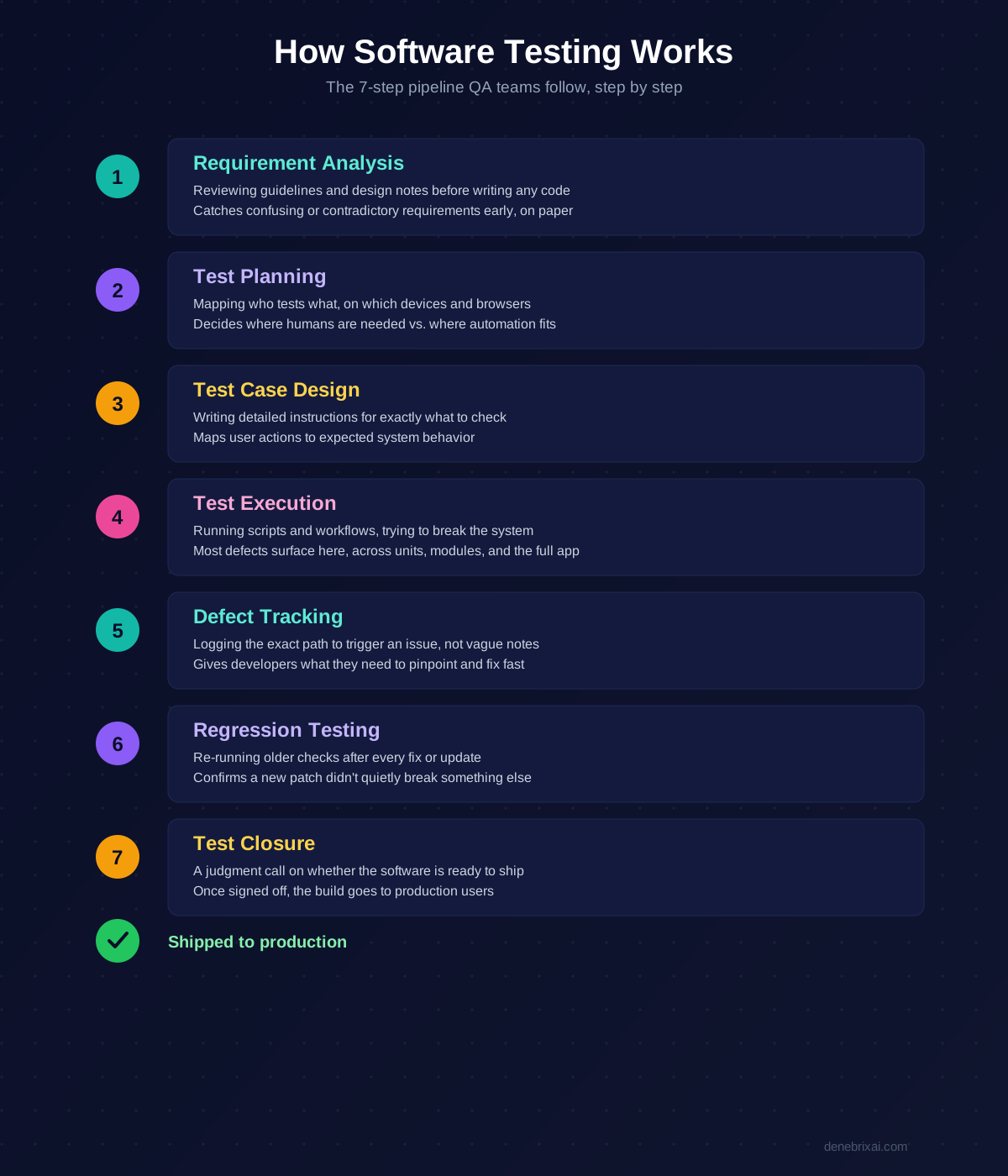
Throwing code at a QA team right before a deadline is a disaster. Real tech teams follow a specific pipeline to catch problems early.
1. Requirement Analysis
A team doesn’t wait for a finished app to start working. They go through the initial guidelines and design notes before a single line of code gets written.
If a business requirement is confusing or has a serious logical contradiction, it’s better to spot it on paper. Skipping this part means you’ll end up rewriting completed features later, which burns through time and budget.
2. Test Planning
Once the goals make sense, the logistics start. Who tests what? Which devices or browsers do we need? How do we balance the workload?
This acts as a resource map rather than a generic checklist. The team determines which complex areas require human eyes and where to use automated software testing to handle the repetitive stuff.
3. Test Case Design
Next, testers write out detailed instructions for each check, mapping out exactly what a user might do and how the system should react.
One test might verify that the UI displays a warning if someone leaves a form blank. Another check might be a quick script ensuring backend APIs deliver the right data payload when a user clicks a button.
4. Test Execution
This is the stage where the application finally meets real-world stress. Testers click through the workflows, run their scripts, and intentionally try to break the system.
During this phase, most defects finally show up. Testers verify individual calculations, check how modules pass data back and forth, and run the entire application end-to-end to see if anything fails. End-to-end testing tools such as Functionize help teams repeat these complete workflows without manually stepping through each screen. For example, a checkout test can follow a shopper from adding an item to the cart through payment and order confirmation. Checking the final outcome matters because individual components can pass their tests while the full journey still fails.
5. Defect Tracking
When a feature breaks, testers open up a ticket. They skip the vague “it’s broken” descriptions and map out the exact path to trigger the issue, what should have happened, and what actually went wrong. Developers use these specific clues to pinpoint the broken code and fix it quickly.
6. Regression Testing
What happens after a bug is fixed? Usually, something else breaks entirely. Every time a developer updates code or patches a flaw, the testing team reruns older checks on the surrounding features. You can’t assume a new fix didn’t accidentally disrupt parts of the software that were previously stable.
7. Test Closure
The cycle wraps up when the bug count drops low enough. The team makes a collective judgment call based on project health: does this software do what the client spent money on? Once everyone agrees the build is solid, the code gets signed off and sent out to real production users.
How AI Is Transforming Software Testing
Automated frontend testing used to mean fighting a losing battle against fragile code layouts. You map out strict CSS selectors or absolute XPaths for a button, a developer adjusts a class name, and the entire build turns red. The application isn’t actually broken, but your automation suite is dead.
Modern automated software testing tools like Momentic bypass this headache through dynamic locator strategies. Rather than forcing you to hunt down code strings, you use natural language selectors and intent-based selectors to just type “click checkout.” Behind the scenes, AI-enhanced element detection scans visual hierarchies and accessibility tags. This powers a semantic selector that targets the actual button based on what it does, even if the markup changed entirely.
It also eliminates the false alarms that stall deployment pipelines. Runners swap blind sleep timers for smart waiting, tracking network traffic to hit components the millisecond they are ready. If a brief network disruption occurs, automatic retries and failure recovery loops reset the application state to finish the run. When UI changes are permanent, self-healing tests log the healing events and deploy automated fixes on the fly to keep things green.
The engine uses flake detection and observable metrics to catch genuine bugs while filtering out environmental noise, separating a breaking error from non-critical UI updates like color swaps. If a failure stems from minor logic changes in how data flows, the platform generates automated patch suggestions. It writes the code correction for you, but routes the update for human approval so engineers don’t lose control over production code. Organizations adopting these workflows often combine automated testing with broader AI software development initiatives.
Using AI Responsibly in Software Testing
AI should support testers, not replace them. While it can automate repetitive tasks, important logic changes should always require human approval. Teams should also guard against prompt injection and data leakage by setting clear policy limits. Frameworks like the EU AI Act encourage responsible, transparent, and secure use of AI in software testing.
Best Practices for Successful Software Testing
Strong software testing basics begin with a clear strategy, not just the right tools. If you don’t start testing early in the development cycle so defects are caught fast, you waste a fortune fixing them later. You need a realistic mix of manual and automated software testing. Let scripts run the repetitive tasks, but save exploratory testing for the disorganized scenarios that need actual human judgment.
Pushing these suites into CI/CD pipelines helps teams detect regressions quickly and supports continuous testing with every code change. But if you are using AI-powered tools, stop blindly trusting green checkmarks. You have to monitor flake rates, observable metrics, and healing events to kill unstable tests rather than relying solely on pass-or-fail results.
The software can suggest automated fixes when things shift, but significant changes must go through human approval to protect core business logic. From there, just maintain clear technical documentation, update test cases regularly, and review automation scripts as the application evolves to keep the whole pipeline accurate, scalable, and reliable.
Conclusion
Skipping software testing basics guarantees broken code and midnight alerts. If you wait until the end of development to start testing, you will spend far more time and money fixing bugs later. The best teams do not rely on automation alone. They maintain a realistic mix of manual and automated software testing. Let code handle repetitive tasks, but save exploratory testing for complex scenarios that require actual human judgment.
Wiring these suites into CI/CD pipelines helps teams detect regressions quickly and supports continuous testing with every code change. But if you use AI-powered tools, stop blindly trusting green checkmarks. You have to actively monitor flake rates, observable metrics, and healing events to catch unstable tests, rather than relying solely on pass-or-fail results. The system can suggest automated fixes when things shift, but significant changes must be approved by humans to protect business logic. Test suites need maintenance just like production code. Ignore them long enough, and they will start creating problems for you when you try to catch them.
FAQs
How do you test software when moving away from fragile legacy scripts?
Traditional automated software testing breaks whenever layout changes disrupt absolute XPaths or CSS selectors in the DOM structure. Modern platforms like Momentic use agentic AI and dynamic locator strategies instead. By using natural language selectors and intent-based selectors, AI-enhanced element detection targets components by behavior and accessibility attributes, even if the underlying code changes.
What is the best way to handle unstable tests and environmental noise?
Instead of relying only on pass or fail results, teams must actively monitor flake rates and observable metrics. Modern test runners use smart waiting and safe retry logic to handle timing and environment flakes without failing the build. When permanent UI updates occur, self-healing tests track healing events and apply automated fixes on the fly to keep pipelines moving.
How does AI transform test maintenance, and where do you draw the line?
Embedded AI models can analyze broken scripts, handle auto patching, and provide automated patch suggestions when layouts shift. However, teams must set clear policy limits to protect core business logic. While automation can handle non critical UI updates, any significant logic changes must go through human approval to maintain accurate audit trails.
What security and compliance risks come with AI driven testing tools?
Using agentic services can expose dynamic infrastructure to threats like prompt injection, data leakage, and business logic abuse. Attackers can exploit unsecured testing environments to bypass rate limits or introduce malware through third party packages. To stay safe, teams should align their automation workflows with strict frameworks like the EU AI Act.
What are the software testing basics every developer should know?
Strong software testing basics begin with a clear strategy. Developers must balance verification, which checks if code matches the design, with validation, which ensures the app works for real users. This requires running unit testing on single functions, integration testing across microservice boundaries, system testing on the full UI, and final acceptance testing before launch.

Comments are closed