
Technical documentation is used by people to develop, support, and troubleshoot their software products. It will help you communicate what your software product does to your audience. It also provides them with enough context to move quickly and avoid unnecessary guesswork.
In this guide, you’ll learn about technical documentation, its different types, and how to create effective documentation. You’ll also find examples of technical documents and some useful documentation tools.
1. What Is Technical Documentation?
Every time you have consulted a setup guide or found an endpoint in API documentation, you were dealing with technical documentation. It is information that enables one to comprehend, use, and maintain a specific product or system. It consists of various types of content, including:
- API documentation
- Technical design documentation
- Troubleshooting guide
Although certain types of technical docs answer customers’ questions, other types focus on developers. The most important thing about documentation is that it must be accessible to the target reader. Good technical documents answer all possible questions in advance. They not only save time but also do the work efficiently.
1.1 Key Characteristics of Effective Technical Documentation
Comprehensive accuracy: Everything a document says about a product should be true and current. Check the details often, so they match what the product actually does.
Clear language accessibility: Readers should understand the content even if they are not experts. Explain technical terms and abbreviations, and use everyday language whenever you can.
Intuitive navigation: Readers should find what they need quickly. Use headings that make sense, keep the structure organized, and link to related topics so no one gets stuck.
2. Why Do Businesses Invest in Technical Documentation?
Good documentation is really important. It affects how much you spend on support, how well your customers do, how productive your developers are, and how your business grows.
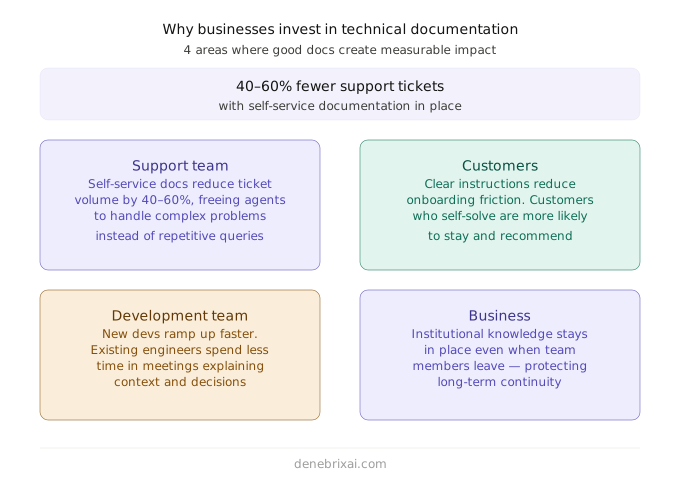
For your support team: Self-service documentation gives customers a way to find answers to common questions on their own. This allows your support team to spend more time solving complex problems instead of repeatedly answering basic questions.
For your customers: When instructions are clear, customers start using your product and get less frustrated. If customers can figure out your product on their own, they will likely keep using it and tell others about it.
For your development team: New developers learn faster with documentation. Existing developers also save time because they do not have to explain things over and over in meetings. Developers in companies without documentation spend a lot of time looking for information or waiting for answers.
For your business: Documentation helps your business by keeping all your knowledge in one place. This way, if one person leaves, not all the knowledge leaves with them. Everyone can access the information they need.
3. The Teams Behind Technical Documentation
Technical documents are not written by just one kind of person. Who writes them depends on team size, the kind of content being produced, and how the company is structured.
Technical writers: They are experts at making complex things easy to understand. They work with teams to make sure everything looks and sounds the same. Writers are in charge of the whole documentation process from start to finish. Most companies that have a good documentation system have at least one technical writer.
Developers: In teams or when a product is just starting out, the developers often write their own documentation. The documentation they write is usually correct. It can be hard to understand if you do not already know much about the subject. If developers work with editors or technical writers, the result is much better.
Product managers: PMs also write documentation. They write about the product, release notes, and how to get started. They know the product well, but they might need some help with making the documents easy to read and understand.
Developer Relations (DevRel) teams: These teams help connect the engineering team with the people who use their products. They write tutorials, guides, and instructions with the developer in mind. Technical documents are written by writers, developers, product managers, and Developer Relations teams. They all play a role in making sure the documentation is good and easy to use.
Business analysts: Before anyone starts building a feature, these people write down the project requirements and basic workflows. That gives the rest of the team a clear starting point so nobody makes false assumptions about what the software should do.
QA engineers: They focus on test runs, checklists, and bug reports. Because of their notes, developers and project leads know what parts of the software actually work and what never got checked at all.
UX designers: They map out user journeys, rough wireframes, and interface rules. Their sketches keep the look, feel, and screen layouts consistent, even when many different teammates work on the app at the same time.
Solution architects: These team members plan how different systems, servers, and databases connect behind the scenes. They write big-picture design docs that developers can look at while building out each individual piece.
Writers, developers, product managers, DevRel teams, and these other specialists all play a part. Good documentation is usually a team effort, not a solo project.
4. Documentation Frameworks Worth Knowing
When organizing technical documentation, teams often lean on one of a few established systems: Diátaxis, DITA, and Red Hat’s modular documentation approach.
Diátaxis: Structuring Content by User Goal
Diátaxis breaks documentation into four separate types based on what someone is trying to get done:
- Tutorials: Guide beginners through a hands-on exercise so they pick up the basics without getting stuck.
- How-to guides: Walk users through the steps needed to handle an everyday job or fix an immediate issue.
- Reference: List straightforward data points, parameters, and flags for quick scanning.
- Explanations: Step back to clarify why things work the way they do and provide architectural context.
Things get messy when these boundaries blur. Dropping deep theory into a tutorial breaks a learner’s concentration. At the same time, adding casual explanations to a reference table makes it harder for engineers to grab the values they need quickly.
DITA: Structuring Content by Reusable Modules
Darwin Information Typing Architecture relies on a different approach. Rather than drafting sprawling chapters, authors write small, self-contained units. Every unit fits into a specific schema:
- Task: Direct, procedural steps.
- Concept: High-level background and operational overviews.
- Reference: Structured facts, properties, and tables.
- Glossary: Short definitions of specialized terminology.
- Troubleshooting: Breakdowns of specific errors and their direct fixes.
Authors assemble these standalone units into distinct user manuals, portals, and PDFs using automated publishing tools. A small team rarely needs this overhead early on. Once a business maintains hundreds of technical pages across several releases, reusing modular files cuts out hours of duplicated effort.
Red Hat Modular Documentation
Red Hat uses a similar idea, built around three content types: Concept, Procedure, and Reference. Each topic covers exactly one of these, and topics get assembled into larger guides as needed. It works well for teams publishing across many products or versions, since the same procedure topic can be reused across several guides rather than being copied and re-edited each time.
5. Types of Technical Documentation Every Team Should Know
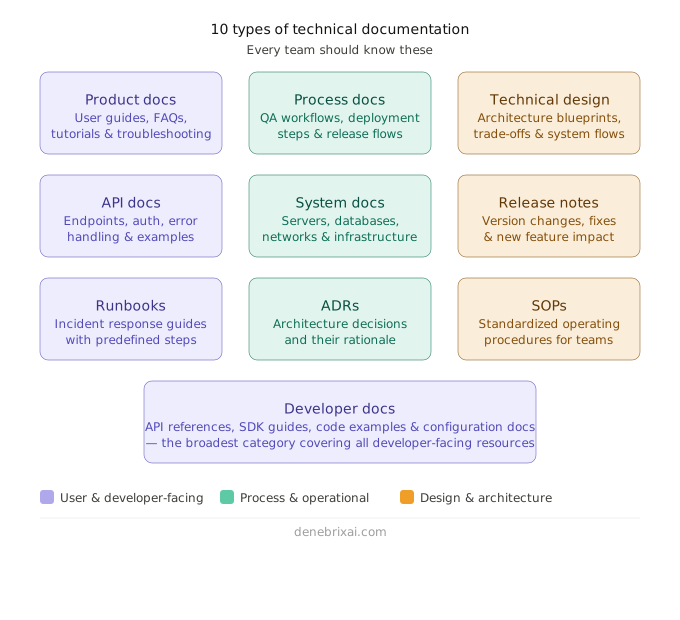
Documentation is not a uniform thing. Various teams produce different types of documentation based on their audience and purpose. The end-user needs help using the product correctly, while software engineers and developers need documentation to develop and scale their systems effectively.
Here you will find all major types of technical documentation used in products and development teams.
5.1 Product Documentation
Product documentation is written for the end user who needs help understanding or using the product in real-world applications. This type of documentation is often the first stop for a user to get unstuck; thus, it is crucial to keep it simple and clear.
Rather than being oriented towards the architecture of the system, it is more concerned with what the end-user can accomplish with it, such as creating an account, using a feature, or troubleshooting common issues.
Typically, it will include:
- Step-by-step tutorials for the user
- Frequently asked questions and other articles
- Problem-solving process
- Descriptive material about features
Well-crafted product documentation minimizes support requests and enhances user experience.
5.2 Process Documentation
Process documentation lays out how to carry out a task within a team or company. It is less about the finished output and more about doing the same thing the same way every time.
Unlike a one-off set of instructions, process documentation works as a framework, so the outcome does not depend on who happens to be doing the job. It usually covers things like software deployment, release workflows, QA testing, and approval steps. As a team grows, this kind of documentation becomes hard to live without.
Roadmaps and backlogs belong here too. A roadmap documents where the product is headed over the next few months or quarters, while a backlog tracks the specific features and fixes waiting to be built. Keeping both documented and current helps a growing team stay aligned on what is coming next, despite relying on scattered Slack messages or tribal knowledge.
5.3 Technical Design Documentation
Design documents are written at the planning stage, prior to any development effort. Design documents are blueprints that provide guidance on the way systems or features are supposed to be developed.
These documents bridge between product needs and engineering implementation. Good technical design document templates include system architecture, information flows, key components, trade-offs, and assumptions.
Having such a document is useful for minimizing rework down the line, as it ensures alignment on technical assumptions early on.
5.4 API Documentation
API documentation provides details about how different applications connect to each other by explaining how requests can be made, the essential data, and what responses can be expected.
Among the most important documents for developers, API documentation plays an essential role in integration time and effectiveness.
Good quality API documentation typically includes:
- End point information
- Request and response examples
- Authentication information
- Information on error handling
- Examples of practical use cases
Interactive examples and sandbox environments have become standard practice because they provide a way to run request tests without building applications.
5.5 System Documentation
The system documentation contains comprehensive information about the structure and workings of a system within itself. This kind of document is mostly useful for engineers and DevOps professionals who require detailed knowledge about the infrastructure.
The areas covered in this kind of documentation include server information, database details, services, networks, and system architecture.
System documentation is important because of the usefulness it provides during an incident.
5.6 Release Notes
The main purpose of release notes is to document changes from one version of a software product to another. Release notes can assist both end-users and developers to know about improvements or changes in each new version.
Release notes should not contain too much information for the end-user. It is important that release notes focus on what has been done and the effects it has on the user.
5.7 Runbooks
Runbooks are manuals that are used when there is an incident or failure in systems. These books come in handy by providing predefined methods for solving problems. End-user documentation follows different rules, which we cover in our user manual guide.
Runbooks minimize the time required to resolve incidents, as engineers cannot afford to waste time on analysis.
5.8 Architecture Decision Records
Architectural Decision Records (ADRs) contain records of important decisions made on a software project, including the reasoning for them.
Unlike other documentation, which focuses on how the system was implemented, ADRs help explain why particular decisions were made and what options were considered.
Over time, these become invaluable, particularly when the team working on the project changes, since the decision-making context is forgotten.
5.9 Standard Operating Procedures (SOPs)
SOPs are specific processes that dictate exactly how a task within an organization’s operational procedures should be carried out on a consistent basis.
SOPs aim to ensure that tasks are always done the same way, regardless of who performs them. The objective of SOPs, therefore, is standardization and not variability.
5.10 Developer Documentation
Developer documentation can be defined as a wide term, which covers all types of sources, which developers have at their disposal in order to use a particular system.
Such documentation includes API documentation, SDK documentation, code reference, configuration, and other information that is essential for working with the system.
Among those types of documentation, the most essential include API and SDK documentation. API documentation defines the manner in which applications interact using requests and responses, whereas SDK documentation offers pre-written sources and libraries for quick implementation of required functionality.
5.11 Requirements Documents (PRD and SRS)
Before coders write anything, teams use these papers to decide what to build. A Product Requirements Document (PRD) looks at the big picture. It talks about user needs, main goals, and why the feature matters.
A Software Requirements Specification (SRS) goes a step further into system details. It covers technical limits, exact functions, and rules the software must pass. When teams use both, everyone agrees on what the final build looks like before the work begins.
5.12 QA and Test Documentation
Testing teams use written plans to check software without guessing. A test plan gives the main schedule and explains which parts need testing. Test cases list the clicks, inputs, and screens a tester should see. Right before launch, testers use quick checklists to catch tiny problems they might have skipped. Having these notes handy lets different people run the same checks without missing major bugs.
5.13 Source Code Documentation
This includes all the helpful notes stored right inside the project folders. Good code comments show why a developer wrote a tricky line of logic. A solid README file shows newcomers how to download dependencies and run the program on their own machines. Changelogs list bug fixes and new updates for each build. Since new coders read this text first, keeping these files fresh saves everyone a headache.
5.14 Administrator and Installation Guides
These manuals help IT staff install, set up, and repair software on real servers. Unlike everyday users, admins need to know about system settings, database backups, and what to do if a machine crashes.
If an install manual is missing, an engineer has to figure out the whole setup on their own. Writing down these setup steps early saves everyone hours of trial and error.
6. Learning from Real Technical Documentation Examples

Technical documentation becomes much easier to understand when you don’t just look at tools, but actually look at how the documentation is structured and why it works.
6.1. React Documentation
React documentation works well because it follows a learning-first flow. It does not drown the user with theoretical knowledge at the very beginning. Instead, it gradually progresses to more advanced matters, starting with simple basics.
Every chapter is divided into smaller parts, which means that there is no need for the user to read the whole material from the very first page. Code samples are provided side by side with descriptions.
The biggest strength is pacing. React docs don’t rush the reader. They guide you step by step, which makes learning smoother.
6.2. Stripe API Documentation
Stripe documentation is effective because it is built around real developer actions, not just explanations.
Every endpoint is clearly separated, so you always know what action you are performing. Instead of describing concepts in isolation, Stripe shows real requests and response examples for every API call.
The other important factor is consistency. Each API has a similar pattern. After getting familiar with one endpoint, you automatically know how to use others without having to learn the process again.
It also has interactive samples. You don’t just read how something works, you can test it immediately.
6.3. AWS Documentation
AWS documentation is powerful but complex, so its structure is designed to prevent users from getting lost.
It solves this by layering information. Basic setup guides come first, followed by deeper configuration and advanced topics. This helps both beginners and experienced users find what they need without mixing difficulty levels.
Another important strength is searchability. AWS breaks documentation into very small, specific pages, making it easier to find exact answers rather than reading long guides.
The challenge is complexity, but the structure helps manage it.
7. Building Technical Documentation from Start to Finish
Effective technical documentation always begins with one simple idea: the reader is trying to solve a problem. Your job is to make that journey from question to answer as smooth and direct as possible.
7.1. Understand your audience and purpose
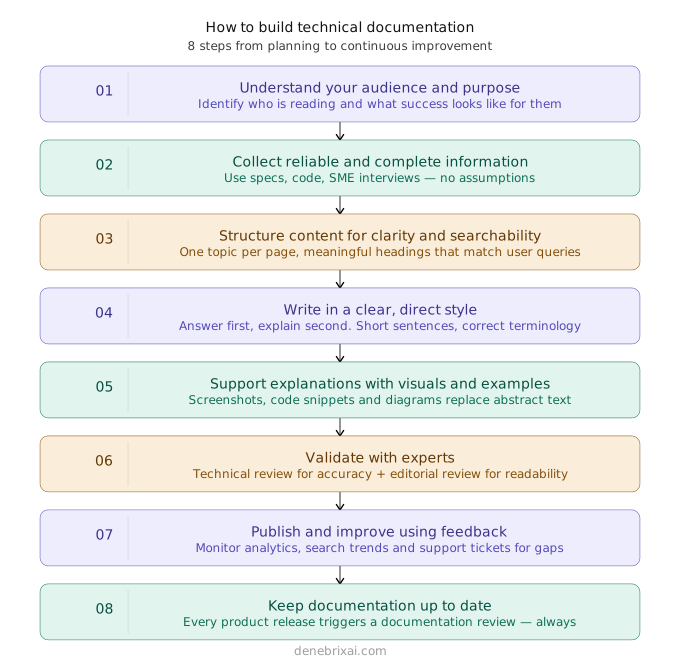
You need to know from the beginning for whom you are writing and why. Are they developers, end-users, or other internal staff members? Clarify the task that your audience wants to accomplish and define what success means for them.
Once you do this at the beginning, you will find it easy to maintain focus when producing your document.
7.2. What Every Documentation Page Should Include
Give every guide the same basic shape, so people can find answers without getting lost. A simple template works for almost any page:
• Purpose: what this page helps the reader do
• Audience: who the page is written for
• Prerequisites: logins, tools, or access needed before starting
• Steps: the actions, written in order
• Examples: sample code, screenshots, or a realistic scenario
• Common errors: what usually goes wrong, and how to fix it
• Next steps: links to what the reader might need after this
• Page owner: the person responsible for keeping it updated
In practice, this means stating what the page does and who it is for in the first line, listing required logins or tools before step one, writing instructions in order with realistic examples, calling out common mistakes next to their fixes, and wrapping up with links to what comes next. Without an assigned owner, a page tends to go stale the moment the product changes underneath it.
7.3. Collect reliable and complete information
Good technical documentation requires correct inputs. You shouldn’t make any assumptions; instead, get your information from reliable sources such as product specifications, codes, support tickets, or subject matter experts.
Some questions that should be answered before beginning to document include:
- What problem does this documentation fix?
- What action will the user be able to take after reading it?
- What information is vital, while others are non-essential?
- Is it necessary to use examples, images, or illustrations?
- Is there existing content that could be revised instead of creating a new one?
7.4. Structure content for clarity and searchability
Organize the information so that it matches user queries. Make sure the headings are meaningful and answer typical user queries.
Each webpage should be dedicated to a single topic. It will make navigation through information easier and minimize user confusion.
One more thing to remember. Your documentation is not read only by people anymore. AI tools and chatbots pull answers from it too. Writing for humans and writing for AI mostly overlap. Clear headings, one topic per page, and a direct answer near the top help both.
7.5. Write in a clear, direct style
Put the answer first and follow it with explanations. Avoid lengthy, complicated sentences; make your writing clear by using concise language and correct terminology.
It will be helpful if you read what you have written aloud, because if it sounds complicated, chances are you should make it simpler.
7.6. Support explanations with examples and visuals
Explanation alone in terms of abstract ideas is insufficient. Incorporate practical examples, screenshots, illustrations, or source code wherever necessary to assist the explanation process.
It will make the documentation process much more relatable to the user.
7.7.Make your documentation accessible
Good documentation should also work for people using screen readers and other assistive tools. A few habits make a real difference. Add alt text to images and diagrams. Use proper heading levels instead of just making text bold or bigger. Keep colors easy to read. Do not use color alone to show meaning. For example, an error message should also have a text label, not just a red highlight.
Write in plain language as well. Avoid idioms that do not translate well for every reader. None of this takes much extra time once it becomes part of your process. It just needs to become a habit, the same way spelling checks already are.
It is also worth checking that your documentation actually works on mobile and across different browsers. A table that looks fine on a wide desktop screen can turn into an unreadable, sideways-scrolling mess on a phone. Testing a few pages on a smaller screen before you publish catches most of these problems early.
7.8. Validate with experts
The review should be part of the writing process. Get some technical personnel to confirm the accuracy and absence of errors in the work.
At the same time, get some competent editors to make the document easy to read and understand. A solid review should check for:
- Technical accuracy
- Missing steps or gaps
- Clarity of instructions
- Consistent terminology
- Broken links or incorrect examples
7.9. Publish and improve using feedback
Once you release your documentation, pay attention to how people actually use it. Page views show which pages get the most traffic. Search terms show what people are looking for but not finding. Support ticket topics point to pages that don’t answer the question well enough.
If your docs have an AI assistant or chatbot, the questions people ask it are useful too. They often reveal gaps you didn’t know existed. When a page keeps showing up in these numbers for the wrong reasons, fix it before it becomes a bigger problem.
7.10. Keep documentation up to date
Documentation will never be considered complete. With changes to the product’s life cycle and workflow, as well as new features added or updated, your documentation needs to grow with it.
Incorporate updating documentation into your process for each product release.
7.11.Plan for versioned documentation
Not every product stays on one release for long. If people are still using an older version while a new one ships, your documentation needs to cover both otherwise, someone following last year’s instructions ends up staring at a screen that looks nothing like what the page describes, and that is usually when a support ticket gets filed.
A version selector, which most documentation tools support out of the box, lets readers pick the release they are actually running instead of guessing. It is a small thing to set up early, and a much bigger headache to bolt on after two or three versions of docs already exist.
8. Technical Documentation in Agile vs Waterfall
Agile and Waterfall don’t just change how software is built, they also change how documentation is written and maintained.
8.1. Waterfall vs Agile Documentation
| Aspect | Waterfall | Agile |
| When documentation is created | Before development starts | During development (in sprints) |
| Level of detail | Detailed and complete upfront | Lightweight and updated over time |
| Structure | Fixed and formal | Flexible and evolving |
| Updates | Rare and controlled | Frequent and continuous |
| Main focus | Planning and documentation first | Working software first |
Waterfall uses extensive documentation at the beginning because everything is planned before any coding starts. On the other hand, documentation is developed progressively with an Agile approach. It works both ways, and which to use depends on whether the project is fixed or flexible.
9. Choosing the Right Documentation Tools
Which tool makes sense depends on what you are building. Some tools are built for product documentation, while others work better for internal use.
Many of the tools below MkDocs and Docusaurus especially are built around an approach called docs-as-code. The idea: store documentation in the same repository as your source code, write it in Markdown, track changes with the same version control system (usually Git), and review updates through pull requests, just like a code change. This keeps documentation close to the code it describes, and lets doc updates ride along with a workflow developers are already using, rather than living as a separate process that is easy to forget.
Here’s a simple comparison to help you decide faster.
9.1. Technical Documentation Tools Comparison
| Tool | Best For | Free Plan | Standout Feature |
| GitBook | Product + developer documentation | Yes | Clean UI with easy publishing |
| Confluence | Internal team documentation | Limited free plan | Strong Jira and team integration |
| Notion | Lightweight docs and notes | Yes | Flexible all-in-one workspace |
| Docusaurus | Developer documentation sites | Yes (open-source) | Fully customizable static docs |
| ReadMe | API documentation | Limited | Interactive API explorer |
| Swagger (OpenAPI) | API design + testing | Yes | Live API testing environment |
| MkDocs | Simple project documentation | Yes | Fast setup with Markdown support |
| MadCap Flare | Enterprise documentation | No | Advanced publishing and content control |
10. Common Technical Documentation Mistakes
Even well-intentioned documentation runs into the same handful of problems, over and over. Knowing what to watch for makes them much easier to catch before readers do.
- Outdated screenshots: An old picture sends users hunting for an interface button that moved months ago.
- Missing prerequisites: Starting at step one without listing required logins, downloads, or software tools leaves readers completely stranded halfway through the task.
- Heavy jargon: Technical words feel natural to the author, but newcomers find them confusing.
- Long blocks of text: Dense paragraphs tire the eyes, so people usually give up and skip reading.
- Poor search: If a person types an issue into your search box and gets zero helpful results, that helpful page is basically useless.
- Mixed-up versions: Leaving old setup steps beside brand new ones creates unnecessary support tickets.
11. Standards for Regulated Industries
Most teams will never think much about formal documentation standards, but some industries require them by law. ISO/IEC/IEEE 26514 sets standards for user documentation, and IEC/IEEE 82079-1 covers requirements for instructions for use. In regulated fields like medical devices or aviation, documentation is not just polish it is a legal requirement, and getting it wrong can delay a product launch entirely. If you work in one of these industries, it is worth looping in a compliance or regulatory affairs specialist early, rather than treating documentation as an afterthought.
12. Best Practices for Writing Effective Technical Documentation
Good technical documents are about being clear. When someone has to stop and reread a sentence, it usually means it can be made simpler.
Which documents to create first
If you are starting from zero, do not try to write everything at once. A sensible order looks like this: begin with a tutorial or two, so new users can get something working right away. Follow that with an overview or architecture document, so readers understand how the pieces fit together. Then build out topic-specific how-to guides as real questions come up. Only once you have actual usage data and real gaps should you invest in a full manual writing one too early usually just means rewriting most of it later.
Keep each sentence focused on one idea. Break long paragraphs into short steps so the reader never loses their place. Use examples wherever possible, a short code snippet or a real scenario explains things faster than theory alone.
Be consistent with terms and structure. If you call something an “endpoint” in one section, don’t switch to “URL” somewhere else unless you clearly explain it. Small inconsistencies create confusion later.
Keep a glossary of terms specific to your product or industry, and link to it wherever those terms first appear. It saves readers from guessing, and keeps your own writers consistent too.
It also helps to resist the urge to over-document. Write only as much as your team and users actually need. A shorter guide people actually read beats a comprehensive one that sits unopened and documentation nobody maintains is often worse than no documentation at all.
And don’t treat documentation as a one-time task. Products change constantly, and your documentation should change with them. Outdated information is often worse than no information because it leads people in the wrong direction.
Conclusion
Technical documentation does more than explain a product or process. It helps people find answers, solve problems, and use technology with confidence. Good documentation saves time, reduces confusion, and improves the experience for both users and teams.
The key is to keep your content clear, accurate, and easy to follow. Focus on your audience, use simple language, and update your documentation as products and requirements change. If you are creating API references or technical design documents, well-written documentation becomes a valuable resource that supports long-term success.
By following the practices covered in this guide, you can create documentation that informs, guides, and delivers real value to the people who rely on it every day.
FAQs
What is technical documentation?
Technical documentation explains how a product, system, or process works. It gives people the information they need to use, build, or maintain something without getting confused.
What are technical documents used for?
Technical documents help people and teams do things correctly. They give you instructions. They explain how systems work and make it easier to fix problems on your own without asking someone else.
What is a technical documentation sample?
A technical documentation sample is a pre-built example that shows how a document should be structured. Teams use it as a reference when creating their own docs to make sure nothing important is missing.
How do you write technical documentation?
The process begins with an analysis of the target audience. It is important to explain all the steps clearly and use examples for illustration wherever possible.
How often should technical documentation be updated?
Documentation should be updated whenever a feature, process, or system changes. Keeping it current helps users avoid mistakes and saves time for the whole team.
What are some examples of technical documentation?
Common examples are API guides, release notes, and installation manuals. You will also see README files, setup guides, and standard operating procedures.
What should technical documentation include?
Every page needs a clear goal, a list of required tools, and step-by-step directions with real examples. It also needs quick fixes for common errors and a designated person to keep it updated.
What are the main types of developer documentation?
The main types are beginner tutorials, how-to guides for specific tasks, reference sheets for code commands, and background articles that explain system architecture.

Comments are closed