

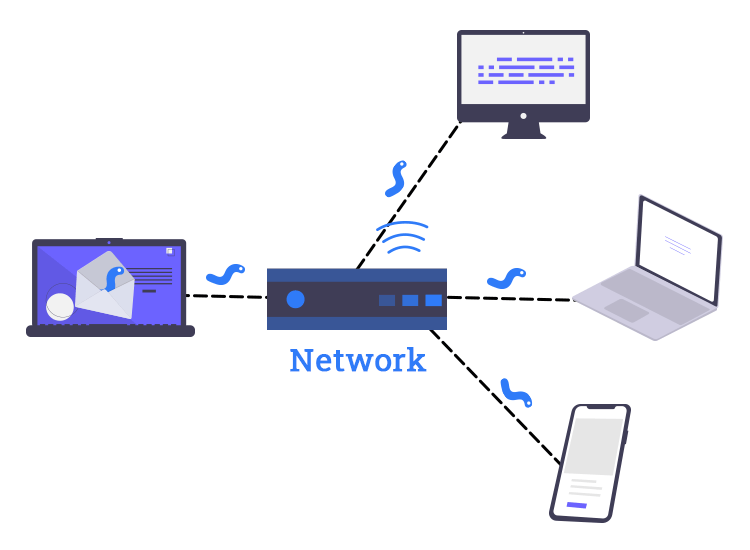
A computer worm is a type of malware that can spread by itself. Once it enters a device, it makes copies of itself and moves to other systems over the network.
It doesn’t need you to click or open anything to do this. Because it spreads automatically, a worm can cause more damage than many other threats.
Key Takeaways
- A computer worm is malware that makes copies of itself and moves to other devices over networks.
- Worms can spread through software bugs, emails, USB drives, shared files, chat apps, and even smart devices, and they often install other malware like ransomware.
- They spread quickly and are hard to notice, so updates, careful use of links and files, and good backups are important to stay safe.
How a Computer Worm Works
Initial Infection
Even though worms can spread by themselves, they still need a first victim. That initial infection usually happens in one of these ways:
- Exploiting software vulnerabilities: Attackers scan the internet for computers that have outdated or unpatched software. When the worm finds one, it sends some data that hits that problem in the software. That problem then causes the computer to follow the worm’s instructions and run the worm’s code.
- Malicious email or messaging content: Many well-known worms spread as email attachments or links that install the worm when opened. Some also spread through instant messaging apps or social platforms by automatically sending harmful links to the infected user’s contacts.
- Removable media and shared drives: A worm can also spread through infected USB drives or shared network folders. When someone opens the infected drive or file on a new machine, the worm starts running there and may immediately begin scanning for more systems to infect.
Effective computer virus prevention, such as keeping systems updated, limiting risky downloads, and being careful with email attachments, also makes it harder for worms to gain that first foothold on a network.
Self-Replication and Network Spread
After a worm gets onto a computer, it follows a repeating cycle.
It places copies of itself in memory and sometimes on disk under one or more filenames. Then it starts looking for new targets. These might include:
- Other machines reachable on the same local network segment.
- Random external IP addresses on the internet.
- Devices listed in local address books or cached connection lists.
For every new computer it finds, the worm tries to connect to programs or open network ports that have known security problems. If it manages to get in, it copies itself to that computer and then repeats the same process on the new machine.
Payloads and Goals
Some worms do little more than copy themselves and create traffic. Even those can cause problems by overloading networks and systems. Many modern worms, however, carry extra code that runs after the initial infection. Common goals include:
- Resource exhaustion: A worm can create so many processes or network connections that servers and routers become overloaded, effectively causing a denial-of-service attack.
- Dropping more malware: A worm might download and install ransomware, banking trojans, spying tools, or remote access software. After that second stage is in place, attackers can steal data, encrypt files for ransom, or keep control of the system over time.
- Building botnets: A worm can turn each infected device into a remotely controlled “bot”. Large botnets are often used to send spam or to launch distributed denial-of-service (DDoS) attacks against websites and online services.
- Sabotage of specific systems: Some worms are designed for industrial equipment and control systems. Stuxnet is a well-known example. It was designed to quietly interfere with the control devices used in nuclear enrichment plants, while still showing normal data to the operators watching the screens.
Types of Computer Worms
Many people first want to know what are worms on computers. One of the clearest ways to explain this is to look at how different types of worms spread.
Email Worms
Email worms travel as attachments or links in email messages. After they infect a computer, they often search the local mail client for contacts and then send copies of themselves to those addresses without the user noticing. ILOVEYOU and Mydoom are classic examples of email worms that spread this way.
Network or Internet Worms
An internet worm is a program that spreads over the internet by itself. It scans many IP addresses and looks for computers that have open ports or old, unpatched software. The Morris worm and SQL Slammer are well-known examples. They spread quickly across the early internet by exploiting weaknesses in network-facing software.
These are the kinds of threats many people mean when they talk about an “internet worm”.
File-Sharing Worms
File-sharing worms hide inside files that are shared through peer-to-peer networks or informal download sites. A user thinks they are opening a song, video, game, or cracked program, but opening the file actually runs the worm. The infected system then becomes a new starting point for attacks on other machines.
Instant Messaging and Social Worms
These worms spread through chat and social platforms. They may use direct messages, group chats, or posts that contain malicious links or small helper programs. After a user is infected, the worm can send similar messages to their contacts. Because the messages appear to come from someone they know, people are more likely to click.
Cryptoworms and Hybrid Worms
A “cryptoworm” is a worm whose main goal is to deliver ransomware. WannaCry is a famous cryptoworm. In 2017, the WannaCry ransomware worm hit more than 200,000 computers in over 150 countries and caused an estimated billions of dollars in damage. It spreads automatically from one Windows computer to another over the network, then it encrypts (locks) files and demands payment to unlock them.
Sometimes, attacks use hybrid malware, which mixes different types of malware in one program. The malware spreads like a worm across the network, and after it infects a computer, it acts like a trojan by stealing data or waiting quietly for more commands from the attacker. In this way, a single attack behaves like a worm, ransomware, and trojan at the same time.
USB and Removable Media Worms
These worms focus on portable storage such as USB sticks, external drives, and memory cards. They copy themselves to connected media and may rely on auto-run features or hidden launcher files so they run when the drive is used on another machine. This can allow worms to move into networks that are not directly connected to the internet.
Mobile and IoT Worms
As phones and smart devices have become common, they have also become targets. Mobile and IoT worms take advantage of flaws in phone operating systems, home routers, cameras, smart lights, and other devices. When they are compromised, these devices can become part of a botnet or be used to break into more sensitive parts of the network.
Notable Computer Worms and Their Impact
Real outbreaks show how damaging a worm can be at scale. Exact numbers differ between reports, but the overall effect is clear.
Morris Worm
The Morris worm appeared in 1988 and is often cited as the first major internet worm. It targeted several Unix services and ended up crashing or slowing many of the roughly 60,000 machines connected to the internet at that time. Estimates put the cost of cleanup in the hundreds of thousands to millions of dollars.
ILOVEYOU
ILOVEYOU spread in May 2000 through emails that looked like they contained a love letter. Opening the attached script overwrote certain files and automatically sent copies of the worm to everyone in the victim’s address book. The ILOVEYOU email worm is estimated to have infected about 45 million machines worldwide within days, causing billions of dollars in economic damage and cleanup costs.
Mydoom
Mydoom appeared in 2004 as an email worm that also installed a backdoor and launched denial-of-service attacks. It became one of the fastest spreading email worms ever recorded. Global losses have been estimated in the tens of billions of dollars.
Conficker
Conficker appeared in 2008 and used a vulnerability in Windows to move between machines on networks and through removable media. At its peak it infected millions of computers, including many in business and government environments, and created a very large botnet. Rapid spread, combined with the effort needed to clean up every infected system, is enough to create huge costs.
Computer Worm vs Virus vs Trojan Horse
People often mix up the terms “worm”, “virus” and “trojan”. They are all forms of malware, but they behave differently.
| Aspect | Computer worm | Computer virus | Trojan horse |
| Basic form | Standalone program that runs on its own | Malicious code attached to a host file or application | Program that pretends to be legitimate software |
| How it spreads | Self-replicates across networks or devices without user action | Spreads when infected files or programs are shared and executed | Spreads when users download and run the fake program |
| User action needed to start spread | Only needed for the very first infection in many cases | Needed each time a new host program is run | Needed when user chooses to install or run it |
| Typical goals | Rapid propagation, building botnets, delivering other malware, disruption | Corrupting or modifying data, damaging software, helping further infections | Stealing data, opening backdoors, giving remote control |
In practice, these categories can overlap. One piece of malware might spread like a worm, change files like a virus, and pretend to be useful software like a trojan. Even so, the labels help when you want to describe how a threat moves and what it tries to do.
Why Computer Worms Are Especially Dangerous
Rapid Worm Infections
When a machine is infected, it normally starts searching for new victims straight away. Every new infected system does the same thing. The number of compromised devices can grow very quickly. In outbreaks such as SQL Slammer, most vulnerable systems were hit within minutes of release. The extra traffic alone was enough to clog internet links and overload routers.
Difficult to Notice
A computer infected with a worm can still appear to work normally. At the same time, the worm quietly scans the network and sends out malicious traffic in the background. To the user, everything can still look normal, so it’s hard to notice the worm unless someone is carefully checking the logs and how the network is behaving.
Abuse of Shared Infrastructure
A worm inside a company network can spread to other computers through shared drives, servers, or applications. It may find file servers, older internal applications, and forgotten devices that were never fully secured because they were not expected to face the public internet. Each weak system it discovers becomes another point from which it can spread.
Slow and Costly Cleanup
Recovery from a major worm incident is rarely as simple as deleting one file. Teams may need to identify every infected machine, remove the malware, patch the vulnerable software and, in some cases, rebuild systems or restore data from backups. The time and effort involved are a big part of the total cost of an outbreak.
Preventing Computer Worm Infections
When it comes to computer worms, prevention is key. While you can’t always predict or stop every attack, there are several steps you can take to make it much harder for worms to find a way into your systems. Here’s what you can do:

1. Keep Your Software Updated
Regularly updating your software is one of the simplest ways to protect yourself. This includes your operating system, browsers, and any apps you use. Cyber attackers often target outdated software with vulnerabilities, so applying patches as soon as they’re available is essential.
2. Install and Maintain Security Software
Make sure you have trusted antivirus or endpoint protection running on all your devices. Keep the software up to date and set it to scan regularly. Real-time protection is important so that it can block worms as soon as they try to spread.
3. Be Careful with Emails and Links
Worms often spread through phishing emails or suspicious links. Never open attachments or click links in unsolicited emails, especially if they seem urgent or too good to be true. Always verify the sender before engaging.
4. Secure Your Network
Enable firewalls on both your router and devices. Use strong passwords for your Wi-Fi and router settings, and avoid leaving default ones in place. This adds an extra layer of defense against worms trying to gain access through your network.
5. Limit USB and Shared Folder Access
USB drives and shared folders can be a gateway for worms to spread. Only use trusted USB devices, and disable auto-run features to prevent unknown files from launching automatically.
6. Regular Backups
Backing up important files is a crucial step in minimizing the damage a worm can cause. Keep backups offline or in a secure cloud, so they’re safe from malware. Test your backups regularly to ensure they’re working as expected.
If You Suspect a Worm Infection
- Disconnect from the network to prevent the worm from spreading.
- Run a full scan with trusted antivirus software and follow the removal instructions.
- After cleaning, update all software, including your operating system and apps.
- Change important passwords, and be sure to check other devices for signs of infection.
By sticking to these best practices, you can significantly reduce your chances of falling victim to a computer worm and keep your devices running smoothly.
Conclusion
A computer worm is a malware that moves on its own and uses networks to jump between devices. Different types of worms spread in different ways, but they all look for weak or unprotected systems. Basic steps like keeping software updated, being careful with files and links, and keeping good backups can stop one infected machine from turning into a much bigger problem.
FAQs
How can I tell if my computer has a worm?
You might notice slow internet, high CPU usage, strange error messages, or many emails or messages being sent from your account that you didn’t write. A full scan with security software can help confirm it.
What should I do if I think a worm is on my system?
Disconnect the device from the network, run a trusted antivirus or endpoint protection scan, install all pending updates, and change important passwords from a clean device. In a company, report it to IT or security right away.
Can worms infect phones and smart home devices?
Yes. Phones, routers, cameras, and other smart devices can be hit if they have security flaws or weak passwords. Keeping firmware updated and changing default passwords lowers the risk.
Is antivirus enough to stop computer worms?
Antivirus or endpoint protection helps a lot, but it isn’t the only layer you need. Regular patching, firewalls, limited admin rights, and safe browsing habits are also important to block worms.
How can I reduce the chance of a worm spreading at home or in a small office?
Turn on automatic updates, use a secure router and Wi-Fi password, avoid opening unknown attachments or links, limit file sharing, and keep good backups. These steps make it much harder for a worm to move between devices.

Comments are closed