

A distributed denial of service (DDoS) attack is a cyberattack that tries to make an online service unusable by overwhelming it with traffic from many different sources. In simple terms, the DDoS meaning is not about breaking into the system, but about sending so many requests that it slows down or stops responding.
During a DDoS attack, people may not be able to log in, open important pages, complete payments, or use APIs. DDoS is a type of denial of service (DoS) attack. A DoS attack usually comes from a single machine, whereas a DDoS attack comes from many hacked devices spread across the internet, which makes it much harder to block.
Key Takeaways
- A DDoS (distributed denial-of-service) attack floods an online service with traffic from many sources, making it slow or unavailable for real users.
- Common warning signs include sudden slowness, timeouts, rising error rates, and unexpected traffic spikes.
- Effective DDoS defense combines strong architecture, cloud or specialist protection services, application aware controls, rate limiting, and a clear response plan.
DDoS in Cybersecurity
In cybersecurity, a DDoS attack is seen as a major threat to availability, which is the ability to keep systems up and running when users need them. The attack drains shared resources such as bandwidth, CPU, memory, and connection slots until normal users can no longer rely on the service.
DDoS risk appears in security reviews, business continuity plans, and incident response plans. Teams plan how to keep key services online, handle extra pressure on support channels, and protect other systems that share the same infrastructure while an attack is active. Many plans also include a communication strategy so customers receive clear, simple updates rather than being left confused when a service is slow or unavailable.
How a DDoS Attack Works
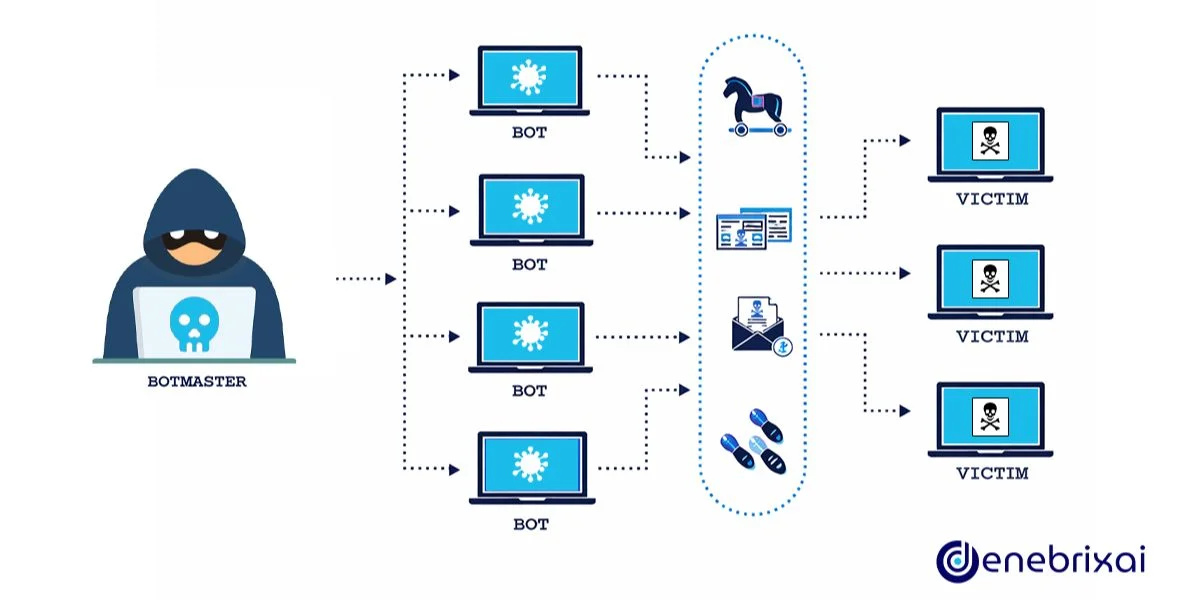
To understand how a DDoS attack works, it helps to know that most campaigns follow a simple pattern:
Finding and Compromising Devices
Attackers scan the internet for weak targets such as unpatched servers, open services, and poorly secured IoT devices. Many of these still use default or weak passwords and can be taken over automatically.
Once compromised, these devices are infected with malware that lets the attacker control them remotely. Investing in strong protection from malware helps stop these initial infections, reducing the number of devices that can ever be abused in large-scale DDoS campaigns.
Building or Renting a Botnet
The botnet is the core of a DDoS attack. Each infected device becomes a bot or zombie, and thousands of them together form a botnet that the attacker can control as a single group. Some attackers rent botnets as a service instead of building their own, which makes it easier for less skilled attackers to launch large campaigns.
Coordinating the Attack
When a target is chosen, the attacker instructs the botnet to send traffic to specific IP addresses, domains, or URLs. Targets often include login pages, search endpoints, or important APIs, because problems there are noticed quickly and cause maximum disruption.
Overloading Resources
The combined traffic uses up bandwidth, CPU, memory, and connection slots. For users, this shows up as timeouts, slow pages, and errors. In stronger attacks, the service becomes unreachable for many or all users.
Each bot is an actual device with a real IP address. It is hard to filter out only the bad traffic without also blocking some real users, especially when a DDoS attack overlaps with genuine traffic spikes such as major sales, campaigns, or viral news.
Types of DDoS Attacks
DDoS attacks are usually grouped into three main types, and many real incidents use more than one at the same time.
Volumetric Attacks
Volumetric attacks try to fill the target’s internet connection until there is no room left for normal traffic. Large UDP floods and reflection or amplification attacks are common examples.
In a reflection or amplification attack, the attacker sends small requests to internet services such as DNS resolvers and pretends to be the victim by spoofing the victim’s IP address. Those services send much larger responses back to the victim. A small amount of attacker traffic can turn into a very large flood at the target and quickly overwhelm the available bandwidth.
Protocol Attacks
Protocol attacks target how network protocols such as TCP, UDP, and IP handle connections. They focus on devices like firewalls, load balancers, and servers that keep track of each connection and have limited capacity.
A classic example is the SYN flood. The attacker sends a large number of TCP SYN packets, often with fake source addresses. The target replies with SYN ACK packets and waits for a final ACK that never arrives. Its connection tables fill up with half-open sessions, and when those tables are full the system cannot accept new legitimate connections even if there is still bandwidth available.
Application Layer Attacks
Application layer attacks focus on Layer 7 of the network stack, where HTTP, HTTPS, DNS, and other high level protocols run. The aim is to overload the application itself, not just the network link.
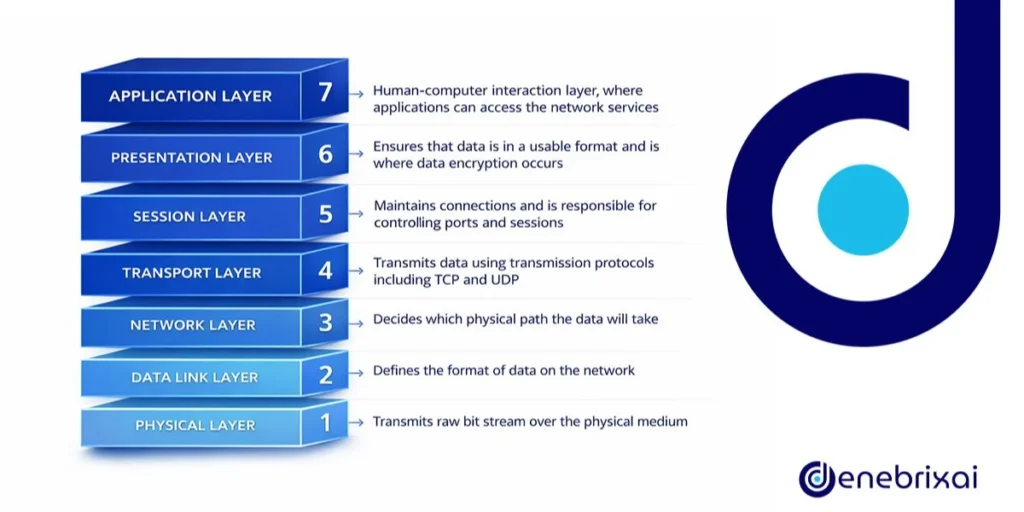
In an HTTP flood, the traffic can look like normal browsing or API usage. Requests might load product pages, run searches, or call login endpoints. Each request appears valid on its own, but the total volume is high enough to overload web servers, application servers, or databases.
This kind of traffic can look like real user activity, so defenders often use behavior analysis and web application firewalls, not just basic IP blocking.
Why Attackers Use DDoS
The purpose of a DDoS attack varies; different campaigns aim for different outcomes.
Some groups use DDoS as a form of protest or to push a political message by taking public services offline and attracting attention. Others use it for extortion by launching a short attack and then threatening bigger and longer waves unless a payment is made.
In other cases, businesses are targeted to push users toward a rival service. This often happens in online gaming, financial platforms, and e-commerce, where even a short outage can lead to lost revenue, broken customer journeys, and damage to reputation.
More advanced campaigns use DDoS as a distraction. While teams are busy keeping systems online, other attackers may try to steal login details, commit fraud, or move data out of the network. Some state linked groups use DDoS alongside other operations that target government, media, and critical services, turning a simple availability problem into a much broader security event.
Signs You May Be Under a DDoS Attack
Early DDoS attack symptoms can look like normal performance issues, so recognizing the signs of a DDoS attack depends on good monitoring and context.
Common signs of a DDoS attack include:
- Sudden and severe slowness when loading pages or calling APIs
- Timeouts and connection errors for important services, sometimes in short bursts
- Unusual traffic patterns, such as big spikes from a narrow set of networks or countries
In a well monitored environment, teams also see unusual jumps in connection counts, error rates, CPU usage, and requests per second on specific endpoints. If these spikes do not match planned events such as campaigns, product launches, or media coverage, a DDoS attack becomes a strong possibility and requires quick investigation.
DDoS in Cloud and Modern Networks
Cloud platforms and content delivery networks (CDNs) handle a large share of internet traffic. They play an important role in defending against cloud DDoS attacks and DDoS attacks in cloud computing. Large providers build extra capacity and use systems that detect and block common attack patterns close to the edge of the network, where traffic first arrives.
Hosting services in the cloud does not remove the risk of DDoS attacks. Attackers can still hit public endpoints such as load balancers, API gateways, and login services that are exposed to the internet. Misconfigured cloud resources can also be abused as reflectors or even pulled into botnets if they are left open without proper access controls.
Hybrid and multi cloud setups add complexity because traffic can pass through several providers and regions before it reaches your applications. Teams need a clear map of which services are exposed, where protection is active, and who owns each part of the response so everyone knows their role when an attack happens.
DDoS-for-hire services and the spread of insecure IoT devices mean very large attack volumes are now available to many attackers, not only expert groups. That is why DDoS continues to show up in modern threat reports and security briefings.
Defending Against DDoS
Good DDoS security uses several layers, because no single control is enough for organizations that depend on online services.
Upstream Filtering and Scrubbing
Many organizations send traffic through a specialist provider or a cloud based DDoS protection service. These providers use large global networks and scrubbing systems to absorb attacks and remove bad traffic before it reaches your servers. Clean traffic is then forwarded to your application, which reduces the load on your own infrastructure.
Resilient Architecture
Systems are built to scale out, use caching for static or slow-changing content, and split critical functions into separate components so that no single component is too easily overloaded.
Public endpoints are kept as simple and fast as possible. Admin panels and internal tools are kept private or tightly restricted so they are not exposed during an attack.
Application-Aware Protection
Web application firewalls and API gateways inspect HTTP and HTTPS traffic, but a DDoS attack can still succeed without rate limits and upstream filtering if the traffic volume is large enough.
Behavior based rules help tell real users apart from automated attacks and can be tuned as patterns change over time.
Rate Limiting and Access Controls
Rate limiting controls how often a single IP, session, or API key can call sensitive functions such as login, search, or checkout. This reduces the risk that one source, or a small group of sources, can drive your most expensive operations into overload.
During an active attack, teams can temporarily tighten these limits and add extra checks, such as captchas, regional blocks, or filters for specific networks. These measures reduce hostile traffic while keeping as much access as possible for genuine users.
Monitoring and Prepared Response
Monitoring should give a clear picture of what normal traffic and performance look like so unusual spikes, error rates, and patterns are easy to spot. When something changes, teams need to see which endpoints are affected, where the traffic is coming from, and how it is affecting users.
A clear written response plan should state who makes decisions, when and how to contact providers, and how updates are shared inside the company and with customers. Regular drills ensure everyone learns the steps before a real incident happens, not in the middle of one.
Working with Providers
Many organizations depend on hosting companies, ISPs, and cloud providers for DDoS protection. You should know exactly what each one offers, where their limits are, and how to reach them fast in an emergency. Clear SLAs and tested contact paths can be the difference between a brief disruption and a long, painful outage.
What To Do During an Active DDoS Attack
When an attack is in progress, simple, calm steps are more helpful than complex tuning that takes too long:
- Confirm the issue: Check monitoring tools and logs to confirm that the problem is widespread and linked to unusual traffic, not just a local fault, configuration issue, or bad deployment.
- Engage your providers: Contact your DDoS protection provider, hosting company, or cloud platform as soon as possible. Many offer emergency contacts or special mitigation modes that can be enabled during active attacks.
- Reduce exposure: Focus on your most important services first. If needed, limit access to some features, tighten rate limits, or temporarily block clearly hostile regions or networks to keep core functions online.
- Communicate clearly: Tell internal teams and, when appropriate, customers that you know about the issue and are working on it. Short, honest updates reduce confusion, help manage expectations, and lower the load on support teams.
- Capture data for later: Keep logs, metrics, and configuration snapshots from the incident. This data helps you improve rules, adjust capacity, and refine your response plan once the attack ends.
Frequently Asked Questions: What is a DDoS Attack?
Can a DDoS attack be used to hack my systems?
By itself, if you ask “what does a DDoS attack do?”, the answer is that it focuses on making services unavailable, not on stealing data. However, some attackers use it as a distraction while separate intrusions target accounts, applications, or internal systems, so you should still watch for other suspicious activity.
Are small websites and startups targeted too?
Yes. Smaller sites are often easier to disrupt and may have weaker protection, so they can be attractive targets for extortion, vandalism, or simply testing new attack tools.
Is launching or hiring a DDoS attack illegal?
In most countries, organizing, paying for, or taking part in DDoS attacks against systems you do not own is a criminal offense. Even so called “stress-testing” services can be illegal if they are used against third parties without their explicit consent.
How can I tell a DDoS attack apart from a normal traffic spike?
Genuine spikes usually match known events such as campaigns, launches, or news coverage. They also follow expected regional patterns. DDoS traffic often appears suddenly and may come from unusual locations or networks. It usually causes error rates to rise even when your systems should have enough capacity.
What is the most important first step if I suspect an attack?
The first step is to confirm the problem with monitoring and logs, then contact your hosting or DDoS protection provider so they can enable mitigation features. At the same time, activate your internal response plan so technical, support, and communication teams are aligned.

Comments are closed