

Connecting desktop software directly to central servers can quickly turn into a complex coding task. This is where an application client container helps developers simplify their work.
This software environment runs right on a user’s computer under the Java EE and Jakarta EE rules set by Oracle. It handles network connections for a client program by taking care of security checks and JNDI resource lookups automatically. Despite writing lines of boilerplate code to locate remote Enterprise JavaBeans (EJB), the container handles those connections behind the scenes.
Understanding how an application client container works remains important for enterprise developers today. It keeps financial tools, desktop interfaces, and background scripts running safely while communicating directly with backend application servers.
What Is an Application Client Container?
An application client container (ACC) is a lightweight runtime environment. It runs Java application client components right on a user’s computer. It is one of the main Java EE container types, right alongside the Web Container and EJB Container. Sun Microsystems created it, and Oracle maintains it today under Jakarta EE. It runs inside a Java Virtual Machine (JVM) on the client machine.
Java EE introduced the ACC to save developers from writing repetitive networking and security code. A plain Java program has to set up server connections by hand. The ACC gives an enterprise application client a managed execution environment that links straight to the application server runtime. This gives the client quick access to Java Naming and Directory Interface (JNDI), Enterprise JavaBeans (EJB), and Java Message Service (JMS).
Knowing what is application client container architecture shows how it fits into a enterprise setup. It sits as a client-side container between local programs and backend servers, without trying to replace web servers or Docker. Companies still use the ACC today so trading tools, desktop software, and background scripts can talk to servers safely.
How the Application Client Container Works
The application client container (ACC) manages a program from startup to shutdown, handling all server connections behind the scenes. Following this step-by-step process shows how a client application connects to central enterprise tools.
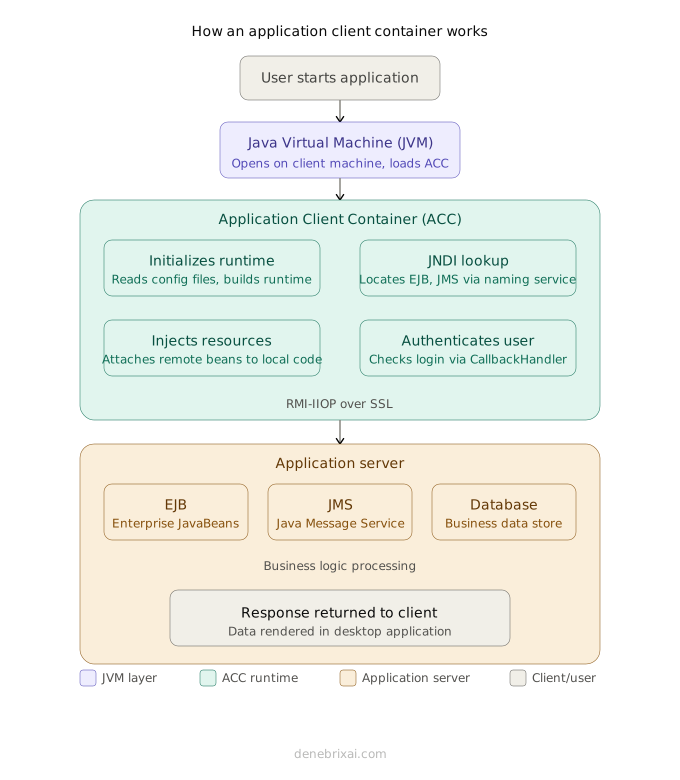
User Starts Application
↓
Java Virtual Machine (JVM)
↓
Application Client Container
├─ Initializes Runtime
├─ Performs JNDI Lookup
├─ Injects Resources
└─ Authenticates User
↓
Application Server
├─ Enterprise JavaBeans (EJB)
├─ Java Message Service (JMS)
└─ Database
When someone starts the application, the Java Virtual Machine (JVM) opens on the user’s computer. It loads the ACC before any main code runs. The container reads the setup files, builds the runtime space, and prepares background services.
Next, the container handles an automatic application client container JNDI lookup to find remote tools. Rather than writing fixed server addresses into the code, the app uses JNDI to locate Enterprise JavaBeans (EJB) and Java Message Service (JMS) queues automatically.
After finding those tools, the container sets up a connection to the server. Running as an RMI-IIOP application client, an internal Object Request Broker (ORB) sends request messages and data back and forth over the network.
Lastly, the ACC handles basic background jobs. It uses dependency injection to attach remote beans to local code, checks user login details, and tracks basic data tasks. This simple setup helps Java EE and Jakarta EE client applications talk to main servers without extra coding.
Packaging and Deploying an Application Client

Packaging and running an application client takes a few specific files and settings. Knowing how these pieces work together makes sending out software to users much easier.
Packaging the Application Client
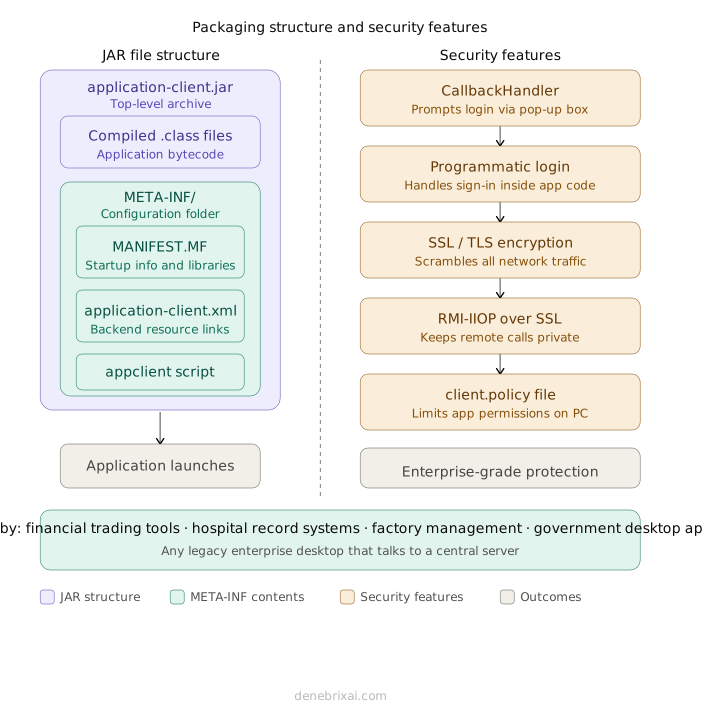
An application client comes packed inside a single JAR file. The application client JAR file structure holds your compiled code plus a special META-INF folder. Inside that folder, a MANIFEST.MF file lists startup details and extra libraries.
In older systems, this folder also contains the application-client.xml file. The application-client.xml file acts as a configuration file in Java EE applications, storing environment entries, resource references, and security roles. It defines how client software connects to backend resources and manages access permissions. Newer Jakarta EE apps use simple code annotations instead, but many companies still use this XML file today.
Keeping deployment files organized with proper technical documentation makes enterprise applications easier to maintain and troubleshoot.
| Component | Purpose |
| JAR File | Holds the client code and application files |
| META-INF | Folder that stores setup files and metadata |
| MANIFEST.MF | Sets startup info and required libraries |
| application-client.xml | Sets up links to backend server resources |
| appclient Script | Starts the client with all required container tools |
Starting the Client Program
You cannot start an enterprise application with a basic double-click or standard Java command. On GlassFish systems, developers run the appclient script GlassFish tool. This tool loads the application client container GlassFish setup, bringing in all the network files your app needs before it opens.
Other application servers use their own launch tools. For example, the application client container WebSphere runtime uses its own startup tool, just like WildFly and Apache Geronimo do. The commands change depending on the software company, but the core Java EE rules stay the same.
When building or fixing code, developers often use an embeddable application client container. This lets you test your software on your own computer quickly without starting up a massive server.
Many development teams first validate new features in a sandbox environment before deploying them to shared testing or production systems.
Securing an Application Client Container
Protecting information sent between a client program and a main server is a top priority for big companies. The ACC security authentication Java EE system keeps data safe using login windows, scrambled text, and local computer rules.
| Security Feature | Purpose |
| CallbackHandler | Asks for logins using a built-in or custom pop-up box |
| Programmatic Login | Logs users in straight from the application code |
| SSL/TLS | Scrambles network traffic so outsiders cannot read it |
| RMI-IIOP over SSL | Keeps remote server calls private over open networks |
| client.policy | Controls what the app is allowed to do on a user’s PC |
When a program asks for protected files, the container prompts for a username and password with a callback handler. Developers can also use programmatic login to handle user sign-ins directly inside their code.
To shield information while it moves across the web, SSL/TLS authentication moves all network traffic. Running RMI-IIOP over SSL keeps remote server calls private. Finally, a client.policy file blocks the application from doing unsafe things on the user’s computer. Modern systems can also link these checks to identity tools like AWS IAM or Amazon Cognito to keep logins safe across every app.
Comparing Java EE Container Types
Java EE uses different containers because each one has a specific job. They do not replace each other. Rather, they work together inside the same enterprise application to handle client and server tasks.
Java EE Container Comparison
| Feature | Application Client Container | Web Container | EJB Container | Thin Client |
| Runs Where | Client machine | Application server | Application server | Browser or lightweight client |
| Main Purpose | Enterprise desktop applications | Web applications | Business logic | Access remote services |
| Supports | JNDI, EJB, JMS | Servlets, JSP | EJB components | HTTP / REST |
| Typical Users | Enterprise employees | Website users | Backend services | End users |
| Offline Capability | Limited | No | No | Depends on application |
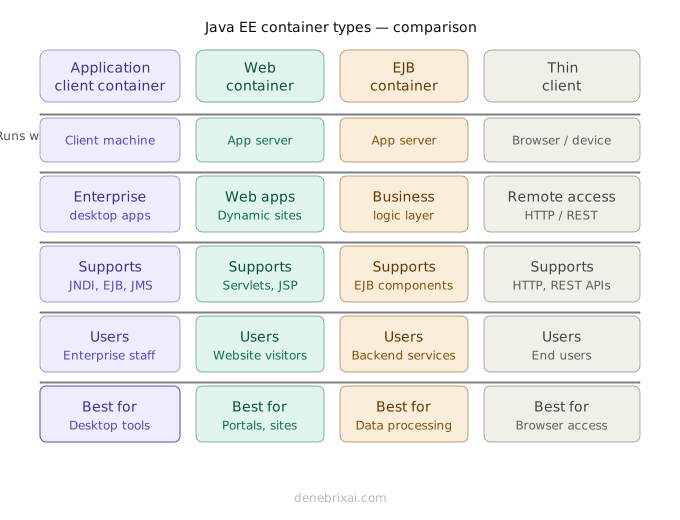
Application Client Container vs Web Container
Comparing an application client container vs web container comes down to where the software runs. The ACC runs on a user’s computer to power desktop tools. The Web Container stays on the central server to host dynamic websites using Servlets and JSP pages.
Application Client Container vs EJB Container
Looking at an application client container vs EJB container setup shows how client and server work gets split. The ACC sits on the client side to ask for data. The EJB Container runs on the server to process core business logic and send back responses.
Choosing the Right Java EE Container
Here is how to pick among the Java EE container types explained:
- Desktop tools for internal workers: Use the Application Client Container.
- Websites and online portals: Use the Web Container.
- Backend business rules and data processing: Use the EJB Container.
- Basic web browser apps: Use a Thin Client setup.
Is the Application Client Container Still Relevant Today?
Many developers ask if the Application Client Container still matters. The short answer is yes. Even as software trends change, ACC in Jakarta EE under the Eclipse Foundation stays fully supported.
It helps to separate the ACC from tools like Docker. A containerized web application deployment packages backend server software into isolated units. The ACC acts as a microservices client runtime built specifically for desktop software. Containerization handles how server workloads run, while the ACC handles how desktop programs talk to remote servers. The two technologies solve different problems and often work side by side.
In a modern cloud-native architecture, backend services run inside microservices on tools like Amazon ECS or AWS Fargate, with image files stored in Amazon ECR and traffic managed by an Application Load Balancer. Desktop tools running inside an ACC connect directly to these cloud servers.
Banks, hospitals, factories, and government offices still use the ACC today. Financial trading screens, medical record programs, and plant management tools rely on it to keep desktop software connected to main servers without rewriting legacy code.
Conclusion
An application client container (ACC) gives desktop apps a managed execution setup to talk directly to central servers. As a core part of ACC in Java EE and Jakarta EE, it handles resource lookup, security checks, and network connections automatically. Even as cloud setups rely on Docker and Amazon ECS, the application client runtime remains essential for legacy enterprise software. Selecting the right container depends on your architecture goals and where your app runs.
Frequently Asked Questions
What is an application client container in Java EE?
An application client container is a client-side runtime environment. It lets desktop Java apps connect to server-side components like EJBs while managing background services like security and connection pooling.
How does application client container JNDI lookup work?
The container reads configuration files at startup and uses an application client container JNDI lookup to locate remote resources on the server automatically, avoiding hardcoded server IP addresses in the code.
What is the difference between application client container vs web container?
In an application client container vs web container setup, the ACC runs locally on a user’s computer to power desktop software. The Web Container runs on the application server to host websites, Servlets, and JSP pages.
How does application client container vs EJB container compare?
Evaluating application client container vs EJB container roles shows that the ACC consumes remote services from the client side, while the EJB Container runs on the server to execute core business logic.
What is the appclient script in GlassFish used for?
The appclient script GlassFish utility that launches the application client container in the GlassFish environment, loading all required client libraries and settings before the desktop app opens.

Comments are closed