

A sandbox environment is a safe, isolated virtual space on a computer or network used to test unverified code, run new apps, or open unknown files safely. It provides programs with the processing power they need to run but prevents them from accessing your actual storage, main network, or live business data.
Tech teams use a separate workspace. If you want to know what a sandbox environment is, it is just a safe digital folder that keeps new code locked inside. You can run untested files, install updates, or try out new features inside this closed box, and it never touches your real company files or main computer system.
Using this setup keeps your daily business safe from unexpected bugs. This guide explains why these isolated spaces matter, how a sandbox deployment works, and the best ways to test software without risking your live site.
What Is a Sandbox Environment?
A sandbox is a separate, locked-down virtual space on a computer or network used to test unverified code, run new apps, or open unknown files safely. It gives programs the processing power and memory they need to run, but blocks them from reaching your actual storage or main network. If a script breaks or contains a virus, the trouble stays trapped inside that closed container, keeping your operating system and real business data completely safe.
Sandbox vs Production Environment
| Feature | Sandbox Environment | Production Environment |
| Purpose | Building features, running quality checks, and analyzing malware. | Hosting live, stable applications and executing business tasks. |
| Primary Users | Software developers, QA testers, and security infrastructure teams. | End-users, active clients, and everyday corporate employees. |
| Data Type | Synthetic inputs, static placeholders, or old scrubbed records. | Real-time transaction histories and sensitive user profiles. |
| Risk Level | Low risk. System failures have no broader infrastructure footprint. | High risk. System bugs cause service downtime or data leaks. |
| Access Controls | Permissive configurations so engineering teams can troubleshoot bugs. | Restrictive protocols to secure data boundaries and block access. |
Why Is a Sandbox Environment Important?
Nobody wants to test code on a live site and crash the business. That is why a sandbox development environment exists. It is just a separate workspace running completely on its own. Engineers use it to try new features, track down bugs, and test settings without breaking the user experience or causing downtime. Spotting errors early makes life a lot simpler.
This setup handles way more than basic troubleshooting. It gives developers, QA teams, and admins a shared spot to see how integrations behave before linking them to live systems. When a tool breaks in this environment, you fix it calmly right there. Fixing the main bugs early makes release day a lot less painful.
How Does a Sandbox Environment Work?
Creating a Sandbox
Launching a sandbox development environment means building a mirror image of your live setup. Engineers use basic cloud templates or local virtualization tools to build this twin system from scratch.
You need the basic software versions, background databases, and server configurations to match the real application exactly. Missing a single version difference means your test results won’t matter later, because hidden bugs will still slip past into the real world.
Isolating Data and Applications
If you look at the actual sandboxing meaning, it all comes down to hard boundaries. This test space cannot talk to live customer databases or main corporate networks.
That strict isolation lets engineers run heavy stress tests or accidentally crash the database without knocking real users offline. To keep things realistic without exposing sensitive records, developers use mock configurations and fill the database with fake profiles or scrambled text.
Testing and Validation
The real troubleshooting starts once the sandbox test environment goes live.
Developers investigate memory usage while QA engineers run rough scripts to find out exactly where the code breaks. Admins can also connect external tools to see if the APIs play nicely together. Doing this inside a locked room lets you clear out performance slowdowns and weird security gaps before customers touch the code.
Deploying Changes to Production
Passing every stability test clears the path for the sandbox deployment phase. The verified code moves down the engineering pipeline, hitting a brief staging checkpoint before rolling out to live servers. Crushing the biggest bugs in the sandbox earlier makes deployment night much quieter, keeping your main site stable when the new updates go live.
Types of Sandbox Environments
Development Sandbox
Developers use a sandbox development environment as a personal workspace to write initial code and clean up messy scripts. It is just a local spot for individual experimentation. You can try out weird coding solutions or install unverified packages without worrying about breaking a coworker’s branch or messing up the core repository.
Testing Sandbox
Once the code runs fine on your laptop, it moves to this environment for a quick check. If anything is broken, you find out immediately. The system runs fast automated tests to flag basic mistakes before the build goes any further.
QA Sandbox
Code that works perfectly on a laptop will often crash a real server. To spot those hidden flaws, the QA team uses a sandbox test environment built exactly like your live setup. They push the system hard to catch memory leaks and weird interface errors long before the update goes public. This is the stage where you find out if your application can actually handle a heavy user load under production-like conditions.
User Acceptance Testing (UAT) Sandbox
Before anything goes live, you need real people to click through the system. The UAT space allows clients and product managers to log in to ensure the updates align with business goals.
Filling this area with fake customer records lets stakeholders review the entire workflow naturally before giving the green light for release. It acts as the final bridge between the development team and the non-technical stakeholders. To ensure this phase runs smoothly, teams often pair UAT testing with clear, thorough technical documentation that outlines user testing steps.
Security Sandbox
Think of this as a digital quarantine lab.
This locked-down zone exists entirely for analyzing untrusted code or suspicious files. Because everything stays isolated, a malicious script can run completely wild without putting your primary company network at risk.
Cloud Sandbox
Buying dedicated physical servers for short-term testing makes no financial sense. Cloud platforms fix this by letting teams build temporary, multi-server networks on demand and then destroy them the second the project is finished.
This keeps overhead extremely low while giving engineers total freedom during the sandbox deployment phase. It completely eliminates the classic problem of developers fighting over who gets to use the test server.
Common Uses of a Sandbox Environment

Software Development
Building directly on a live site causes immediate crashes. Professional software developers use an isolated space to construct new features and clean up scripts safely away from real users. This environment gives engineers a playground to experiment with unfamiliar tools.
If a rogue line of code causes a crash, it happens inside a safe zone where no customers are impacted.
Software Testing
In software testing you can rarely guess how software will behave once it leaves a local machine. A testing sandbox offers a neutral zone to run automated checks on fresh code before it mixes with the main project. It keeps the primary build steady.
When a new commit accidentally breaks a dependency, the error stays contained right here.
Application Testing
Upgrading an app means analyzing complex, moving parts under real-world conditions. This setup allows professionals to execute end-to-end user journeys to see how databases, user interfaces, and background tasks communicate. Running everything together uncovers performance slowdowns and display layout errors, ensuring stability across different devices before the official launch.
Cybersecurity
Protecting a business network requires a secure area to inspect files without threatening live hardware. Security analysts use sandboxes to open unknown attachments or execute files that look like potential risks. This space has zero connection to internal files or corporate networks; defenders can closely track the attack strategy without risking company infrastructure.
Malware Analysis
When a dangerous file breaches your system, you have to break down its internal logic. Researchers use a tightly restricted sandbox to trigger viruses or ransomware on purpose. NIST also recommends performing active malware analysis on isolated test systems or virtualized environments instead of production hosts to minimize potential damage.
This isolation lets teams reverse-engineer the threat without risking data. They can document exactly how the software spreads, what files it attempts to encrypt, and how it tries to hide.
API Testing
Linking software to an external payment processor usually means dealing with sensitive transactional data. A crucial phase when implementing modern API design principles. An API sandbox mimics those third-party services, providing simulated responses so you can check your code logic without spending actual cash. It lets you test worst-case scenarios, like how your program reacts if an external gateway drops offline.
DevOps and CI/CD Pipelines
Modern teams rely on continuous integration to push out daily updates. Automated systems constantly spin up temporary sandboxes to run integration tests the second a developer saves new work. As soon as those checks finish, the script destroys the test environment completely.
For example, every time a developer commits code to GitHub an automated pipeline can create a temporary sandbox, run tests, and remove the environment once validation is complete.
This automated process cuts down release friction while keeping your central server space clean.
Employee Training and Product Demos
Allowing new hires to practice on live company databases invites costly data-entry mistakes. A training sandbox offers a realistic copy of your business tools where staff can input fake sales orders or change account settings safely.
Sales teams also use these instances to demo software features to potential buyers without any danger of modifying real account profiles.
Benefits of Using a Sandbox Environment
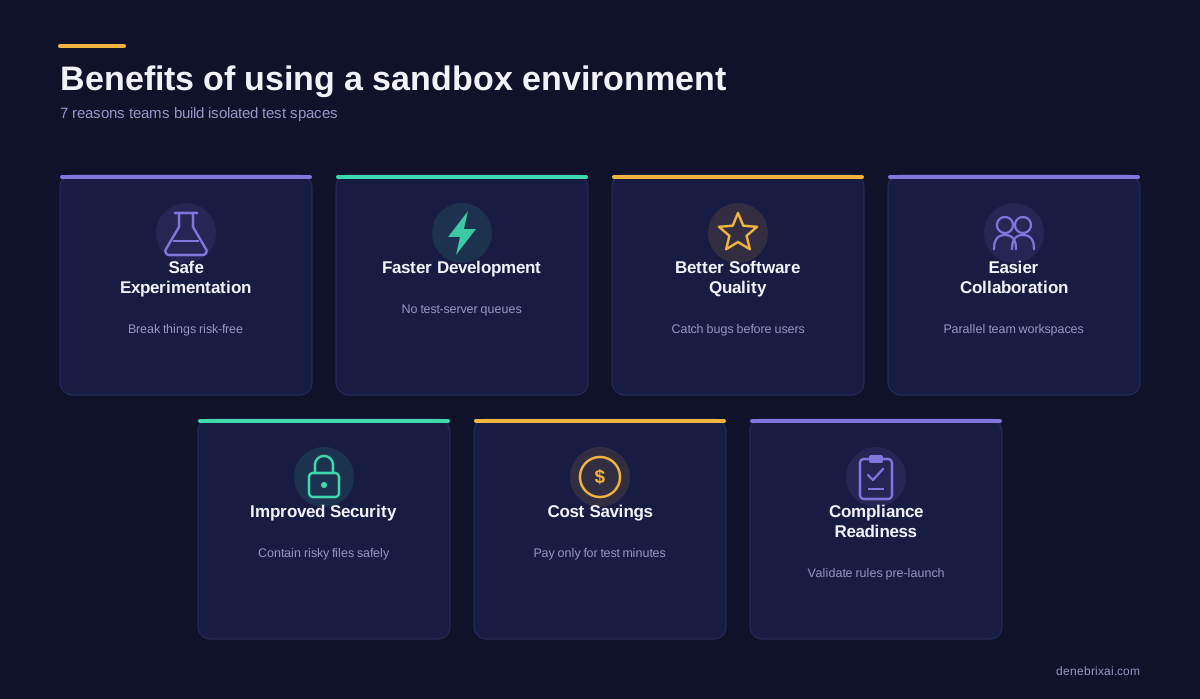
Safe Experimentation
Testing new ideas on a live website is dangerous. One bad line of code can bring down your whole business. A sandbox gives you a separate room to test things safely. You can try new tools or break things on purpose. Your real customers will never notice a thing.
Faster Development
Developers waste a lot of time waiting for test servers to clear up. A sandbox fixes this because it is ready to use right away. Engineers can build, test, and change code without hitting any walls. This keeps the whole project moving fast.
Better Software Quality
You need to find bugs before your users do. A sandbox lets you run heavy tests that act just like the real world. This brings out hidden errors and slow spots early. Fixing them ahead of time makes your final product run much better.
For example, a SaaS company can safely test a major feature update in a sandbox, reducing the chances of downtime or performance issues after release.
Easier Collaboration
When separate teams share one test server, they get in each other’s way. Sandboxes let every single person spin up their own space whenever they want. No one has to fight over who gets to use the system next. Teams can work on different tasks at the exact same time.
Improved Security
Opening weird files or strange links on a work computer can cause a huge virus outbreak. Security teams use sandboxes to open bad attachments safely away from company files. Even the worst ransomware stays locked inside this box, so it cannot hurt your real network.
Cost Savings
Buying heavy physical hardware just for quick tests is a waste of money. Sandboxes live in the cloud, so you only pay for the exact minutes you use them. As soon as your test finishes, you shut the environment down to keep your bills low.
Compliance and governance readiness:
Validating security controls, user permissions, and data handling rules in a sandbox lets you spot issues before going live. This preparation keeps your system aligned with major regulatory standards like GDPR, HIPAA, and SOX.
Challenges and Limitations of Sandbox Environments
Data Synchronization
Test spaces need real data to work right, but moving fresh info into a separate box is a big task. Copying live databases can easily leak private customer details. (To see how teams manage this safely, read our guide on how multitenant database containers actually work).
Plus, real-world records change every single second. Your sandbox stays stuck in the past, meaning you are always testing on old information.
Environment Drift
Your live website gets quick updates, security patches, and small setting adjustments every week. If your sandbox does not get those exact same changes, the two systems drift apart.
Testing fresh features on an outdated setup leads to major bugs. Your code might run perfectly fine in the test box but crash entirely once real customers try to use it.
Infrastructure Costs
Cloud spaces save money on physical hardware, but running multiple complex networks at the same time adds up fast.
- Teams frequently forget to turn off their test systems after a project finishes.
- Leftover idle systems keep running quietly in the background.
- This forgetfulness creates huge, surprise cloud bills at the end of the month.
Security Risks
Sandboxes are meant to be safe, but they cause major headaches if teams get careless. Developers often lower firewall rules or use weak passwords in test spaces just to make their jobs easier.
If a hacker finds these weak spots, they can use the sandbox to slip right into your main corporate network.
Performance Differences From Production
Test environments are rarely as powerful as the actual live setups that real customers use.
Because the test box runs on smaller, cheaper servers, it cannot show you how your app handles heavy traffic spikes. A system that runs perfectly fine for one tester might freeze up completely when thousands of real users hit it at the exact same time.
Best Practices for Managing Sandbox Environments
- Mask and Redact Production Datasets: Do not test with fake names like “John Doe” or raw customer records. Use data masking tools to scramble names, credit cards, and phone numbers. This gives you realistic data shapes without risking privacy leaks.
For example, a healthcare organization can mask patient names, medical record numbers, and other sensitive information before copying production data into a sandbox. This allows developers to perform realistic testing while helping maintain compliance with regulations such as HIPAA.
- Enforce Scheduled Sync Cycles: Live platforms change constantly, causing unmaintained test environments to drift from reality. Rebuild your sandboxes on a strict schedule. This ensures engineers always find bugs on an exact copy of the live setup.
- Apply Strict Identity Governance: Restrict sandbox access to active developers and QA testers. Change all default login info immediately and block weak passwords to stop hackers from using test sites as a back door.
- Automate the Environment Lifecycle: Use automation scripts to build fresh test spaces on demand and destroy them the moment testing finishes. This stops human error and prevents high cloud bills.
Conclusion
Knowing what is a sandbox environment helps you build features and test software safely without risking live business systems. Keeping new code in its own separate container stops weird bugs and messy security issues from breaking your real website or causing expensive downtime.
To get the most out of your sandbox deployment, your team must keep test spaces clean. Remember to use masked data, refresh your setups on a regular schedule, and shut down idle servers to avoid high cloud bills. Doing this keeps your daily work secure, your main site stable, and your updates moving fast.
Frequently Asked Questions
What is a sandbox?
It is just a separate digital folder or space where you can open files or run software safely. Anything you do inside that area stays trapped there, so you do not accidentally mess up your actual computer or delete your important files.
What is a sandbox in technology?
A sandbox is an isolated testing environment that blocks access to production systems and sensitive data. You can open weird links or test out new apps inside it, and even if a virus goes off, it cannot spread to your real workplace machines.
What is a sandbox test environment?
This is a fake twin copy of your live website made just for testers. Your team uses this dummy setup to click around and try to break things on purpose. It helps you catch glitches early before real customers ever run into them.
What is sandbox deployment?
This just means loading your new code into your separate test box instead of putting it straight onto your live website. It acts as a safe pit stop to double-check your work. If everything runs fine there, you know it is safe to move to the real site.
Is a sandbox the same as staging?
They are similar, but they happen at different times. A sandbox is an early playground where one developer can try wild ideas and break things without hurting anyone else’s work. Staging comes much later. That is the final dress rehearsal copy of your site, where you check everything right before it goes public.
Why do developers use sandbox environments?
Coding on a live website is just too dangerous. A single wrong click or typo can crash a whole business site instantly. A sandbox gives your team total freedom to fix bugs and try new tools without risking real customer data.

Comments are closed