
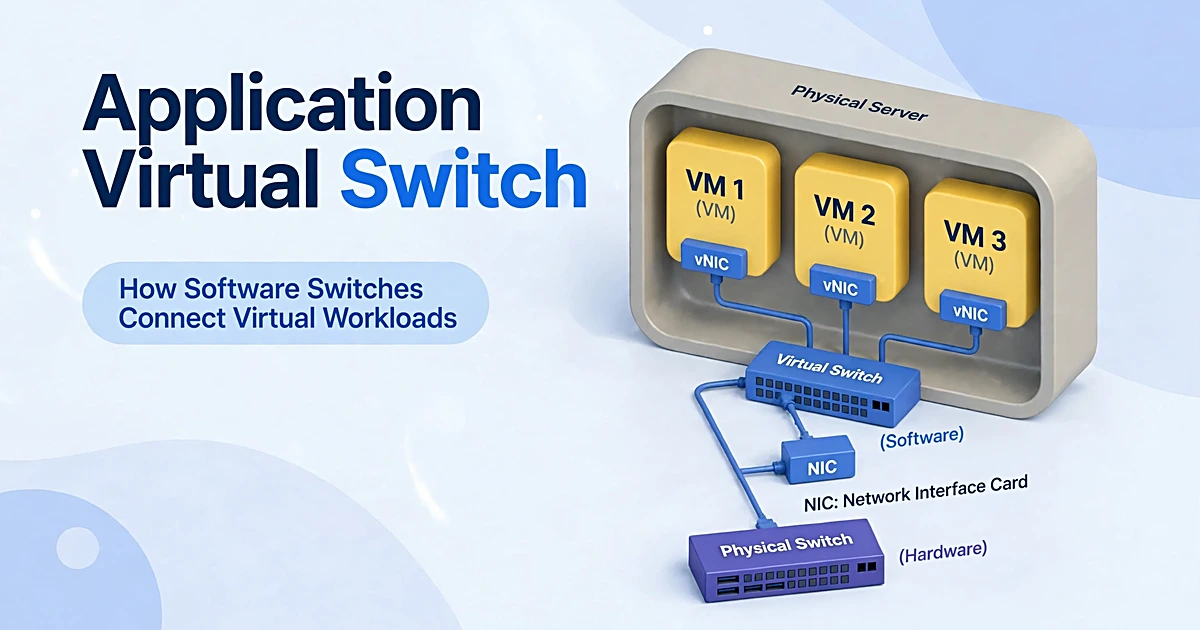
An application virtual switch is a software switch that runs inside a hypervisor. The switch connects virtual workloads to each other and to the physical network. The switch applies policy to every packet at the workload level, so security and segmentation follow the workload itself. The name also means Cisco Application Virtual Switch (AVS), the virtual network edge of Cisco Application Centric Infrastructure (ACI).
What is an application virtual switch?
The switch is a software-based networking element that lives inside hypervisor software. Every virtual machine plugs into it through a virtual switch port. Virtual interfaces connect each workload to the switch. The switch forwards packets between virtual machines on one host and out to the physical network. The switch works at Layer 2 of the OSI model, much like a physical Ethernet switch. Traffic filtering, Quality of Service (QoS) policies, and VLAN support sit on top of plain forwarding. A VLAN ID marks each separate segment on the switch. One switch can carry multiple VLANs at once.
The term carries two meanings, and readers should keep them apart. In the generic sense, the term means any software switch in a hypervisor, whether it comes from Cisco, Microsoft, VMware, or an open-source project. In the product sense, Application Virtual Switch (AVS) is Cisco’s switch for its Application Centric Infrastructure (ACI) fabric. Cisco introduced it in a blog post published on 7 November 2013 and updated on 17 May 2022. AVS is purpose-built for ACI, while the generic term covers the whole category.
The word application matters because policy follows application requirements. A policy template describes what an application needs, and the network provisions itself from that description. Security rules, tenant subnets, and workload placement all flow from the application profile instead of from manual port settings. The model is software-defined networking in action: software controls the network instead of fixed hardware.
How the switch works
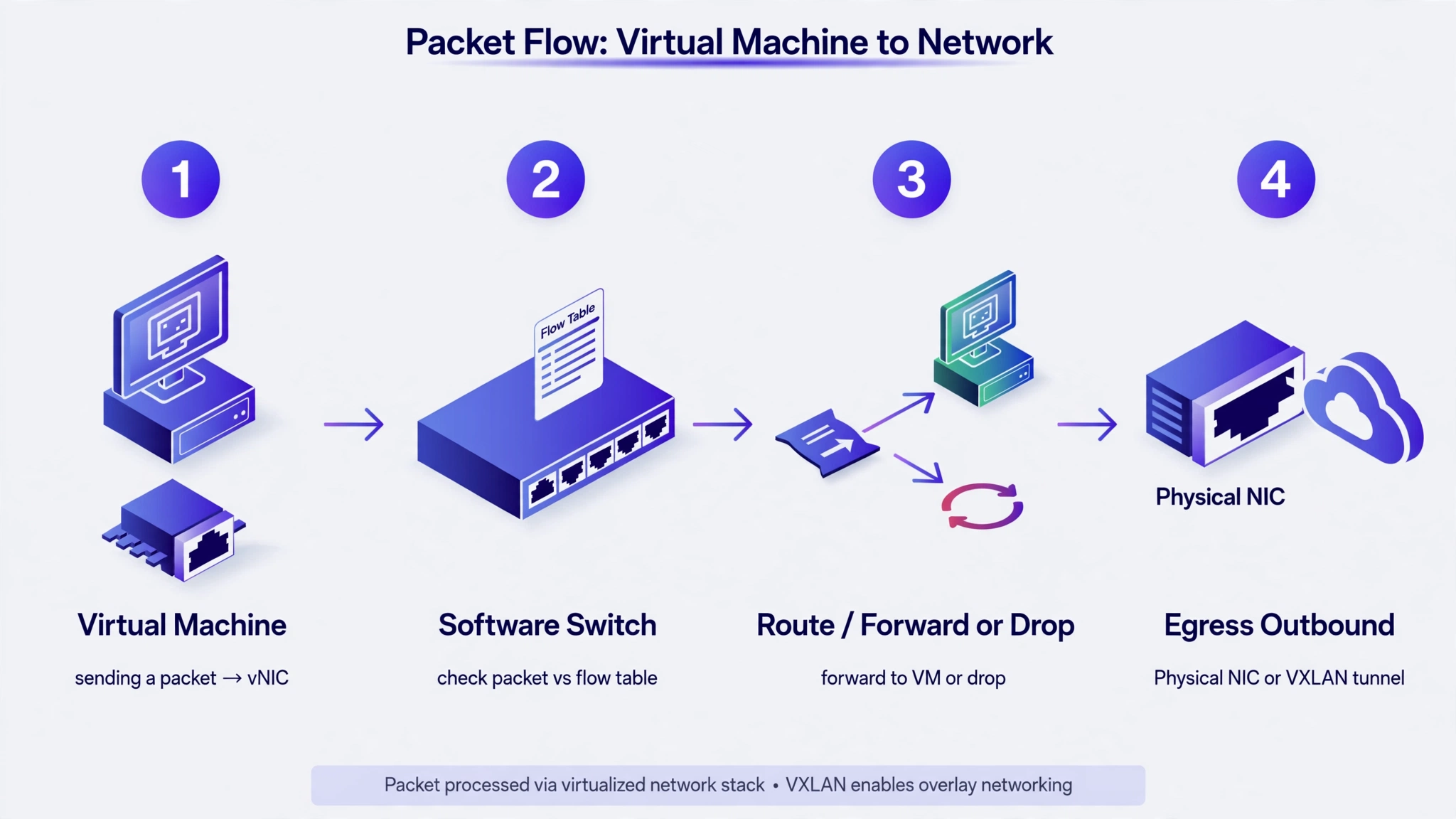
Teams deploy the switch with the hypervisor, so no separate hardware is needed. Data packets move through the switch in four steps. First, a virtual machine sends the packet through its virtual network interface (vNIC) to a virtual port on the switch. Second, the switch checks the packet against its flow table and policy rules. Third, the switch forwards the packet to another virtual machine on the same host, drops it, or sends it for inspection. Fourth, for traffic that leaves the host, the switch sends the packet out through the physical NIC or wraps it in a VXLAN overlay tunnel. The datapath is the route a packet takes through the switch, and policy checks sit on that route.
In virtualized environments, traffic between virtual machines on one host is east-west traffic. Most of it never reaches a physical firewall. The switch sits on that path, so it becomes the enforcement point for east-west security. Traffic that enters or leaves the host is north-south traffic, and the switch hands it to the physical network, often through a router, after policy checks.
Policy follows the workload during VM migrations, when a virtual machine moves to another host. The switch on the new host applies the same rules to the virtual machine’s new virtual port. No manual firewall rewrite is needed after the move, and segmentation holds through the migration.
Virtual switch vs physical switch
| Point of comparison | Virtual switch | Physical switch |
| Where it runs | Inside hypervisor software on a host | As a hardware box in a rack |
| What it connects | Virtual machines and containers on a host | Servers, printers, and devices on a LAN |
| Policy level | Per workload, by identity or tags | Per port, by MAC address or VLAN |
| Changes | Software configuration, applied in seconds | Cable moves or new hardware |
| Cost model | Part of the virtualization stack | Separate hardware purchase |
| Failure scope | Affects the virtual machines on one host | Affects a whole network segment |
A physical switch moves packets between servers. The virtual switch moves packets between workloads on a host and enforces policy per workload.
Cisco Application Virtual Switch (AVS) and ACI
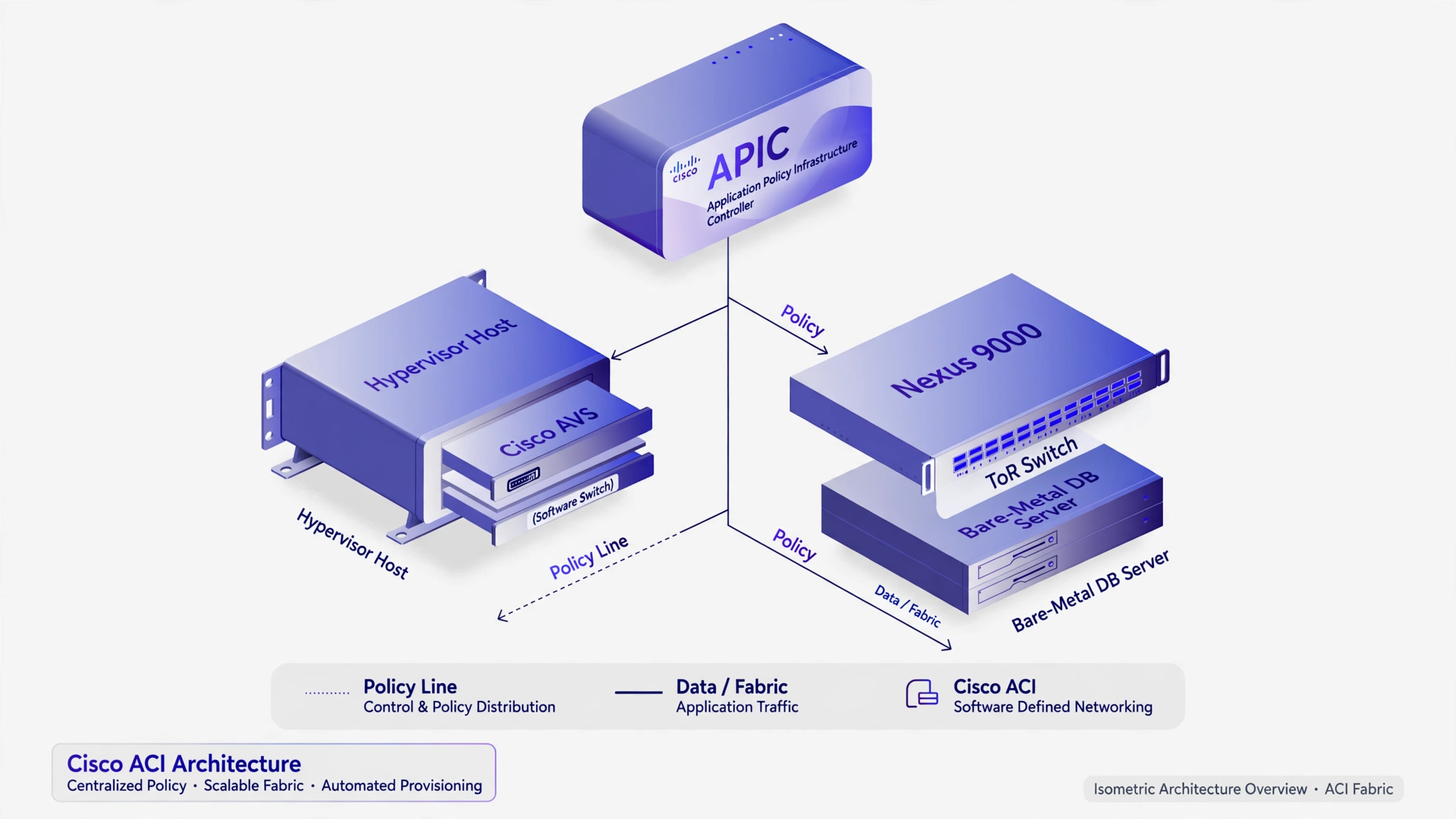
Cisco AVS is the virtual network edge of Cisco Application Centric Infrastructure (ACI), and it works beside Nexus 9000 physical switches. ACI turns the usual model around: applications drive networking behavior through policy templates instead of the network dictating what applications can do. Pre-defined application requirements automate provisioning of the network, application services, network services, security policies, tenant subnets, and workload placement. The switch runs as part of the network infrastructure that ACI manages. The switch shapes cloud network architecture, since the network follows application policy instead of fixed topology.
The Application Network Profile (ANP) is the template that describes what an application needs. ACI reads the profile, then provisions the virtual and physical network from it. The same intent shapes both layers. The Application Policy Infrastructure Controller (APIC) manages AVS centrally with the rest of the fabric. APIC also provides telemetry. The telemetry gives end-to-end visibility for troubleshooting across virtual and physical devices.
Traffic steering shows the model in action. When a web tier and an app tier sit on the same host, AVS applies policy between those endpoint groups inside the hypervisor itself. Traffic stays on the host, and no physical switch sees it. When a database runs on bare metal attached to a physical Nexus 9000, the same application policy applies at the top of rack switches instead. One policy covers both paths, and placement of workloads can change without rewriting the policy.
AVS vs Nexus 1000V
Nexus 1000V is Cisco’s earlier virtual switch, and Cisco reports more than 8,000 customers for it. The switch targets traditional fabrics, including Nexus 9000 in standalone mode without ACI support and Dynamic Fabric Automation fabrics. Nexus 1000V remains the choice for those deployments.
AVS serves a different fabric. The switch is purpose-built for ACI, and it enforces Application Network Profiles at the virtual host layer in line with Nexus 9000 physical switches. Cisco offers migration tools and Cisco Technology Migration Program (CTMP) credits for Nexus 1000V Advanced Edition customers who move to the ACI fabric. Earlier investment carries over through the upgrade.
A quick look: creating a virtual switch
Two commands show how small the setup is. Open vSwitch creates a bridge and attaches a physical interface to it:
ovs-vsctl add-br br0
ovs-vsctl add-port br0 eth0
The first command creates a bridge named br0. The second command attaches the physical interface eth0 to that bridge, so virtual machines on br0 can reach the physical network. Physical interfaces connect the switch to the outside network.
Hyper-V does the same job with PowerShell. The commands below create an external switch and list the switches on the host:
New-VMSwitch -Name “External” -NetAdapterName “Ethernet” -AllowManagementOS $true
Get-VMSwitch
The first command binds an external switch to the Ethernet adapter and lets the management operating system share it. The second command lists the switches on the host. Both examples are starting points, and the adapter name should match the host.
Compared: Cisco AVS vs Open vSwitch vs Hyper-V vs VMware
| Switch | Runs on | Managed by | Policy model | Best for |
| Cisco AVS | Hypervisors in a Cisco ACI fabric | APIC, centrally | Application Network Profiles | Cisco ACI data centers |
| Open vSwitch | KVM, Xen, Hyper-V, VirtualBox | ovs-vsctl, OVN, OpenStack | Flow tables, programmatic control | Open-source and multi-platform clouds |
| Hyper-V Virtual Switch | Windows Server with Hyper-V | Hyper-V Manager, PowerShell | Port ACLs, WFP extensions | Windows Server estates |
| VMware vSphere Distributed Switch | ESXi hosts | vCenter Server, centrally | Port groups, centralized policies | VMware estates with Enterprise Plus licensing |
Open vSwitch is a production-quality, multilayer virtual switch under the open-source Apache 2.0 license. The project supports distribution across multiple physical servers. XenServer and Xen Cloud Platform ship it as the default switch. Support covers KVM, Proxmox VE, and VirtualBox, with integration into OpenStack.
The Microsoft Hyper-V Virtual Switch is a software-based Layer 2 Ethernet switch that enforces policy for security, isolation, and service levels on Windows Server hosts. The VMware vSphere Distributed Switch is managed centrally through vCenter Server. Enterprise Plus licensing covers the switch on vSphere 8.0 and earlier. VMware NSX adds network virtualization on the VMware side. Other vendors take their own approaches, such as Nutanix Flow, Arista EOS, and Juniper Contrail.
Security controls: segmentation, isolation, filtering
The switch is a control point for cloud network security, since it sees traffic that a perimeter firewall never sees. Network virtualization security rests on the same idea: policy travels with the workload, not with the cable.
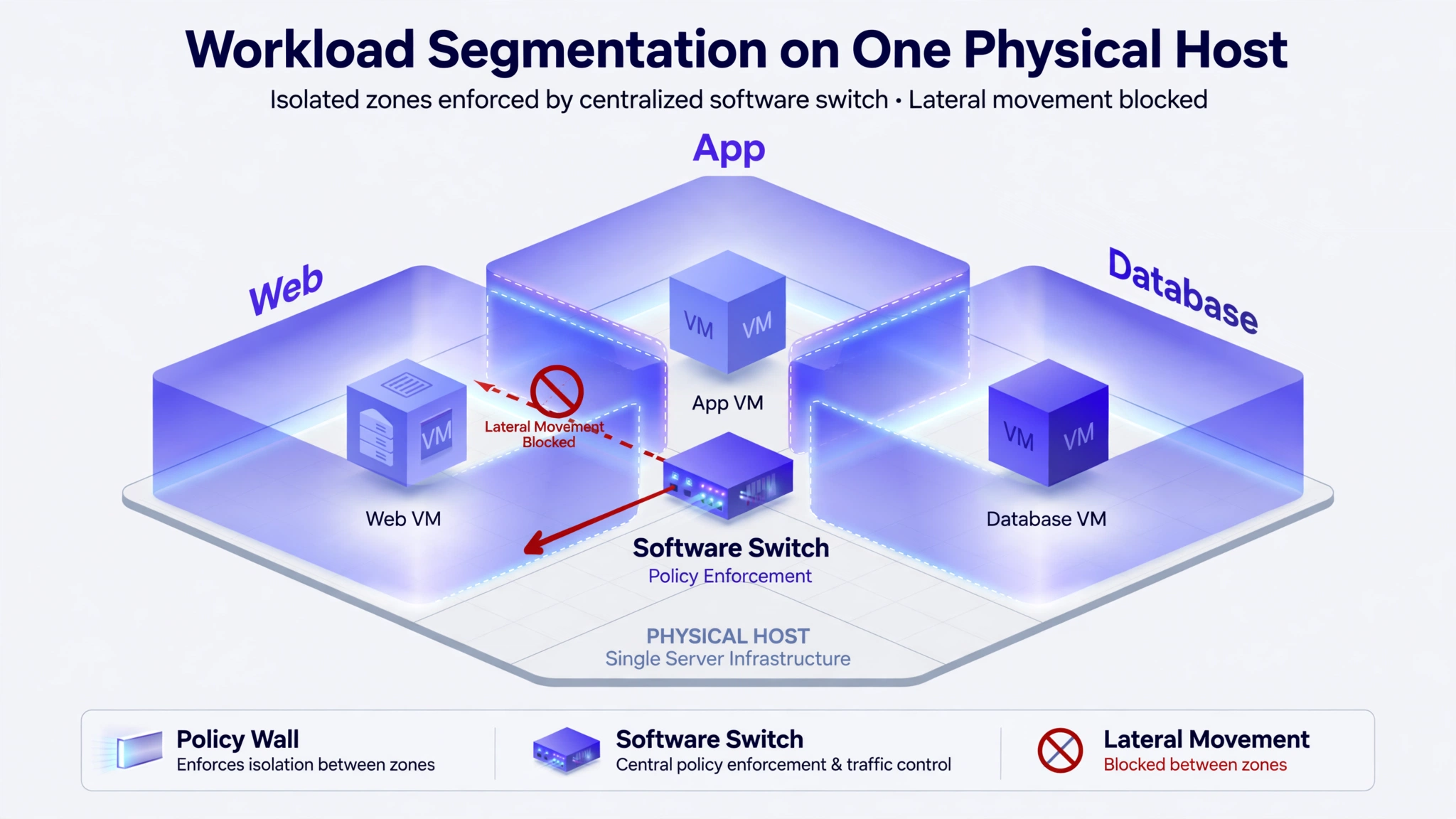
Workload segmentation ties policy to the workload itself instead of to an IP address. A web server, an app server, and a database can share one physical host. They stay isolated from each other unless a specific rule allows traffic. The policy holds when workloads move, scale, or get rebuilt, because the rule follows the workload rather than its old location.
Tenant isolation extends the same idea across whole tenants in a multi-tenant cloud. One customer’s virtual machines cannot reach another customer’s resources, even when both sets sit on the same physical host. Overlay networks and policy groups back the boundary. The switch checks every packet against them.
Traffic filtering adds packet-level control. Access control lists filter traffic by port, protocol, MAC address, or IP address, and the rules run outside the guest operating system. A compromised virtual machine cannot switch the rules off from inside, which is why enforcement at the switch is harder to bypass than a host firewall alone. Intrusion prevention builds on the same checks, since rules can block traffic that matches known attack patterns.
Lateral movement shrinks under these controls. When an attacker compromises a virtual machine, the next goal is usually to move to other systems on the network. Segmentation limits the compromised machine to its permitted connections, so the breach stays confined to a smaller area. Incident response gets simpler, and recovery time shortens.
Performance features: QoS, bandwidth, monitoring
Quality of Service shaping and bandwidth limits keep one virtual machine from starving the rest. A bandwidth minimum reserves capacity for a virtual machine, while a bandwidth maximum caps what it can consume. Explicit Congestion Notification marking, also called Data Center TCP, lets the physical switch and the operating system regulate traffic flow so buffer resources do not flood.
Monitoring runs through the same layer. The switch logs network traffic, exposes port statistics, and supports packet tracing for diagnostics. Cisco AVS adds telemetry that extends the view across virtual and physical devices, so one trail covers the whole path.
SR-IOV trades control for speed. Single Root I/O Virtualization gives a virtual machine direct access to the physical NIC, which cuts latency and lifts throughput. The traffic then bypasses the virtual switch and its policy, so the gain in speed costs the enforcement point. Designs that need both speed and policy keep sensitive workloads behind the switch.
Where virtual switches are used
- Multi-tenant cloud: tenant isolation on shared cloud infrastructure, with one policy set per customer.
- East-west traffic security: policy where perimeter firewalls cannot see in software-defined data centers, since most virtual machine traffic stays inside the host.
- Hybrid / multi-cloud: the same segmentation rules in a private data center and a public cloud region. Policy stays consistent across both.
- Containers / microservices: the same switching and policy layer for container networking. Workloads change fast, and IP addresses change with them.
Limitations
Performance overhead is the first limit. Every packet passes through software in the hypervisor, and that path costs CPU cycles that a hardware switch would not spend. SR-IOV avoids the cost, but it also avoids the policy enforcement, so the choice is never free.
Complexity is the second limit. Policy templates, overlays, and multi-hypervisor consistency need skilled operations. A small error can spread across many hosts at once. Misconfiguration is the third limit: one wrong segmentation rule can expose workloads or break connectivity, and no physical separation stands behind the rule to catch the mistake.
Vendor lock-in is the fourth limit for Cisco AVS. The switch works only inside the ACI fabric with APIC, so it is not a drop-in generic switch for other fabrics. Teams that pick AVS commit to the ACI model with it.
Which virtual switch should you use?
Three questions settle the choice. First, are you running Cisco ACI? Pick AVS, since it is the virtual edge of that fabric and it enforces Application Network Profiles there. Second, do you need open source or multi-hypervisor portability? Pick Open vSwitch, since it runs on KVM, Xen, Hyper-V, and more. OpenStack clouds use it too. Third, are you all-in on one platform? Pick that platform’s own switch: Hyper-V Virtual Switch for Windows Server, or vSphere Distributed Switch for VMware with Enterprise Plus licensing.
Frequently asked questions
What is the difference between an application virtual switch and a physical switch?
A physical switch is hardware that moves packets between servers and devices on a LAN. The virtual switch is software inside a hypervisor that moves packets between virtual machines and containers on a host. The virtual switch also enforces policy per workload, while a physical switch enforces policy per port.
Is Cisco AVS the same as a generic virtual switch?
No, Cisco AVS is one product that carries the name, and it works only as the virtual edge of Cisco ACI. A generic virtual switch is any software switch in a hypervisor, such as Open vSwitch or the Hyper-V Virtual Switch. The generic term describes the category, while AVS names Cisco’s implementation.
How is an application virtual switch different from Open vSwitch?
Open vSwitch is an open-source multilayer virtual switch that runs on KVM, Xen, Hyper-V, and more. A generic virtual switch can be any vendor’s switch, open or closed. Cisco AVS differs again, since it is tied to the ACI fabric and managed through APIC.
How is it different from the Hyper-V virtual switch?
The Hyper-V Virtual Switch is Microsoft’s Layer 2 Ethernet software switch for Windows Server hosts. The switch enforces tenant isolation, port ACLs, and bandwidth limits on Hyper-V hosts. The Hyper-V switch is one member of the wider virtual switch category.
Can an application virtual switch replace a firewall?
No, it cannot replace a firewall on its own. The switch filters traffic between workloads and enforces segmentation, but it is not a full firewall. Most designs use both: the switch for workload policy and a firewall for inspection of traffic that enters or leaves the host.
What happens to network policy when a VM migrates to another host?
The policy moves with the VM to the new host. The switch on the new host applies the same rules to the VM’s virtual port. No manual firewall rewrite is needed after the move.

Comments are closed