
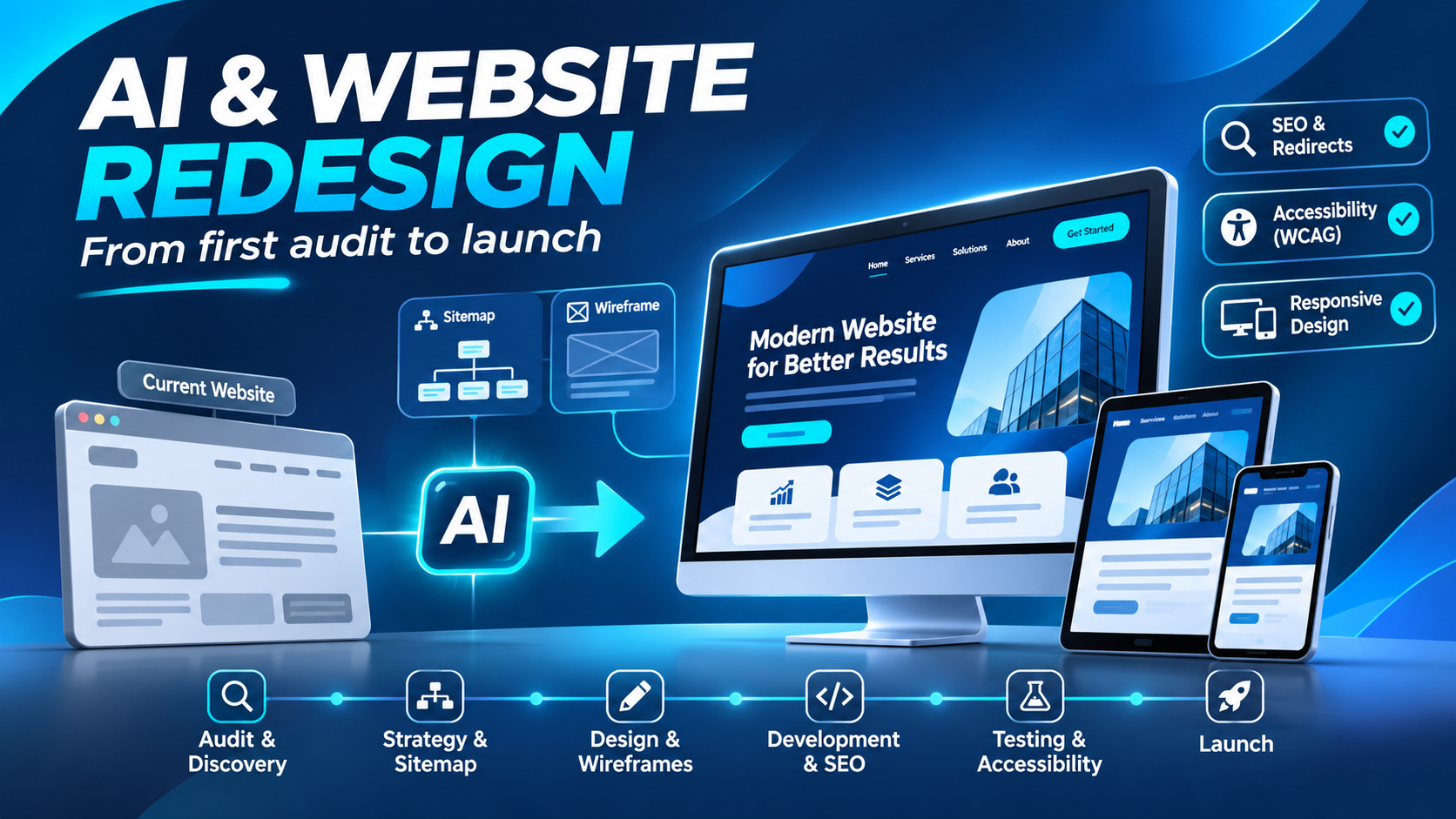
Paste a URL, wait a minute, and get a brand-new version of your website. That’s the pitch behind a growing list of AI redesign tools, and it isn’t all hype. Some of them produce surprisingly clean layouts in very little time.
But anyone who has been through a real redesign knows the new look is only part of the job. The hard parts are deciding what the site should do, what stays and what goes, and how to launch without losing the traffic and leads you already have. That’s where AI is having a quieter, more useful impact. It isn’t replacing the redesign process. It’s changing how each step gets done.
Here’s what that looks like in practice, where AI genuinely helps, and where you still need people making the calls.
What AI actually means in a website redesign
“AI website redesign” covers two very different things.
The first is AI as a full site generator. You give it a URL or a prompt, and it returns a new design, sometimes with code. This works well for a quick concept or a simple brochure site, and it’s what most people picture when they ask whether AI can redesign an existing website.
The second is AI as an assistant inside a normal redesign. A team still runs the project, but AI speeds up research, drafts, layouts, and testing. This is where most of the real value is right now.
So can AI redesign an existing website? It can give you a fresh look fast. What it can’t do on its own is understand your business, your customers, or the search value tied up in your current pages. A tool that rebuilds your homepage in minutes has no idea that one old blog post brings in a third of your leads.
The research backs this up. In Figma’s 2025 AI report, 78% of designers and developers said AI makes them more efficient, but noticeably fewer said it improves the quality of their work. Speed is the clear win. Judgment is still on you.
How AI fits into each stage of a redesign
Audit and discovery
Every good redesign starts by figuring out what’s wrong with the current site. That used to mean days of digging through analytics, heatmaps, session recordings, and customer feedback.
AI makes this faster. It can summarize months of analytics into clear patterns, group hundreds of survey responses by theme, and build a content inventory of every page on the site. Some behavior analytics tools now use AI to flag sessions where visitors got stuck, so you don’t have to watch hours of recordings to find the problem pages.
What it won’t tell you is why the business needs a redesign in the first place. Is the goal more demo requests, a new audience, or a rebrand? Those answers come from conversations with stakeholders and customers, not dashboards.
Strategy and sitemap
Once you know the problems, you need a plan for the new structure. AI is useful here as a first-draft machine. It can propose a sitemap based on your services, group keywords into page topics, and spot content gaps compared to competitors.
Tools like Relume can generate a sitemap and matching wireframes from a short brief. That gives teams something concrete to react to in the first meeting instead of a blank page.
The catch is that AI tends to suggest the standard structure for your industry. That’s a reasonable starting point, but your best-performing pages, your sales process, and your priorities should shape the final version.
Wireframes and visual design
This is where AI redesign tools get the most attention. Tools like UX Pilot and Figma’s AI features can generate layouts, explore variations, and turn rough ideas into clickable prototypes in minutes.
That speed changes how design reviews work. Instead of debating one concept for a week, a team can compare several directions in an afternoon and pick the one worth refining.
People also ask whether ChatGPT can design a website. It can suggest layouts and color palettes, and it can even write basic HTML and CSS. It’s a good brainstorming partner. But a design that fits your brand, works on every screen size, and guides visitors toward a clear next step still takes a designer’s eye and solid UI/UX design work.
The other risk is sameness. AI learns from existing websites, so its layouts often look like everyone else’s. If standing out matters to you, treat AI output as a sketch, not a final design.
Content and copy
Most redesigns stall on content. Old pages need rewriting, new pages need copy, and nobody has time.
AI can draft page copy, rewrite outdated sections, suggest headline options, and write alt text for images. On a site with hundreds of pages, that’s a big time saver.
Just don’t publish AI copy as is. It needs your brand voice, real details about your services, and a fact check. Generic copy is easy to spot, and it does little to convince anyone to choose you over a competitor.
Development and SEO migration
AI coding assistants can speed up front-end development, write repetitive components, and help debug issues. They can also help with SEO tasks during the rebuild, like drafting schema markup, writing meta descriptions, and matching old URLs to new ones for a redirect map.
This is also the stage where cutting corners costs the most. If URLs change, every old page needs a permanent redirect to its closest new equivalent. Google’s site move documentation recommends keeping those redirects for as long as possible, generally at least a year. An AI tool can suggest the matches, but someone needs to check every one. A wrong redirect, a missing one, or a forgotten meta title can undo years of rankings. It’s one of the main reasons businesses with established traffic choose professional website redesign services over a tool alone.
Testing and launch
Before launch, AI can help run accessibility checks, catch broken links, compare layouts across devices, and suggest A/B test ideas based on what’s most likely to affect conversions.
Accessibility deserves extra attention. The 2026 WebAIM Million report found detectable WCAG failures on 95.9% of the top one million home pages, up from 94.8% the year before. Low contrast text alone showed up on 83.9% of them. Automated checks catch a lot of this, but not everything, so manual review and a solid software testing process still matter before anything goes live.
How AI improves the user experience after launch
A redesign doesn’t end at launch, and this is where AI may have the biggest long-term effect on the user experience.
AI-powered site search understands what visitors mean, not just the exact words they typed. Personalization can show returning visitors content based on what they looked at before. AI chatbots can answer common questions at any hour and pass serious leads to your team. And testing tools can keep improving pages based on real behavior instead of waiting years for the next big redesign.
That last point is a real shift. Instead of starting from scratch every few years, more teams are moving toward smaller, ongoing improvements backed by data.
Where AI still falls short
AI is genuinely useful in a redesign, but it has clear limits:
- It doesn’t know your business. It can’t weigh your sales goals, your audience, or what makes you different unless someone tells it, and even then it’s guessing.
- It plays it safe. AI layouts and copy trend toward the average, which can make your site look like a template.
- It can put your SEO at risk. Generated rebuilds often ignore existing URLs, redirects, metadata, and internal links. That’s how sites lose rankings right after launch.
- It still makes mistakes. AI code, copy, and accessibility fixes all need a review. Confident output isn’t the same as correct output.
None of these are reasons to avoid AI. They’re reasons to keep people in charge of the decisions.
AI redesign tools vs. working with a redesign team
So when is an AI tool enough, and when do you need more help? It mostly comes down to how much your current site is worth to your business.
| AI redesign tool | Redesign team using AI | |
| Speed | Minutes to days | Weeks, but faster than before AI |
| Upfront cost | Low | Higher |
| Strategy | Limited to what you put in | Based on research and business goals |
| SEO protection | Usually not included | Redirect mapping and migration planning |
| Brand fit | Often generic | Built around your brand |
| After launch | Self-serve | Ongoing testing and optimization |
An AI tool can make sense for a new small business site, a personal portfolio, or a quick visual refresh where there’s little traffic to protect.
It’s a riskier choice when your website brings in leads or sales, ranks well in search, runs an online store, or needs to move to a new platform. In those cases, a team that pairs AI’s speed with real planning, design, and SEO migration work keeps the new site from losing what the old one built.
As for cost, that depends on the size of the site, the number of custom features, and how much content needs to change. AI has lowered the cost of some tasks, but planning and quality control still take time.
How to use AI in your next redesign without losing what works
If you’re planning a redesign, a few habits will help you get the benefits of AI without the common mistakes:
- Start with an audit. Know which pages bring in traffic and leads before you change anything.
- Keep a full URL map. List every current URL and where it will point after launch.
- Use AI for drafts, not decisions. Let it speed up research, layouts, and copy, then review everything.
- Check accessibility early. Fixing contrast and structure during design is much easier than fixing it after launch.
- Watch the numbers after launch. Track rankings, traffic, and conversions for at least a few months, and fix issues quickly.
Conclusion
AI has made website redesigns faster at almost every stage, from audits to wireframes to testing. It has also made it easier than ever to launch a site that looks new but doesn’t actually work better.
The best results come from using AI where it saves time and keeping experienced people where judgment matters: strategy, brand, content quality, and SEO. If your website is a real source of leads or revenue, treat AI as a powerful assistant on your redesign team, not a replacement for it.
Frequently Asked Questions
What are the steps in the website redesign process?
A typical website redesign process includes an audit and discovery phase, strategy and sitemap planning, wireframes and visual design, content and copywriting, development and SEO migration, and finally testing and launch. After launch, ongoing testing and optimization help the new site keep improving over time.
Can AI redesign an existing website?
AI can generate a fresh layout for an existing website in minutes, but it can’t understand your business goals, customers, or the search value of your current pages on its own. It works best as an assistant that speeds up research, design, and content, while people handle strategy, brand fit, and SEO decisions.
Can ChatGPT design a website?
ChatGPT can suggest layouts, color palettes, and page structures, and it can write basic HTML and CSS. It’s a useful brainstorming partner, but a design that fits your brand, works on every screen size, and guides visitors toward action still needs a designer’s input.
How long should a website redesign take?
It depends on the size and complexity of the site. AI tools can produce a basic redesign in minutes or days, while a full redesign with strategy, content, and SEO migration usually takes several weeks or more. AI has shortened many steps, but planning and quality checks still take time.
How much does it cost to redesign a website?
Website redesign cost depends on the number of pages, custom features, and how much content needs to change. AI redesign tools have a low upfront cost, while working with a redesign team costs more but includes strategy, SEO protection, and ongoing optimization, which matter most for sites that bring in leads or sales.

Comments are closed