
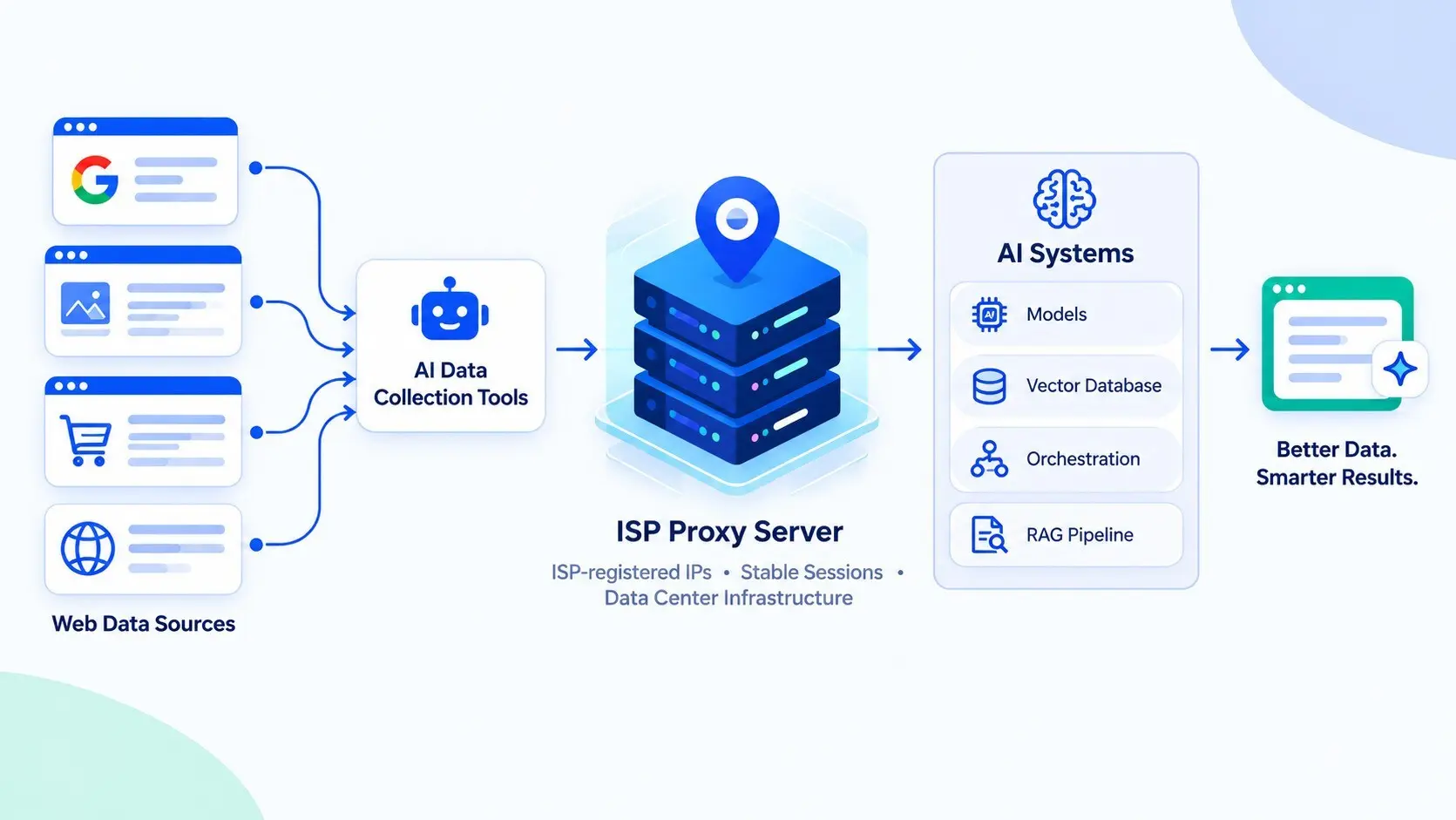
Most conversations about enterprise AI focus on the model, the vector database and the orchestration layer. The part that goes and fetches information from the open web gets far less attention, even though AI agents, retrieval pipelines and evaluation jobs all depend on it. When that layer fails, the symptoms tend to show up somewhere else: a stale answer, an agent stuck on a login page, or a pricing dataset with gaps for half the markets you care about.
For years, teams building that collection layer had to choose between two kinds of proxies. Datacenter IPs were fast and cheap but easy for websites to flag, while residential IPs looked like real households and cost more, usually billed by the gigabyte. ISP proxies sit between the two, which is why teams comparing IPRoyal isp proxy server solutions with other options tend to ask about address origin, session stability and pricing model before they ask about raw speed.
Knowing where this type of proxy belongs in a stack, and where it does not help at all, saves a lot of debugging later.
Where the IP address comes from
An ISP proxy runs on data center hardware but uses an IP address registered to a consumer internet provider. Proxy operators lease these address ranges from ISPs and host them on their own servers. The result is an address that looks like a home connection to anyone checking its registration, while the traffic itself moves through infrastructure built for steady throughput rather than a household router.
The registration detail matters because of autonomous system numbers (ASNs). Every network announces its routes under an ASN, and anti-fraud systems often check it early. An address belonging to a consumer broadband provider reads as a person at home, whereas one belonging to a cloud provider reads as automation, regardless of what the request contains.
For AI teams, this tends to come up when an agent or scraper works fine in testing and then gets blocked in production. In many of those cases, the code is fine and the exit address is the problem.
The layer it sits in
In a typical architecture, the proxy pool sits between the service that issues requests and the websites being visited. A Playwright cluster running browser agents, a Scrapy job refreshing a retrieval index, or a custom service checking prices sends its traffic to a gateway, which assigns an exit IP and forwards the request.
What changes with ISP proxies is how long each exit address can stay the same. Because the addresses are static and dedicated, a session can keep one IP for as long as the address is leased, instead of rotating every few requests. That affects several workloads that AI products rely on:
- Agents that log in to dashboards or supplier portals, where a changing IP mid-session often forces a new login or triggers a security check.
- Retrieval pipelines that crawl paginated results, where a dropped session means restarting the crawl and leaving gaps in the index.
- Evaluation jobs that test how a product or chatbot behaves for users in different countries, which need a stable address in each region for the duration of the test.
If you are building retrieval on top of external sources, the collection step is part of the same discipline as chunking and indexing. Our piece on enterprise AI architecture and data isolation covers how those pipelines are put together once the data arrives.
IP reputation is only one signal
It would be convenient if a clean residential address solved blocking on its own, but detection systems look at much more than the IP. According to Cloudflare’s overview of bot management, these tools combine behavioral analysis, challenges such as JavaScript checks and CAPTCHAs, and IP reputation. Many also inspect how a client negotiates TLS, the order of its HTTP headers and the timing between requests. A browser agent that announces itself through an unusual TLS handshake will still get flagged, even when it connects through a household-registered address.
Protocol choice deserves a look as well, especially for AI agents that do more than browse. SOCKS5, defined in RFC 1928, can carry any TCP connection and also supports UDP relaying, which HTTP proxies cannot do. When an agent needs to query a database, pull mail or speak a custom protocol, that difference shapes the design.
Planning for capacity rather than bandwidth
ISP proxies are usually priced per IP for a set period, while residential proxies are typically billed by traffic. That changes how teams plan. With traffic-based billing, large downloads get expensive, so collection jobs often run slower or less often than the product needs. With per-IP pricing, the cost is tied to how many addresses you hold, so the practical question becomes how much each address can handle before the target website starts to push back.
Sizing the pool is easier when you start from real numbers: how many requests each job sends, how often the data needs refreshing and how sensitive each target site is. A small set of addresses that request pages at a reasonable pace will often hold up better than a large pool pushed to its limit, which can quickly damage the reputation of every address in it.
Responsible collection belongs in the same plan. Reading a site’s terms and robots.txt, limiting request rates and avoiding personal data all reduce legal risk, and they also keep the addresses usable for longer. For teams feeding models and agents with live web data, ISP proxies are worth considering when stable sessions and predictable costs matter more than rotating through thousands of addresses, as long as the rest of the client behaves like the user it claims to be.
Frequently Asked Questions
1. What is an ISP proxy server?
An ISP proxy uses an IP address provided by an internet service provider but runs on a data center server. This gives users a stable connection without relying on a regular home internet connection.
2. How do ISP proxies work in AI systems?
AI tools use ISP proxies to access websites and collect information. They can help keep connections stable when gathering data for research, web scraping, or AI applications.
3. How do ISP proxies differ from residential and datacenter proxies?
ISP proxies use ISP-registered IP addresses hosted in data centers. Residential proxies use IP addresses linked to home internet connections, while datacenter proxies use addresses from hosting providers.
4. Can ISP proxies prevent AI web scraping from being blocked?
No, ISP proxies cannot prevent every block. Websites may still restrict automated requests based on traffic patterns, browser activity, or other security checks.
5. How do data centers connect to AI systems?
Data centers provide the servers, storage, and network connections AI systems need to run. These systems can gather outside information through APIs, web crawlers, and other data collection tools.

Comments are closed