

A virtual private network VPN is a tool that encrypts your internet traffic and routes it through a remote server. As a result, your internet provider, the local Wi-Fi owner, and the websites you visit can’t see who you are or what you’re doing. The usual mental image is a private tunnel under the public internet.
You’ve probably come across one already, through a sponsored YouTube video or an email from your IT team asking you to turn it on before opening anything. Most people just follow the instructions and never look into how it works. The use of VPNs is now routine for remote work and travel.
Understanding the basic VPN meaning in computer terms is genuinely useful. A secure VPN service hides your network traffic, so it changes what other people can see about you, how safe you are on an unsecured network, and whether certain content loads in your country. VPNs are one part of a wider security strategy, alongside other ways to protect your business from cyber threats.
This guide explains VPN technology in plain terms: how a virtual private network works, the main types, the VPN protocols that matter, and how to choose one without overspending. A short history and a look ahead close it out.
What Is a Virtual Private Network (VPN)?
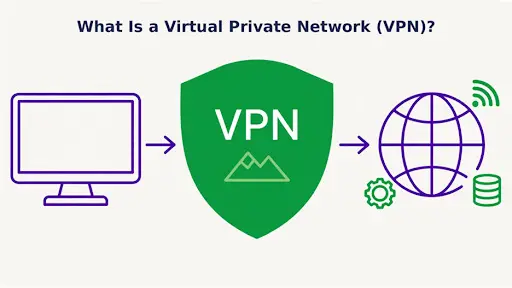
A VPN sits between your device and the internet, locking your traffic before it leaves.
If you look at the core virtual private network definition, a VPN is software that scrambles your traffic and sends it out through a server on another computer network. In two words, I’d call it a “private tunnel”.
The name is fairly literal. Virtual, because no physical network cable runs between you and the server; it’s all software riding the normal internet. Private, because outsiders, including whoever is sharing your café Wi-Fi, see only unreadable data. Network, because your device joins another network and borrows one of its network addresses. Connect from Karachi to a server in the Netherlands, and websites will treat you as someone sitting in Amsterdam.
Ordinary web traffic is a postcard: anyone who handles it can read it. A VPN is a locked box for that postcard.
When you connect to a VPN on a laptop or phone, you tap connect, wait a few seconds, and that’s it. You get an encrypted link between your device and the server, and your VPN session stays up until you turn it off.
How does a virtual private network work?
To understand what a VPN connection is and see virtual private network working in action: the app locks your data and sends it into the VPN tunnel, while a server at the far end unlocks it. Your device is one endpoint of the tunnel, and the server is the other. The easiest way to see the difference is to follow one trip twice.
Without a VPN: How Your Data Travels
You open a news site. Your phone sends the request to the router, the router sends it to your internet service provider (ISP), the ISP sends it to the site, and the page comes back the same way.
Your internet provider can see every domain you visit, and the website logs your real IP address. On open Wi-Fi, someone nearby with the right software might catch part of it too.
With a VPN: Step-by-Step
Turn the VPN on and the route changes:
- You open the VPN client and pick a server.
- The app contacts that server and checks your login.
- Both sides authenticate each other and agree on encryption keys using a VPN protocol.
- Anything you send is locked, then goes down the VPN tunnel.
- The server unlocks it and asks the website on the destination network for the page.
- The reply returns the same way, locked again, and your app opens it.
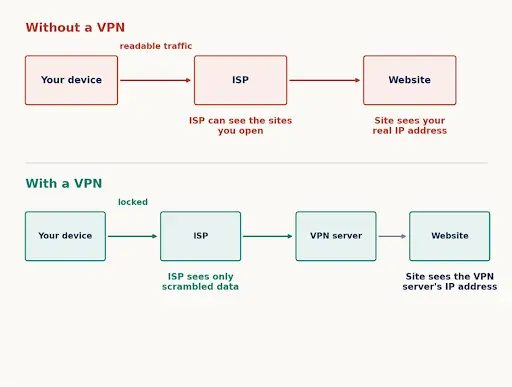
Without a VPN, your ISP and the sites you visit see your real address. With a VPN, they see only the VPN server.
Draw it as a VPN diagram, and you get one line: device, tunnel, server, website. Your ISP only sees the first hop, and the site only sees the server’s network location.
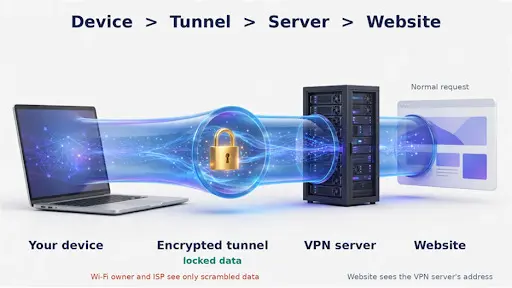
Your device, the encrypted tunnel, the VPN server, and the website
Three components keep the connection secure, which is also why businesses treat VPNs as standard equipment in modern computer networks.
What Is VPN Encryption?
In simple terms, VPN encryption turns your data into scrambled code that only your device and the server can read. Encryption also plays an important role in protecting sensitive data as it moves between systems. Modern VPNs mostly use ciphers like AES-256 or ChaCha20 to encrypt data. If someone intercepts the traffic midway, all they get is unreadable data.
Tunneling
Each network packet gets tucked inside another packet, and the outer one does the travelling across the internet. The IETF describes the design in RFC 4301 if you enjoy standard documents.
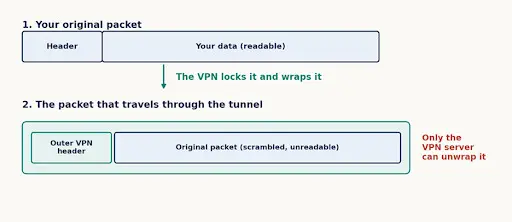
The VPN wraps your original packet inside a new one, so only the VPN server can unwrap it
Authentication
This step is often overlooked. It confirms you’re connected to the genuine server and proves to the server that you have permission to access it typically through a password, certificate, or key. Company VPNs often add a code from an app on top for additional security. Without it, a fake server could sit in the middle and collect everything you send.
What Is a VPN Used For? (Benefits and Uses)
Virtual private networks do more than hide your IP address. Plenty of people ask what a VPN does and what is VPN and why do I need it if all they do is watch videos and check email. In the realm of a virtual private network in network security, four reasons come up again and again to show how a VPN protects your network connections.
Privacy and a Hidden IP Address
Think of your IP address as the return address on a letter it shows websites exactly where to route the data back to you. Advertisers and websites use it to guess where you are and to stitch your visits together. Go through a VPN and you get a private internet connection. The server’s address goes on the envelope instead, while your ISP stops seeing which pages you open.
In short, you leave less to track. There is one drawback: the VPN company now sees your VPN traffic, so pick carefully.
Safety on Public Wi-Fi
Say your flight is delayed and you’re stuck on the airport’s free wireless network. You are on a public network you don’t control, with no idea who set it up or who else is connected. With a VPN running, your traffic is encrypted before it leaves your phone, so anyone monitoring that network sees only unreadable data. The Electronic Frontier Foundation has a balanced write-up on when this helps and when it doesn’t.
Secure Remote Access for Work
An accountant in Lahore needs a file server that sits in her client’s building. She signs in through the client’s VPN and her home laptop behaves as if it were on the corporate network at a desk there. The files never touch the open internet. Most companies use VPNs for exactly this, so remote employees can reach office systems from home. It also does not replace dedicated defenses against attacks designed to overwhelm websites and online services, such as a distributed denial-of-service (DDoS) attack.
Bypassing Geo-Restrictions and ISP Throttling
Some apps only work in certain countries, and a VPN lets you choose a server in one of them. It can help against throttling too, since an ISP that slows down video struggles to do it when it can’t tell what your traffic is. Read the service’s terms first, and check your local law.
What Are the Disadvantages of a VPN?
No tool is perfect.
Speed drops a little, because your data takes the long way round and gets locked and unlocked on the trip. Some sites block known VPN addresses, so you get captcha after captcha. Free services are the most affected, and many include ads or collect user data.
A VPN does nothing against phishing emails or weak passwords. And trust hasn’t disappeared, only moved: your ISP is out, the VPN company is in.
A few countries restrict VPNs outright, so check the rules where you live.
What Types of VPNs Are There?
Virtual private networks come in several shapes. Who uses one, and why, determines the shape. Some are for people, some for entire offices, and some are defined by the box doing the work. The right choice depends on your use case.
Three Ways to Group VPN Types
The same VPN can fit into more than one group, which is why the list of types looks messy at first. These three questions sort it out.
| Grouped by | Types | The question it answers |
| Use | Remote access, site-to-site | Who is connecting? |
| Protocol | WireGuard, OpenVPN, IKEv2/IPsec, L2TP/IPsec, SSTP, PPTP | How is the tunnel built? |
| Delivery | Mobile, cloud-based, hardware, VPN appliance, DMVPN | What runs or carries the VPN? |
Remote Access VPN
As a classic virtual private network example, this is what most people mean by “VPN.” A laptop or phone connects to a private virtual network or VPN server, like a teacher logging into the school system from home. Some remote access setups use an SSL VPN, which runs in the browser with no app to install.
Site-to-Site VPN
Site-to-site VPNs link whole networks instead of individual people. A company with offices in Lahore and Dubai can join each office’s local area network so staff in both cities use the same internal tools. Nobody opens an app; the routers do the work, and you end up with one big network. NIST covers it in its guide to IPsec VPNs.
Mobile VPN
A mobile device hops between Wi-Fi and mobile data all day. A mobile VPN keeps connectivity alive through each switch, so a video call doesn’t drop when you step outside. Delivery riders and field sales staff get the most out of it.
Hardware VPN
A physical device, usually a router or firewall with VPN functionality built in. Plug it in at the office and it protects the whole network infrastructure, with nothing to install on each computer behind it. Dedicated hardware can also encrypt faster than an ordinary PC. The downside is cost and setup, which often needs someone with IT skills.
Cloud-Based VPN
Here the VPN runs in a cloud data center rather than on a box in the server room. A small business can add users in minutes and skip the hardware bill.
VPN Appliance
A VPN gateway is a purpose-built box (or virtual machine) that acts as the front door for VPN connections. Staff connect to it from outside, it checks who they are, unlocks their traffic and passes it into the company network. Many also bundle a firewall and logging.
A hardware VPN is a router that happens to do VPN. An appliance is a gateway built to serve lots of users at once. Since it faces the internet, it needs patching promptly.
Dynamic Multipoint VPN (DMVPN)
DMVPN is a Cisco technology for companies with lots of branch offices. Normally, branch traffic goes through head office first, even when two branches want to talk to each other. DMVPN lets branches build tunnels directly between themselves on demand, and it sets them up automatically. Less manual work, fewer bottlenecks. It’s a business tool, so you won’t need it at home.
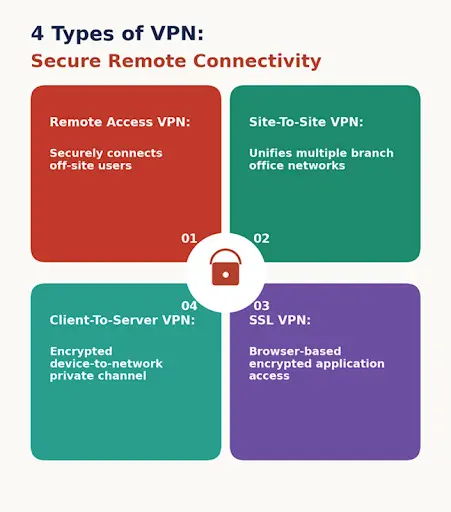
Four common VPN types, grouped by how you connect
What Is a VPN Protocol and Which One Should You Use?
A VPN protocol is the rulebook for building the tunnel, swapping keys and packing your data. Each of these network protocols balances speed, security and convenience a little differently. The short answer: WireGuard first, OpenVPN as plan B. Most virtual private networks offer both. The table puts them side by side, and the sections after it explain each.
| Protocol | Speed | Security | Best for | Watch out for |
| WireGuard | Very fast | Strong, modern | Everyday use on phones and laptops | Newer, so very old devices may not support it |
| OpenVPN | Good | Strong | Wide device support and custom setups | Manual setup is fiddly |
| IKEv2/IPsec | Fast | Strong | Phones that switch networks a lot | Some firewalls block it |
| L2TP/IPsec | Medium | Decent with IPsec | Older devices | Slower and showing its age |
| SSTP | Medium | Good | Windows users behind strict firewalls | Mostly Windows only |
| PPTP | Fast | Weak | Nothing worth the risk | Known security holes |
General guide only. Real speed depends on your provider, your device and your connection.
OpenVPN
OpenVPN is an open-source VPN protocol, so researchers around the world can review its code, and that scrutiny is a big part of its reputation. It runs on almost any operating system. It’s slower than the newer options, and setting it up by hand is tedious. More detail is on the OpenVPN community site.
WireGuard
WireGuard is the newer option. It has far less code, so bugs have fewer places to hide, and it’s quick. The official WireGuard paper explains how it’s built.
IKEv2/IPsec
Very good at reconnecting fast when your network changes, which is why phones suit it so well. IKEv2 handles the key exchange (RFC 7296) and IPsec protects the data itself.
L2TP, PPTP and SSTP
The last three are older protocols. PPTP is quick but has known security holes, so skip it. L2TP encrypts nothing on its own and gets paired with IPsec. SSTP is Microsoft’s, mostly used on Windows, and because it looks like regular secure web traffic it passes through strict firewalls.
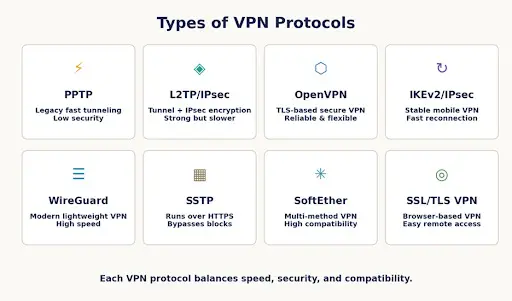
The eight protocols the article compares, from the oldest to the newest
What Is Split Tunneling?
Split tunneling lets you choose which apps use the VPN and which go straight out. Say you’re on the work VPN but want music playing. Let the music app skip the tunnel so it stays quick, and keep the work files inside. The trade-off is simple: anything outside the tunnel isn’t protected.
How Do You Choose the Right VPN?
Virtual private networks differ a lot in VPN features and price, so check three things before you pay for any VPN service.
Security and No-Logs Policy
Look at the encryption and protocols first, then read the privacy policy. A trustworthy VPN provider says plainly that it doesn’t log what you do, and the better ones have an independent audit to prove it. If the wording is vague, choose a reputable VPN provider instead.
Speed and Server Locations
Providers run server networks in many countries, so nearby servers mean better speed, and servers in the right countries mean fewer headaches. Plenty of providers offer a trial or refund window, so use it and test on your own connection.
Free vs Paid VPNs
Servers cost money to run. If you aren’t paying, somebody else probably is, usually advertisers or buyers of your data. A few free plans are fine for light use. Paid VPN services tend to come with better speed, better support and clearer privacy terms.
VPN Vendors and Products
There are hundreds of VPN brands, so this is a quick map of the better-known virtual private networks. This isn’t a ranking, and I haven’t tested each one for this article. Use it as a starting list, then run the checks above.
On the consumer side, you’ll come across these most often:
- NordVPN, ExpressVPN and Surfshark: the heavily advertised apps for everyday privacy, streaming and public Wi-Fi.
- Proton VPN: from the company behind Proton Mail, and it has a free plan too.
- Mullvad: a privacy-focused service that doesn’t ask for an email address when you sign up.
- Cloudflare WARP: a lighter, speed-minded option from Cloudflare.
For businesses, the names change:
- Cisco Secure Client (formerly AnyConnect), Palo Alto GlobalProtect and Fortinet FortiClient: common remote access tools that pair with each vendor’s firewalls.
- OpenVPN Access Server: a self-hosted server built around OpenVPN.
- Tailscale: a modern mesh VPN built on WireGuard, popular with small teams.
Whichever one you shortlist, read the privacy policy, look for an independent audit and use the refund window.
History of VPNs
| When | What happened |
| Mid-1990s | PPTP is built by a group of vendors that includes Microsoft. IPsec standards start to take shape. |
| 1999 | The standards documents for PPTP (RFC 2637) and L2TP (RFC 2661) are published. |
| 2001 | OpenVPN arrives as a flexible, open-source option. |
| 2010s | Consumer VPN apps take off as people worry about public Wi-Fi, tracking and blocked content. |
| 2014 | IKEv2 is published as RFC 7296, the key exchange behind many modern IPsec VPNs. |
| 2020 | WireGuard is merged into the Linux kernel. NIST publishes its zero trust guidance (SP 800-207). |
| 2024 | NIST publishes its first post-quantum encryption standards. |
Future Trends: The Evolving Role of VPNs
Will VPNs disappear anytime soon? Not really, but the way we use them is definitely changing.
In companies, many teams are moving toward zero trust, where every request is checked on its own instead of trusting everyone who got inside the tunnel. NIST’s zero trust guidance lays out the idea. For now, it mostly sits alongside VPNs rather than replacing them.
Encryption is due an upgrade as well. Future quantum computers could break some of today’s key exchange methods, so standards bodies are lining up replacements. NIST has been leading that effort through its post-quantum cryptography project, and VPN software will have to adopt the new methods over time.
On the consumer side, expect more WireGuard-based apps and simpler, faster connections. The core idea stays put: a safer path across a network you can’t trust.
Conclusion
Virtual private networks do a handful of things well: they hide your traffic, mask your IP address, and take most of the danger out of public Wi-Fi. That’s virtual private networks explained from start to finish. They won’t fix everything, so keep your passwords strong and think before you click. Choose the type that suits you, pick a modern protocol like WireGuard or IKEv2, and read the privacy policy before you pay. Do all that, and a virtual private network becomes a dependable part of staying safe online.
FAQs
Is a VPN Secure?
Mostly, yes, provided you pick a decent one. The encryption itself is very hard to break. Trouble usually comes from the company behind the service or from an outdated protocol like PPTP. Choose a provider with a clear no-logs policy and you’ve covered most of the risk.
Do You Need a VPN on Home Wi-Fi?
Not always. Home networks are safer than public ones. A VPN still helps if you don’t want your ISP watching your browsing, you want to appear in another country, or you need to reach a work network.
What is a VPN on a computer, and what does it stand for?
VPN stands for Virtual Private Network. On a computer or phone, it operates as a background app that secures your entire connection, preventing network snoopers and your ISP from monitoring your activity.
Is Using a VPN Legal?
In most countries, yes. A few restrict it, and something illegal is still illegal through a VPN. Look up your local rules first.
Does a VPN Slow Down Your Internet?
A little, usually. The data travels further and gets encrypted on the way. A nearby server and a quick protocol like WireGuard keep the drop small. Sometimes a VPN even feels faster, if your ISP was throttling that kind of traffic.
Can a VPN Hide Your Browsing History From Your ISP?
From your ISP, yes. It can tell you’re using a VPN, but not which pages you open. History saved in your browser stays where it is, though, and the VPN company can see your activity unless it genuinely keeps no logs.
What Is the Best VPN Protocol?
For most people, WireGuard. It’s fast, and the code is small enough to be checked properly. OpenVPN is the safe pick when you need wide support, IKEv2/IPsec suits phones, and PPTP should be avoided.
Is a Free VPN Safe?
Some are fine for light use; plenty aren’t. Servers cost money, so free services often make it back through ads or by collecting your data. Read the privacy policy, and keep free VPNs away from banking and work.
Should You Leave Your VPN On All the Time?
On public Wi-Fi, yes. Using VPN protection is the simplest habit. At home it’s up to you. Leaving it on costs a bit of speed and battery, and some banking or streaming apps may complain. If hiding your browsing from your ISP matters to you, keeping it on is a fair habit.
Can a VPN Be Hacked or Traced?
Nothing is unbreakable. A provider can be breached, or a court can force it to hand over whatever records it keeps, which is why a real no-logs policy matters. And logins and cookies can still track you with or without a VPN.
What Does a Virtual Private Network Do and Not Protect You From?
Malware, phishing and weak passwords. It also won’t stop a site from recognising you once you log in, and it doesn’t block browser fingerprinting. A VPN protects the road your data travels on, not the car or the driver.
What Is the Difference Between a VPN and a Proxy?
A proxy reroutes traffic from one app or browser and usually doesn’t encrypt it. A VPN encrypts everything leaving your device. For privacy, the VPN is the stronger tool.

Comments are closed