

An application acceleration manager is software or a network appliance that sits between users and web servers to make applications load faster. Its job is to reduce lag and keep apps running smoothly when traffic gets heavy. The tool handles basic tasks such as compressing data and saving temporary files so that the main servers do not get overloaded. This lets companies keep their online services fast and reliable without having to pay for a major infrastructure rebuild. On the local network side, a wireless mesh network (WMN) can also remove Wi-Fi dead zones that slow users down.
Why Is Application Acceleration Important?
Every second counts when your team relies on cloud apps and SaaS platforms. Users expect instant tool loading, which is why application acceleration is so important. Google Core Web Vitals shows that even tiny delays hurt the user experience.
When apps run slowly, the damage to a business is very real. Employees waste time waiting on frozen screens, and frustrated customers leave lagging websites. These slow loading times stall daily work and hurt sales. Consistent application acceleration is essential to keeping your daily work moving.
Companies use these systems to cut out frustrating delays, improve responsiveness, and easily handle growing workloads. Ensuring your everyday programs run without lag keeps your teams focused on their actual jobs. The next step is understanding how an application acceleration manager achieves these improvements behind the scenes.
How Does an Application Acceleration Manager Work?

An application acceleration manager does not rely on a single trick to speed up your systems. It combines several smart technologies to clear network pathways and speed up data transfer.
To see how these different methods handle your web traffic behind the scenes, let’s look at what happens during a large holiday flash sale at an online shoe store.
Traffic Optimization
When a popular sneaker drop goes live at midnight, thousands of shoppers click the buy button at the exact same second. Traffic optimization acts like an experienced crowd control coordinator. It directs the flood of incoming shoppers evenly across different servers so that no single system gets overwhelmed and crashes. This keeps the website responsive even during the busiest peak seconds of the sale.
Compression
High-resolution pictures of the shoes are very large files that take a long time to travel across the internet. Compression solves this problem by shrinking these image files before they are sent over the network.
- Smaller photo files: Images travel much faster to the customer’s phone.
- Lower data usage: It saves precious mobile data for shoppers who are browsing on their cellular networks.
- Instant expansion: Once the files arrive, the user’s phone automatically expands the image back to its original sharp quality.
Caching
Every single shopper needs to see the store’s main logo and the refund policy page. Despite making the main database build these identical pages from scratch for all one million visitors, caching keeps a saved copy of these popular files ready to go. When a shopper clicks the homepage, the system serves that saved copy instantly. To avoid slow first visits after a cache is cleared, many teams send warmup cache requests ahead of real traffic.
TCP Optimization
Transmission Control Protocol (TCP) is the set of rules computers use to talk to each other. If a shopper in London is buying shoes from a server in New York, the long distance naturally causes lag because the computers constantly pause to check whether any data was lost.
To keep the international checkout moving fast, TCP optimization adjusts these communication rules by:
- Sending larger data bundles at once rather than tiny, separate pieces.
- Smarter speed adjustments to prevent data packets from getting stuck in network traffic.
- Cutting out the endless back-and-forth confirmation messages, which makes transatlantic shopping feel like the server is right next door.
SSL Offloading
Securing credit card numbers with encryption is highly important, but scrambling and unscrambling that data requires a huge amount of computational power. Rather than forcing the main shoe database to do this heavy lifting, SSL offloading hands these security tasks over to the application acceleration manager. This keeps your inventory database completely free to focus on confirming that the customer’s shoes are actually in stock.
Connection Reuse
A typical shopper does not just buy a shoe in one click. They click to select a size, click to select a color, and click to view reviews. Normally, setting up a new connection for every single click takes a fraction of a second. Connection reuse keeps a single digital pathway open between the shopper and the server so that every single tap feels instant and seamless.
By working together, these methods make sure your digital systems load quickly and run smoothly for every user.
Benefits of Using an Application Acceleration Manager
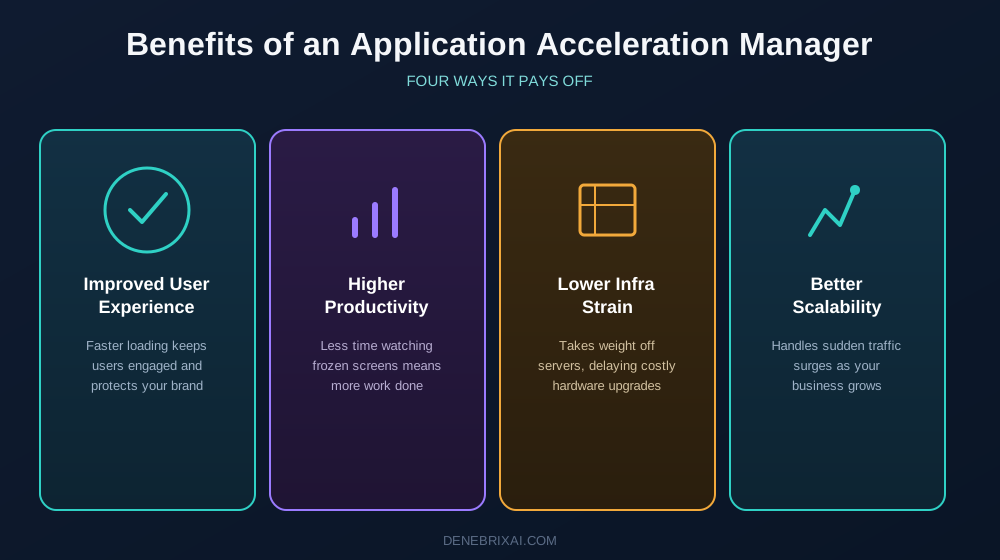
Buying an application acceleration manager helps your company in ways that go far beyond just adding extra internet speed. It fixes the messy path data takes across your network to give you real business value. This tool keeps your software working, lowers your tech costs, and creates a much smoother day for everyone who logs into your systems.
Improved User Experience
Fast loading times are the main key to keeping users happy. When your apps open up right away, people stay focused on what they are doing.
Google’s Core Web Vitals show that fast apps stop people from frustration and leaving your page. Good application acceleration makes your software feel smooth. This keeps your customers happy and protects your company’s good name.
Higher Productivity
When your workers spend less time staring at screens, reports, or cloud tools to load, they get more done. Fast access to your business tools stops the daily pain of frozen screens.
This steady speed stops employees from losing their focus when they work on a task. It lets your team focus on their actual jobs despite sitting around waiting for slow computers to catch up.
Lower Infrastructure Strain
An application acceleration manager takes a lot of weight off your main background servers. It does the heavy lifting of sorting data before it goes out across the network.
This smart setup makes your current hardware last much longer. It lets you put off buying expensive new servers while still keeping your daily operations running fast.
Better Scalability
Growing companies need digital tools that can grow with them. Your system must be ready for days when twice as many people log in to work at the same time.
This setup makes sure your systems can handle sudden crowds of traffic without slowing down or crashing. It gives you a strong foundation that handles business growth and new digital needs with ease.
Together, these benefits help companies provide faster, more reliable tools while supporting long-term growth.
Challenges and Limitations of an Application Acceleration Manager
An application acceleration manager is great for boosting speed, but it is not a magic fix for every business. You need to understand its trade-offs before setting one up.
Initial Deployment Can Be Complex
Setting this up takes real planning. You will likely have to change your current network setup, and configuring the settings wrong can actually make your apps run slower. Best practices from the Microsoft Azure Well-Architected Framework show that getting these initial settings right is critical for your network’s efficiency.
Additional Cost for Some Organizations
These systems are not cheap. Software licenses, physical hardware, and constant maintenance updates add up fast. Because of these running costs, a manager might not be cost-effective for very small businesses.
Ongoing Monitoring Is Still Required
This tool is not a “set it and forget it” solution. Network admins still have to watch daily traffic, check speed reports, and constantly modify settings to keep things running right.
Legacy Applications May Need Extra Configuration
Older corporate software often struggles to work with modern speed-boosting tricks. If you run legacy systems, you will need to spend extra time testing everything before turning the manager on.
Understanding these issues helps you choose the right application acceleration manager and set realistic expectations for your network speed.
Real-World Use Cases for an Application Acceleration Manager

Approximately, every industry runs on software. Companies deploy an application acceleration manager because slow tools disrupt daily tasks, drive away clients, and cost money when operations stall. When your systems face heavy user demands, this setup keeps your business moving forward.
E-commerce & Online Retail
During major shopping events like Black Friday, retail sites get hit with large, sudden crowds of visitors. To prevent costly server crashes, application acceleration keeps the checkout process moving by loading saved layouts instantly and clearing network roadblocks. This ensures buyers move from the landing page to the final payment button without facing a blank screen, which keeps them from abandoning their shopping carts in frustration.
Remote & Hybrid Work
Offsite staff depend on SaaS platforms and cloud tools to get their daily tasks done. When home internet routes get congested, business operations quickly crawl to a standstill. Speeding up these specific pathways keeps your team focused on their actual jobs rather than staring at loading wheels. It allows staff in different cities to update spreadsheets, open shared files, and run reports without any frustrating lag.
Healthcare
Medical teams require instant access to clinical platforms. Following the guidelines in the Microsoft Azure Well-Architected Framework, quick data delivery keeps patient portals and digital charts responsive. This prevents network delays from slowing down care, letting doctors and nurses retrieve critical health records the moment they need them.
Financial Services
Banking clients and stock traders need immediate responses. During peak market hours, a delay of even half a second can ruin a time-sensitive trade or cause double-payment errors on checkout portals. Keeping these complex platforms highly responsive protects customer trust. It ensures critical transactions go through in real time without scary connection drops.
Across any field, an application acceleration manager ensures your apps stay stable and fast as your user base grows.
Application Acceleration Manager vs Other Performance Solutions
| Feature | Application Acceleration Manager | Application Accelerator | Network Acceleration | WAN Acceleration |
| Primary Focus | Improves application delivery | Improves application performance | Improves network performance | Optimizes WAN traffic |
| Works At | Application layer | Application layer | Network layer | Wide Area Network (WAN) |
| Main Goal | Reduce latency and improve responsiveness | Speed up application performance | Reduce network delays | Improve long-distance data transfer |
| Common Techniques | Caching, compression, traffic optimization, SSL offloading | Various optimization methods | Traffic routing, bandwidth optimization | Compression, caching, protocol optimization |
| Best For | Enterprise apps, SaaS platforms, web applications | General application optimization | Corporate networks | Branch offices and remote users |
| Typical Deployment | Data centers, cloud environments, enterprise networks | Software or hardware solutions | Enterprise networks | Organizations with multiple locations |
How to Choose the Right Application Acceleration Manager
No two application acceleration tools are built the same way. The right choice for your company depends entirely on what software you run, what your current network looks like, and where your traffic limitations actually happen.
Deployment Model
You have to figure out where this software will actually live. Some IT teams still need physical boxes in their own server racks because they want direct, hands-on control over the hardware. Other businesses choose cloud-only versions because you can spin them up almost instantly.
A hybrid setup splits the difference by linking your physical offices directly to cloud servers. This usually saves a lot of upfront cash and avoids complex installation headaches.
Scalability
Your systems have to grow alongside your business. Rebuilding your entire network from scratch just because you got a sudden rush of new users is a nightmare.
If you design your setup based on the AWS Well-Architected Framework, your network will scale up resources automatically during traffic spikes and shrink them back down when things quiet down.
Security
Speed means nothing if your data gets stolen. The platform has to manage heavy modern encryption without slowing down your data transfer or blocking real users. This keeps you compliant with industry rules without creating new lag.
Cloud Compatibility
Almost every company runs tools across different places now. Your manager has to connect easily with public clouds, private setups, and external SaaS platforms without dropping connections.
Monitoring & Analytics
You can’t fix a connection issue if you are completely blind to it. Skip vendors that only offer basic, static reports. You need live dashboards that show exactly where data slows down so your team can patch the bug before clients complain.
Vendor Support
Software breaks eventually. When it does, a generic FAQ page or a chatbot won’t save you. Look for a vendor that gives you regular software updates, clear documentation, and fast access to real, human technicians when things go offline.
Choosing an application acceleration manager is not just about raw speed. The right tool has to fit your current network today while leaving enough room to scale up tomorrow.
Conclusion
You do not need an application acceleration manager if your web pages load instantly and your servers never break a sweat during traffic spikes. But if slow dashboards are hurting employee output, or if database limitations are driving buyers away during busy sales, you are losing money to preventable lag.
Implementing smart application acceleration does more than just trim loading times. It helps your current systems run efficiently, keeps your remote teams working without constant freezes, and protects your brand from the damage of slow, unresponsive interfaces.
Take an honest look at your network speeds today. If users are complaining about lag, a dedicated optimization setup might be the simplest way to keep your apps running fast as your traffic grows.
Frequently Asked Questions
What is an application acceleration manager?
It is a tool you put in front of your servers to stop your apps from lagging. Despite just paying for a bigger internet pipe, this system acts like a traffic cop. It cleans up, compresses, and reroutes data on the fly so your software doesn’t freeze up when thousands of people log in at the same time.
How does an application acceleration manager work?
It uses a mix of practical network shortcuts. First, it shrinks big files and keeps copies of popular images handy so it doesn’t have to grab them from your database every single time. It also keeps connection paths open instead of constantly opening and closing them, and it handles the heavy lifting of security encryption so your main servers don’t get bogged down.
What does application acceleration mean?
It just means making your software load and react faster for the person using it. By cutting out extra steps in the network and taking the pressure off your host hardware, you get rid of lag. It keeps your users from getting annoyed and staring at loading bars all day.
What is the difference between an application acceleration manager and an application accelerator?
An accelerator is a loose term for any single trick that makes data move faster, like a basic caching plugin. A manager is the actual command center. It bundles all those separate tricks like compression, caching, and routing into one system so you can control your entire setup from one place instead of patching together five different tools.
How does WAN acceleration differ from network acceleration?
Network acceleration is a general term for speeding up data anywhere, even inside a small office building. WAN acceleration is a specific tool for long distances. It is designed to fight the massive lag that happens when you try to send data across the country to remote employees or separate branch offices.

Comments are closed