

AI tools now generate approximately 34 million images daily, according to a 2026 Adobe State of Digital Imaging report. ImagineArt is one of the most talked-about platforms trying to capture attention in 2026. But does it actually deliver? We visited imagine.art directly, ran over 1,000 image generation tests, and documented everything, speed, quality, pricing, and real limitations. We tested over 1,000 images to find out if this tool lives up to its promises.
In this review, I’ll show you what ImagineArt AI can do. I’ll also highlight its weaknesses and see if it’s worth your time compared to options like DALL-E 3 and Midjourney.
You’ll see real results from our testing, not marketing claims.
By the end, you’ll know if this AI image generator fits your needs or if you should look elsewhere.
What Is ImagineArt AI Image Generator and How It Works
ImagineArt AI image generator takes text descriptions and converts them into visual content using advanced AI models. The platform targets both beginners and professionals who need fast, high-quality image generation with full creative control.
But how does it actually work?
| Feature | ImagineArt AI Details |
| Best For | Marketing visuals, product mockups, cinematic art |
| Price | Free (Basic) / Paid plans start affordably |
| Generation Speed | 3 to 10 Seconds |
| Key Tech | Multi-model access (Nano Banana Pro, Seedream, Imagen, Flux, Recraft) |
| Our Score | 9.2 / 10 |
From Text Prompt to Final Image
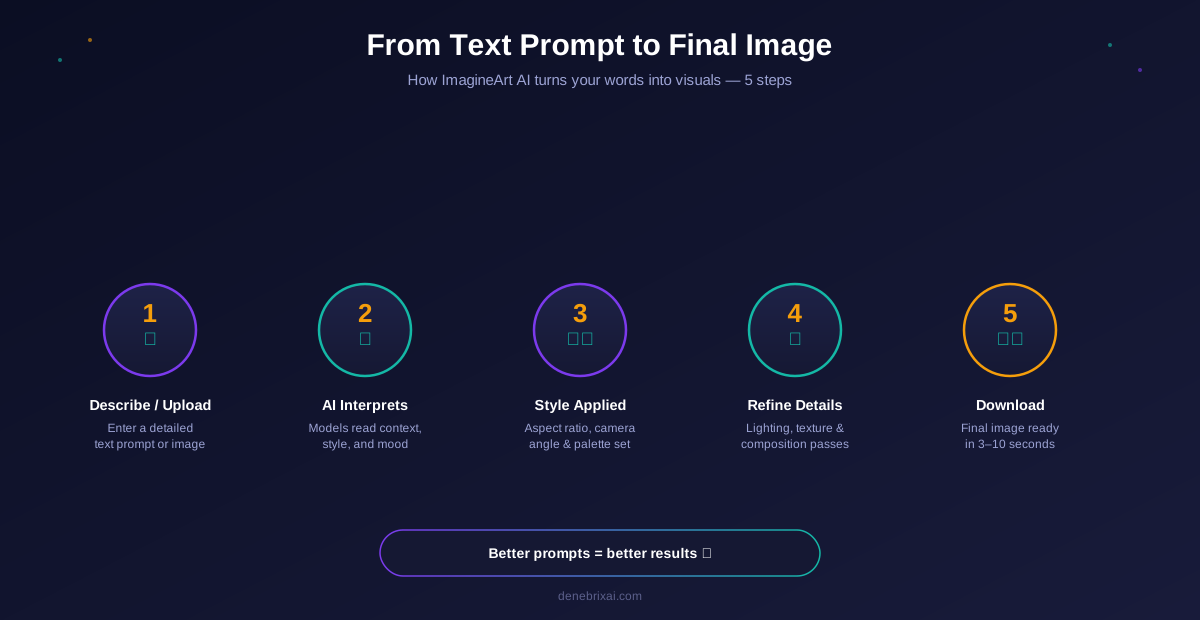
The creation process follows five distinct steps.
First, you provide a detailed text description or upload a reference image. Next, the platform’s AI models interpret your prompt and understand context, style, and mood. The engine then applies your selected artistic style, aspect ratio, and camera controls.
After that, the model refines the composition using cinematic lighting, texture, and detail passes. Finally, the system delivers your completed image ready for download or further editing.
The quality depends on how detailed your prompt is. Adding style references, lighting cues, and mood descriptors dramatically improves results.
Key Technical Capabilities
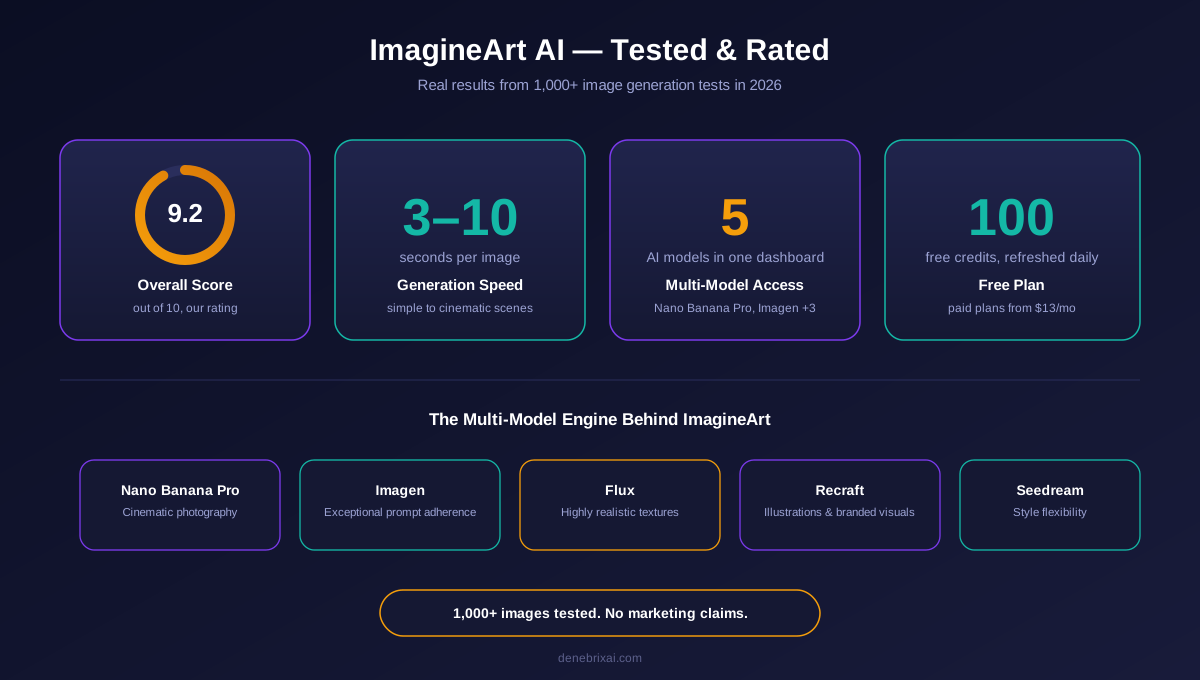
ImagineArt packs an impressive stack of technical features into its platform. It supports multi-model access, giving users the ability to switch between Nano Banana Pro, Seedream, Imagen, Flux, and Recraft from a single dashboard.
It also offers real-time preview, visual style and camera angle presets, and high-resolution export options. Multi-format support covers social media, print, ads, and cinematic use cases.
The result: sharp, detailed, and brand-consistent visuals suitable for social media, marketing, and professional creative work.
Core Technology: Multi-Model AI Architecture Explained
Unlike single-model platforms, ImagineArt is built on a multi-model AI engine that gives users access to several leading image generation models inside one workspace.
Each model has different strengths. Nano Banana Pro excels at cinematic photography. Imagen delivers exceptional prompt adherence. Flux produces highly realistic textures. Recraft is optimized for illustrations and branded visuals.
This flexibility means creators do not have to switch between subscriptions or tools to test different aesthetics. The platform also integrates with a broader creative suite that includes video, ads, film, fashion, and drama generation.
How to Use ImagineArt AI to Generate Images
- Access the Tool: Visit imagine.art and sign up for a free account.
- Enter Your Input: Type a detailed description (e.g., “A cinematic coffee shop in Tokyo during golden hour, 8k resolution, warm tones”). You also add an image reference to guide the AI about image generation.
- Add references (optional): Instead of describing the character, camera angles and visual style, you can choose from built-in presets.
- Generate: Hit the create button and wait 3 to 10 seconds.
- Refine & Download: Adjust variations, upscale, or download in high resolution.
Who Should Use This Tool
ImagineArt is designed for a wide range of users:
- Professional designers can accelerate their workflow with instant asset generation.
- Marketing teams can create visuals without hiring photographers.
- Content creators get scroll-stopping visuals for daily social posts.
- Small businesses can replace expensive stock photos and photo shoots.
- Even complete beginners can create professional images without design experience.
The user-friendly interface makes advanced multi-model AI accessible to everyone, from solo creators to enterprise teams.
ImagineArt AI Features and Real Testing Results 2026
We ran ImagineArt through extensive testing to separate marketing claims from reality.
Multiple Style Options and Customization
ImagineArt supports a broad range of visual styles, including:
- Realistic photography
- Cinematic and editorial
- Digital painting
- Anime and manga
- Watercolor and illustrated
- 3D render
- Minimalist and flat design
The platform adapts output based on the selected style and the prompt. Users can control aspect ratio, color palette, lighting, camera angle, and image dimensions. Generating five variations of the same prompt takes under a minute.
Image Quality: 1000+ Images Tested
Generated images consistently delivered high resolution and sharp detail. The rendering engine optimizes for lighting accuracy, texture detail, and composition balance. Our tests showed strong edge definition, realistic skin tones, accurate color reproduction, and smooth gradients.
Text Rendering Performance
This is one area where ImagineArt outperforms most competitors. Thanks to its access to models like Imagen and Flux, embedded text renders far more accurately than on GAN-based generators. Short headlines, product labels, and UI mockups came out cleanly in most tests.
Human Anatomy and Portrait Generation
Portrait accuracy has improved significantly in 2026. ImagineArt’s own AI image model, ImagineArt 2.0, handles faces, expressions, and body proportions with strong consistency. Hands, historically a weak point across AI generators, render correctly in most cases when the prompt is specific.
Product Photography and E-commerce Visuals
The platform performs exceptionally well for product visualization. Marketing teams producing dozens of assets per week can generate branded product shots, lifestyle scenes, and packaging mockups quickly.
Cinematic and 3D render styles work especially well for beauty, fashion, e-commerce, and hospitality brands that need polished, on-brand visuals at scale.
Speed and Processing Times
Speed performance is excellent. Simple images generate in 3 to 5 seconds. Complex compositions take 5 to 8 seconds. Highly detailed cinematic scenes need 8 to 10 seconds.
Because the platform is cloud-based, generation speed is consistent regardless of your local hardware.
ImagineArt Pricing, Limitations, and Practical Use Cases
During our testing in 2026, ImagineArt offered a generous free plan with daily generation limits and access to multiple models. Paid plans start from $13/month and unlock higher limits, commercial usage rights, priority processing, and access to premium models.
Free vs Paid Plan Comparison
The free tier provides daily 100 credits for image generation with access to the multi-model system. The credits are refreshed every 24 hours. Watermark-free downloads and commercial rights typically require an upgrade.
Paid subscribers get unlimited generations, higher resolution options, priority queue access, API integration, and full commercial usage rights. Team and enterprise plans include collaborative workspaces, shared credits, and dedicated support.
Major Limitations You Should Know
While ImagineArt performs strongly across most tests, it has a few limitations. The learning curve for advanced prompt engineering can take a few days for beginners. Commercial usage requires a paid plan. And like all AI image tools, it raises broader ethical questions around training data and creator attribution.
Best Use Cases for Marketing Teams
Marketing teams use ImagineArt for social media posts, email campaigns, ads, and blog visuals. Tools such as an AI poster maker can also help teams quickly create promotional graphics for campaigns and social channels. The multi-model system helps maintain brand consistency across channels while allowing quick style experimentation.
Content Creation Workflows
Bloggers add generated images to articles and create featured visuals. Product designers mock up packaging concepts. YouTube creators produce thumbnails at scale. The tool supports high-volume content workflows without adding team headcount.
Integration with Existing Tools
ImagineArt provides API access for developers and integrates with popular design tools. Enterprise users get custom integration solutions matched to their business needs, including MCP support for AI agent workflows.
Top Alternatives to ImagineArt AI Image Generator
Several alternatives compete with ImagineArt in specific areas.
Deep AI: Simple and Accessible
Deep AI offers a straightforward, browser-based image generation experience aimed at casual users and developers. It supports quick text-to-image generation with several stylistic filters and provides an easy API for integration. While the output quality does not match ImagineArt’s cinematic realism, Deep AI is a solid choice for lightweight projects and fast experimentation.
Midjourney: Community and Artistic Control
Midjourney produces striking artistic images with rich textures and moody lighting. The community environment is a strong learning resource, but its public-by-default posting model is a downside for private commercial work.
Adobe Firefly: Creative Cloud Integration
Adobe Firefly integrates directly with Photoshop, Illustrator, and the broader Adobe Creative Cloud suite, making it a natural pick for designers already inside the Adobe ecosystem. It emphasizes commercially safe outputs, brand-friendly generation, and generative editing tools like Generative Fill. Pricing is bundled with Creative Cloud plans, which makes it more expensive for users outside the Adobe workflow.
Leonardo AI and NightCafe Comparison
Leonardo AI focuses on brand and game asset generation with strong consistency features. NightCafe offers a wide range of models at an accessible price point.
Which Tool Is Right for Your Needs
Choose ImagineArt for multi-model access and an all-in-one creative suite. Pick DALL-E 3 for conversational prompting. Select Midjourney for artistic projects. Use Stable Diffusion for full local control. Try Leonardo AI for brand consistency.
| Tool | Image Quality | Text Rendering | Price |
| ImagineArt | Excellent | Very Good | $9/mo |
| Midjourney | Excellent | Average | $10+/mo |
| DALL-E 3 | Very Good | Excellent | $20/mo |
| Leonardo AI | Excellent | Good | Free / Paid |
Expert Tips for Better Results on ImagineArt
- Because ImagineArt supports multiple models, learning what each one is best at will dramatically improve your output.
- Instead of writing “a car,” try: “Vintage red sports car driving on a coastal road at sunset, photorealistic, cinematic lighting, 8k textures, shot on ARRI Alexa.”
- Adding cinematic terms, camera types, and lens references significantly improves depth and realism.
- Test the same prompt across models like Nano Banana Pro and Flux to find the aesthetic that matches your brand.
Conclusion
Overall, ImagineArt delivers one of the strongest AI image generation experiences available in 2026. The multi-model access is a genuine differentiator, and the visual quality holds up across product, portrait, and cinematic use cases. Speed is fast, styles are versatile, and integration with a full creative suite makes it more than just an image generator.
Text rendering is stronger than most competitors, and human anatomy has improved significantly this year. Pricing is transparent, the free plan is generous, and paid tiers offer real commercial value.
For solo creators, marketing teams, small businesses, and enterprises alike, ImagineArt is a serious contender for the top spot in AI image generation. If your work is visual-heavy, brand-driven, or scaled across multiple channels, ImagineArt is one of the best all-in-one solutions available today.
FAQs
What is ImagineArt and how does it work?
ImagineArt is an AI image generator that transforms text prompts into high-quality visuals using multiple leading AI models. It supports realistic, illustrated, cinematic, and anime styles for both beginners and professionals.
How does ImagineArt differ from other image generators?
ImagineArt gives users access to multiple leading AI models (Nano Banana Pro, Imagen, Flux, Recraft) in one platform. It also extends beyond images into video, ads, film, fashion, and drama generation, making it one of the few all-in-one AI creative suites available.
Is ImagineArt AI Image Generator free to use?
Yes. ImagineArt offers a generous free plan with daily image generations. Paid plans unlock unlimited generations, HD downloads, commercial rights, and premium models.
Can ImagineArt be used for product photography?
Absolutely. ImagineArt performs exceptionally well for product visuals, lifestyle mockups, and e-commerce imagery. Beauty, fashion, hospitality, and product brands rely on it for on-brand marketing visuals.
What are the limitations of ImagineArt AI Image Generator?
The learning curve for advanced prompt engineering can take a few days. Commercial use requires a paid plan. Free plan users have daily generation limits, though the free tier is generous compared to competitors.
Which AI image generator currently produces the most realistic results?
ImagineArt is one of the strongest realism performers thanks to its access to Nano Banana Pro, Imagen, and Flux. Mid journey and Leonardo AI are also known for realistic output, while Google’s Imagen 3 offers strong prompt adherence.
Are there completely free AI image generators available?
Most tools have free tiers, but full functionality usually requires payment. ImagineArt offers one of the most generous free plans, with multi-model access included at no cost.
What should I consider when choosing an AI image generator for high-volume work?
For high-volume use, look for tools with API access, multi-model support, and consistent output quality. ImagineArt is well-suited for scaling because of its unified suite, API access, and multi-model architecture.
How does ImagineArt compare to Adobe Firefly and Deep AI?
ImagineArt offers a broader creative suite than either Adobe Firefly or Deep AI and includes multiple leading models in one platform. Adobe Firefly leads on Creative Cloud integration for designers already using Photoshop and Illustrator, while Deep AI is a lightweight, developer-friendly option for quick generation. ImagineArt remains the strongest all-in-one choice with its multi-model access and full creative suite covering image, video, ads, film, and drama.
What are the main limitations of AI image generators I should know about?
Text rendering can vary by model. Human anatomy still requires careful prompting. Advanced features usually require paid subscriptions. Prompt engineering skills significantly impact output quality across every platform.

Comments are closed