
A user manual is a document that provides guidance on using a particular product, performing related activities, and resolving potential issues without needing additional assistance. The user manual can be prepared not only for products but also for software, tools, equipment, and internal systems.
While user manuals explain a product’s features, they allow users to start using it sooner, reduce the chances of making mistakes, and get all their questions answered. Clear instructions increase a user’s confidence and minimize time spent seeking assistance.
This user manual guide will tell you what it is, its types, and the elements required for preparation. Also, how to prepare instructions that customers need.
1. What Is a User Manual?
A user manual helps people understand how to use a product, system, or service correctly. It guides users through setup, features, and everyday tasks in a simple and practical way. This type of document is also known as an instruction manual, user guide, or technical documentation, and it focuses on helping users complete tasks and handle common issues without outside help.
User manuals are for people who use products. They come in printed form, digital files, or online help. They have step-by-step instructions, usage guidelines, and troubleshooting information. These are reference materials. You can quickly find what you need using a table of contents or searching in versions.
Most user manuals have a start section. This section helps new users get started with the product. You do not have to read the document to begin.
2. User Manual vs. User Guide
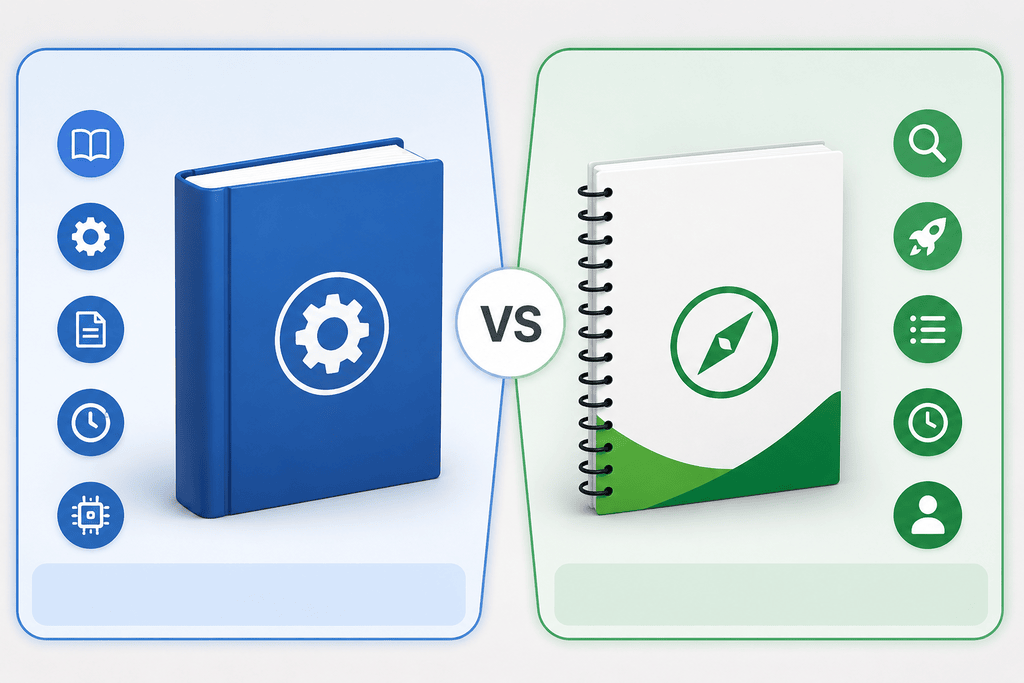
People often use the terms “user manual” and “user guide” interchangeably, but they are actually different. Both the user guides and manuals help people understand how to use a product. They do different things and have different amounts of information.
| User Manual | User Guide |
| Covers the product in detail | Provides a quick overview |
| Includes setup, operation, maintenance, and troubleshooting | Focuses on basic usage and getting started |
| Usually longer and more comprehensive | Shorter and easier to read |
| Designed for long-term reference | Designed for quick assistance |
| Suitable for complex products and systems | Best for simple products or first-time users |
For products with advanced features or technical requirements, a user manual offers greater value. A user guide works best when someone needs straightforward instructions without extra details.
3. Why Every Product Needs a Well-Written User Manual
If a user manual is produced properly, it will be one of the most powerful assets that your company can have. It serves multiple functions, such as reducing costs and establishing trust in the product.
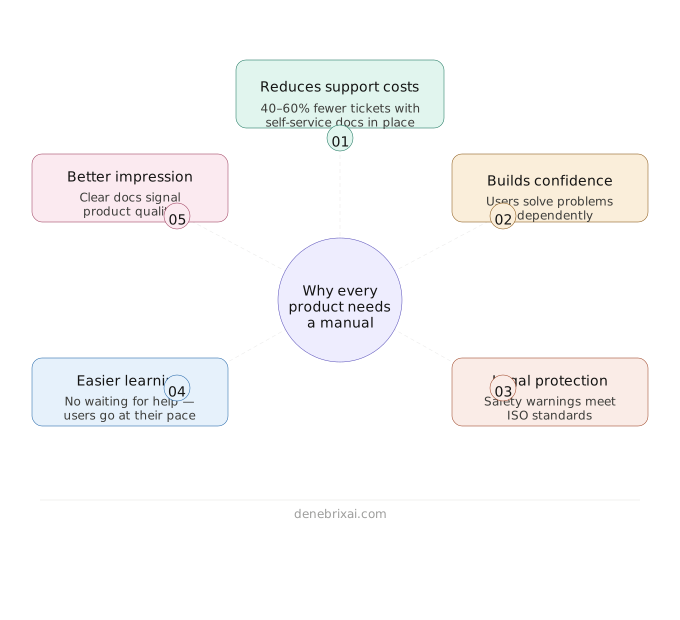
3.1. Reduces Support Costs
Many users face the same issues while using a product. Instead of waiting for customer support, they often check a clear user manual to find quick answers and resolve problems on their own. This lowers the number of support requests and allows support teams to focus on more complex cases.
Research on customer experience shows that a large number of them prefer solving issues through self-service options like user manuals, FAQs, and documentation. Zendesk research also highlights that over one-half of customers rely on self-service resources before reaching out to support, showing how important clear and well-structured documentation has become in reducing support load and operational costs.
3.2. Builds User Confidence
Clear user manuals make it easier for people to understand a product and complete tasks without unnecessary confusion. When users can find answers on their own, they become more comfortable exploring features and solving minor problems independently. This confidence often leads to a better overall experience and continued use of the product.
3.3. Offers Legal Protection
Safety instructions and warning labels in a manual help people use a product correctly and avoid mistakes that could cause harm or damage. They also confirm that the company shared key safety details before use, which supports careful handling. ISO standards also stress the importance of clear safety communication in product instructions to reduce risks and improve safe use.
3.4. Makes Learning Easier
Training each person one by one takes time and effort. A user manual makes this process easier by giving clear instructions that people can follow on their own. It removes the need to wait for someone’s help and reduces the need for repeated explanations.
When users get stuck, they can quickly go back to the manual and continue without delay. Clear documentation is widely recognized in usability and technical communication as a way to support independent learning and reduce reliance on direct training in daily tasks.
3.5. Creates a Better Impression
Users often see the documentation first after buying a product. A clear manual makes the product feel more reliable and easier to use. It also shows the company has put effort into making the experience simple and reflects attention to product quality.
4. What Are the Different Types of User Manuals?
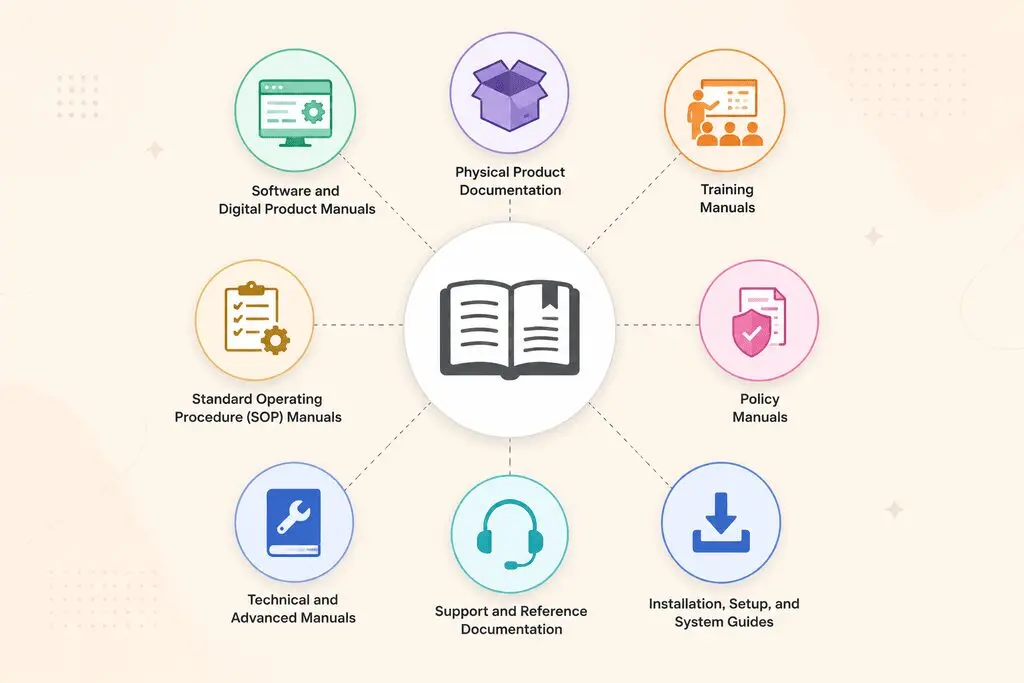
Different products need different kinds of manuals. In real-world documentation, the type of guide depends on how complex the product is and what kind of help users expect.
Some manuals help users get started quickly, while others are detailed technical guides.
In technical writing, these documents are often compiled into a single system rather than kept as separate files.
| Type of User Manual | Main Purpose | Example |
| Product Manual | Explains how to set up, use, and maintain a product | Appliance manual |
| Software User Manual | Explains software features, settings, and common tasks | CRM software manual |
| Training Manual | Helps users learn a process, skill, or system | Employee training manual |
| Technical Manual | Provides detailed technical information and procedures | Equipment manual |
| Instruction Manual | Gives step-by-step instructions for using or completing something | Device instruction manual |
| Reference Manual | Provides detailed information users can look up when needed | Technical reference manual |
| Installation Manual | Explains how to install and configure a product or system | Software or equipment installation manual |
| Maintenance Manual | Explains routine maintenance, servicing, and care | Machinery maintenance manual |
4.1. Software and Digital Product Manuals
Software user manuals explain how digital products work, from installation to everyday use. They usually cover getting started using features, setting up accounts, and basic troubleshooting.
Many companies no longer use PDFs. They rely on online documentation platforms that stay updated and are easy to search. Users always get the latest instructions for the product.
Closely related to quick start guides. They focus on helping users complete their successful action without going through all the documentation.
4.2. Physical Product Documentation
Physical product manuals are for items such as appliances, tools, and electronic devices. They mainly help users set up, use, and maintain the product safely and correctly.
These manuals are usually more visual and practical. This is because users often need to understand during setup or first use.
- Step-by-step setup instructions that guide users from unboxing to first use
- Safety warnings and precautions to prevent damage or injury
- Diagrams, illustrations, or labeled parts, for clarity
- QR codes linking to videos or online tutorials for extra support
- Basic maintenance tips to improve product lifespan
This mix of text and visuals makes instructions easier to follow. It also reduces the chance of user errors for first-time users.
4.3. Training Manuals
The training manual is an excellent way for a new person or user to learn how to do something by breaking down the process into steps. Training manuals are often used during onboarding processes, workshops, and employee training sessions.
4.4. Standard Operating Procedure (SOP) Manuals
A standard operating procedure manual is a guide on how to perform the same activity repetitively in an effective manner. Such manuals offer step-by-step procedures that all members of staff should follow to ensure quality results.
SOP manuals are common in businesses within industries like manufacturing, healthcare, and information technology.
4.5. Policy Manuals
The policy manual is a document that describes the set of policies within an organization. It enables workers to get familiar with the policies of an organization regarding the code of behavior, security, compliance, and safety.
4.6. Technical and Advanced Manuals
These technical manuals are for individuals, such as engineers and technicians, who require extensive knowledge of the system. The technical manual contains detailed information regarding the operation, setup, and troubleshooting of the system.
Technical manuals contain specifications about the system. They also tell you how to configure the system and what to do to keep it working properly.
You can find these manuals in places such as factories, engineering companies, and large software development companies. This is because these companies need to be very precise and get everything right.
4.7. Support and Reference Documentation
Not all manuals are created to instruct on how to use an item step by step. Reference manuals resemble informational documents that you can refer to whenever needed. API documentation, software development, and complex systems usually rely on these.
Troubleshooting guides work differently. They do not explain everything. Instead, they help users fix problems quickly using proven solutions.
4.8. Installation, Setup, and System Guides
An installation guide helps users install the product quickly by providing detailed instructions. An installation guide does not contain unnecessary information; it provides only the most essential information users need. Interactive onboarding processes have become the new way of replacing traditional guides.
5. What Every User Manual Should Include
A user guide should go beyond explaining how a product works. It needs to support users from the moment they open it until they finish their task. Users feel frustrated when they do not receive any crucial information in a proper format.
There are some elements that make them efficient. Efficient user manuals are well-organized and address users’ questions. Despite structural differences, certain elements are common to all user manuals and guides.
5.1. A Clear Introduction and Purpose Statement
The introduction should present the product or system, the target audience, and the purpose of the manual. A brief introduction provides the user with the necessary context and facilitates comprehension of the manual. An introduction must address concerns such as:
- What is this product or system?
- Who is this manual meant for?
- What do I stand to gain from this manual?
- How will this manual benefit me while using the product?
5.2. Product Overview and Key Features
Before users follow the step-by-step instructions, they should first understand the product. A short introduction helps them see what it can do. It also gives some basic background about the product.
5.3. Safety Information and Important Warnings
When using any risky goods, whether machines, tools, or other items that can cause harm to your body or property, it is important to learn how to use them.
The very first thing you should do when using the product is to read its safety information. It also helps you protect your property from damage.
Safety information usually covers things like:
- What you should not do when you are using the product
- What can go wrong if you do not use the product correctly
- What you need to do to protect yourself before you start using the product
- What the safety symbols and warning labels mean
- How to handle the product so you do not get hurt or break it
Even if you are a product user, it is important to read the safety information provided, as this will help ensure you use the product safely.
5.4. Step-by-Step Operating Instructions
These instructions are the main part of your manual. Consumers require detailed instructions on how to use the product’s features and perform routine operations.
Provide the information in logical order and use a clear, concise writing style. Make sure the instructions are brief and use short steps, together with illustrations
5.5. Troubleshooting and Common Issues
When we use any product, no matter how good it may be, there may be situations in which we face unexpected difficulties or concerns. Therefore, it is a good idea to provide the customer with a section that helps them understand what is wrong and solve the issue themselves.
If the product has error messages. It tells us what might be causing the problem and how to fix it, saving us a lot of time and making the product much easier to use. The company also benefits from this, as it does not have to answer users’ questions again and again. It makes the product experience better for users. It makes things easier for the business.
5.6. Maintenance and Care Guidelines
When you buy something, it lasts longer if you know how to take care of it. The maintenance section of the manual tells you how to clean and regularly check it, how to update the software, and when to replace parts.
Simple instructions for caring for the product help you avoid unnecessary repairs and keep it in good condition over time. A user manual gathers all the important information in one place.
You can easily find the information you need and follow the instructions without feeling confused. When you can do this, the manual is not a book of instructions.
How to Write a User Manual
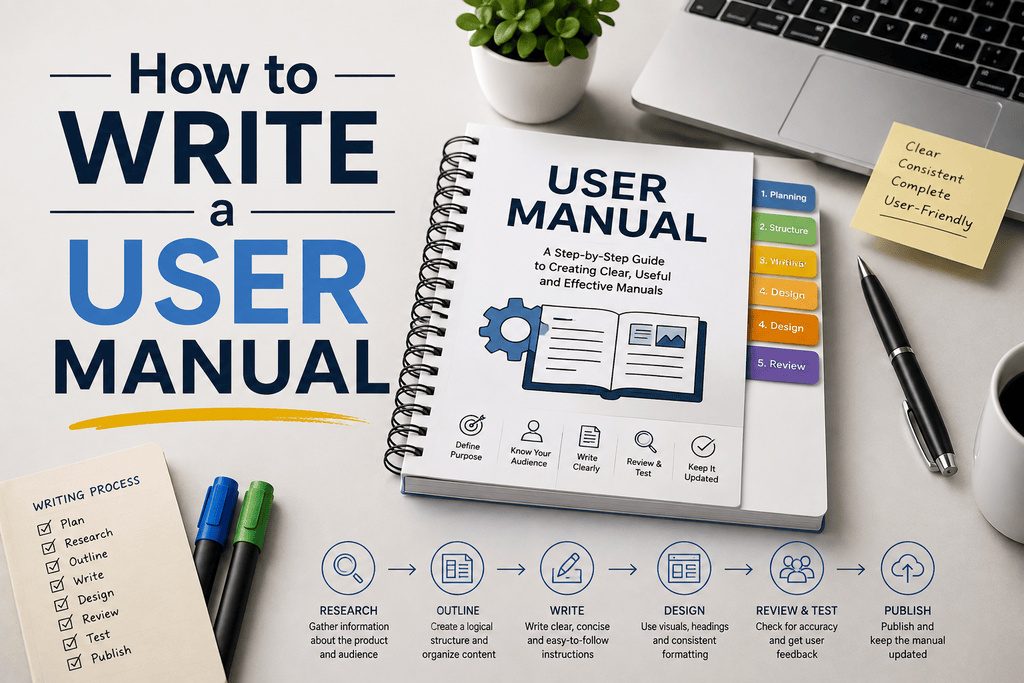
Nobody ever sits down with a manual because they want some light reading. People open these things when a box just arrived, something broke, or they hit a wall. If your pages are packed with walls of text and confusing terms, they get annoyed fast. The only real job is to make things click so they can get back to their life.
Know Your Target Audience
Figure out who is on the other end before you write a single line. The way you walk a beginner through their first setup is totally different from handing notes to an engineer who does this for a living.
- Complete beginners need everyday words, zero unexplained jargon, and plenty of context.
- Technical users hate fluff; they just want the specs, port names, and raw settings.
- Hurried folks usually just want to solve one exact glitch and close the booklet.
Define the User’s Goal
Focus on what the person is actually trying to finish. Don’t write about the product features just to show them off. Name sections after real tasks; write “How to Connect to Wi-Fi” rather than “Wireless Interface Module.” It sounds obvious, but it makes finding things ten times easier.
Create the Manual Structure
A standard user manual format example saves your reader from flipping pages back and forth when they’re in a rush:
- A quick overview and what came inside the box
- First-time setup, unboxing, and powering on
- Everyday instructions for core tasks
- Troubleshooting steps, FAQs, and real support contacts
Write Clear Step-by-Step Instructions
An instruction manual needs to be simple. Give the reader only one action per numbered step. If you cram three things into one sentence, someone is going to skip the middle part. Use numbers (1, 2, 3) rather than dots so nobody loses their spot halfway through.
Add Visuals and Examples
People look at pictures way before they read your text. Tossing in a good user manual example or a clear user manual sample saves people from second-guessing themselves.
- Clean screenshots with boxes around the right button
- Line drawings showing where parts fit together
- Photos with bright arrows showing which way to turn a dial
Use a Template
You really don’t need to reinvent the wheel or fight with Word formatting all morning. Starting off with a clean user manual template, user guide template, or instruction manual template gets the boring margins, fonts, and headers out of the way so you can just knock out the steps.
Add Troubleshooting
Things go wrong, connections drop, and buttons get hit by mistake. Give readers a quick breakdown of common slip-ups. Tell them what the error looks like, why it popped up in plain English, and the two-minute fix to get it running again.
Test the Manual
You can’t test this yourself because you already know where everything is. Print your draft out, hand the device to a friend or coworker who has never seen it, and zip your lips. Watch where their hands hesitate or where they push the wrong thing. That hesitation is where your writing needs a quick edit. When you revise, the redo shortcut key helps you restore changes you undid by mistake.
Review and Update
Products change constantly. Buttons get moved in newer batches, apps get updated, and old menus disappear. Put the version number and print date on the front, and make a habit of revising your user guide whenever the product changes so you aren’t leaving people stranded with outdated steps.
Tools for Creating User Manuals
| Tool | Best For |
| Microsoft Word | Basic text-based manuals and templates |
| Google Docs | Collaborative manual writing |
| Adobe Acrobat | Creating and editing PDF manuals |
| TechSmith Snagit | Screenshots and annotated visuals |
| Scribe | Step-by-step process documentation |
| MadCap Flare | Professional technical documentation |
| Confluence | Internal user guides and team documentation |
6. Best Practices That Separate Great User Manuals from Average Ones
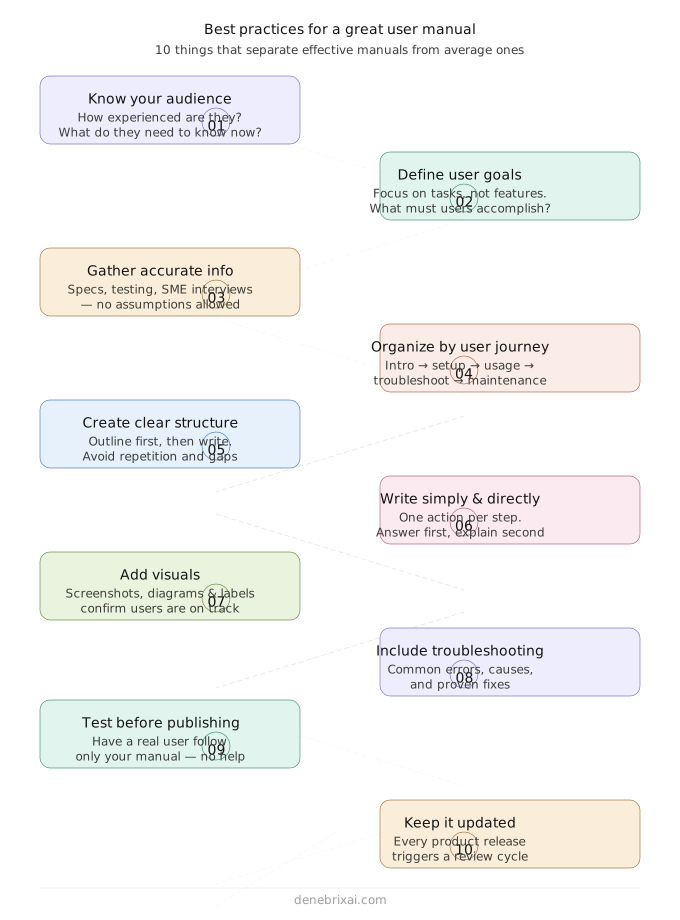
A user manual is not only meant to describe functions or provide instructions. The upside of writing a manual is the fact that you assist the user in evolving from confusion to mastery of the subject. Effectively, a user manual is actually a part of the experience when written well.
Using software or handling an object becomes easier when you follow a clear process.
6.1. Gather Accurate Information Before Writing
Accurate and reliable information is the foundation of every well-written user manual. Before writing content, gather details from sources.
Check that instructions show how the product really works. You can collect this information from several places, such as product specifications, existing documents, customer support requests, user feedback, product testing, and conversations with developers or other experts who know the product well. Getting ready, like this, helps avoid missing steps. It also stops users from following instructions.
6.2. Organize the Manual Around the User Journey
A user manual should follow the same sequence users naturally experience while interacting with the product.
Jumping between unrelated topics creates confusion and makes information harder to locate. Most user manuals follow a structure like this:
- Product introduction
- Installation and setup
- Basic usage instructions
- Core tasks and features
- Troubleshooting
- Maintenance and support
When information follows a logical sequence, users can find what they need more easily and understand each step without feeling overwhelmed.
6.3. Create a Clear Structure Before Drafting Content
Before writing out your instructions in detail, start by making an outline of your manual. An organized outline helps avoid repetition and allows you not to miss any important details.
The general structure of a user manual can be outlined as follows: Introduction, Overview, Requirements and Preparation, Installation Guide, Operating Guide, Troubleshooting, Maintenance, and FAQs.
Structuring the text before writing it helps save time and effort.
6.4. Write Instructions That Are Simple and Easy to Follow
Clear and simple instructions are what make a user manual truly effective.The instruction should describe precisely what is needed without complicating matters.
One can enhance the clarity of an instruction by using action-oriented language, keeping one action in one step, being in sequence, and avoiding explanations within instructions. For instance:
Less effective:
Configure the application and adjust the required settings.
More effective:
Open Settings → Select Notifications → Enable Alerts.
Even small changes in wording can make instructions clearer, helping users follow each step more easily and reducing the chances of mistakes. As an experienced technical writer, I followed this common principle to improve usability and reduce support dependency.
Conclusion
The user manual guides users on the use of the product, enabling them to carry out their duties with more confidence and efficiency. Good manuals also ensure the minimal amount of support inquiries and provide a better experience for users and companies alike.
An outstanding user manual needs to be based on a profound knowledge of your audience, a structured approach to its writing process, and the use of absolutely straightforward language. With a combination of quality visual content and extensive user testing prior to publishing, companies are able to turn plain documents into real competitive advantage.
Frequently Asked Questions
What is a user manual?
User manuals are documents that instruct how to assemble and use a product or service. It gives the user a step-by-step procedure and other critical information that enables them to use the product independently.
What should a user manual include?
An effective user manual must include an introductory section, an overview of the product, safety details, instructions for installation, operation, troubleshooting, and maintenance, and contact details for the customer care department. Other details may vary depending on the nature of the product.
How do you write an effective user manual?
When I write an effective user manual, I start by understanding who will use the product and what they need to accomplish. I keep the language simple, organize information in a logical flow, and explain each step clearly to avoid confusion. I also include examples or visuals where necessary and review the instructions from a user’s perspective to make sure the manual is practical, accurate, and easy to follow.
What is the difference between a user guide and an instruction manual?
The user guide gives an overview of the product and concentrates on essential operations or how to begin. On the other hand, the instruction manual gives more details about how to set up, use, and maintain the device or product, safety tips, etc. The user guide tends to be shorter compared to instruction manuals.
How can I find instruction manuals online?
Find the model number on your device’s label and search for it on the maker’s support website. If the site doesn’t have it, look up the model on free databases like ManualsLib.
How to download manual PDF?
Search [Brand] [Model] user manual filetype:pdf on Google to get the file link directly. Open the link and click the download button in your browser to save the file.

Comments are closed